payload-starter
Next.js 16 and Payload 3 starter with PostgreSQL, role-based admin access, shadcn/ui and SEO helpers
100
v3
Next.js
Updated 4 months agoBlank Payload 3 and Next.js 16 starter with Postgres, Tailwind, shadcn/ui primitives and a built-in SEO module
A general-purpose Payload CMS 3 starter built on Next.js 16 with a PostgreSQL adapter, Tailwind CSS and Radix-based UI primitives. It includes Users and Media collections, a Lexical rich text renderer, and the official SEO, Redirects and Live Preview plugins. S3 and Vercel Blob storage adapters are installed and can be enabled in the config. It requires a PostgreSQL database and a Payload secret.
A blank template to get started with Payload 3.84.1
This repository is a GitHub template: create your own copy of it in one click.
Create a repository from this templateModern, production-ready CMS starter built with Payload CMS 3.84.1 and Next.js 16.
buildMetadata, mergeOpenGraph, JSON-LD generators, robots.ts, sitemap.ts| Technology | Version | Description |
|---|---|---|
| Next.js | 16.2.4 | React framework |
| Payload CMS | 3.84.1 | Headless CMS |
| Tailwind CSS | 3.4.17 | CSS framework |
| PostgreSQL | — | Database (via pg adapter) |
| TypeScript | 6.0.3 | Type safety |
| React | 19.2.5 | UI library |
| Zod | 4.x | Schema validation |
| react-hook-form | 7.x | Form handling |
git clone https://github.com/Xjectro/payload-cms-boilerplate.git
cd payload-cms-boilerplate
npm install
# or
yarn install
# or
pnpm install
Copy .env.example to .env and fill in the required variables:
cp .env.example .env
# Database Configuration
DATABASE_URL=postgres://postgres:<password>@127.0.0.1:5432/payload_cms_boilerplate

# Application Secrets
PAYLOAD_SECRET=YOUR_SECRET_HERE

# Site
APP_URL=http://localhost:3000
APP_TITLE=Your Site Name

# Environment Variables for Next.js
NEXT_PUBLIC_URL=${APP_URL}
NEXT_PUBLIC_TITLE=${APP_TITLE}
# Run database migrations
npm run payload migrate
npm run seed
npm run dev
Open http://localhost:3000 in your browser.
payload-cms-boilerplate/
├── src/
│   ├── app/
│   │   ├── (payload)/
│   │   │   ├── admin/
│   │   │   │   ├── [[...segments]]/
│   │   │   │   │   ├── not-found.tsx
│   │   │   │   │   └── page.tsx
│   │   │   │   └── importMap.js
│   │   │   ├── api/
│   │   │   │   ├── [...slug]/
│   │   │   │   │   └── route.ts
│   │   │   │   ├── graphql/
│   │   │   │   │   └── route.ts
│   │   │   │   └── graphql-playground/
│   │   │   │       └── route.ts
│   │   │   ├── custom.scss
│   │   │   └── layout.tsx
│   │   ├── (public)/
│   │   │   ├── layout.tsx
│   │   │   ├── page.tsx
│   │   │   └── template.tsx
│   │   ├── robots.ts
│   │   └── sitemap.ts
│   ├── collections/
│   │   ├── Media/
│   │   │   └── index.ts
│   │   └── Users/
│   │       └── index.ts
│   ├── features/
│   │   └── example/
│   │       ├── components/
│   │       ├── hooks/
│   │       └── utils/
│   ├── payload/
│   │   ├── components/
│   │   │   ├── fields/
│   │   │   │   └── media/
│   │   │   │       ├── image-media/
│   │   │   │       │   └── index.tsx
│   │   │   │       ├── video-media/
│   │   │   │       │   └── index.tsx
│   │   │   │       ├── index.tsx
│   │   │   │       └── types.ts
│   │   │   └── rich-text.tsx
│   │   ├── utils/
│   │   │   └── payload-hooks/
│   │   │       └── access.ts
│   │   ├── payload.config.ts
│   │   ├── payload-types.ts
│   │   └── seed.ts
│   ├── shared/
│   │   ├── lib/
│   │   │   └── utils.ts
│   │   ├── providers/
│   │   │   ├── client-provider.tsx
│   │   │   └── server-provider.tsx
│   │   ├── seo/
│   │   │   ├── components/
│   │   │   │   └── home-structured-data.tsx
│   │   │   ├── utils/
│   │   │   │   ├── json-ld/
│   │   │   │   │   ├── article.ts
│   │   │   │   │   ├── breadcrumb.ts
│   │   │   │   │   ├── event.ts
│   │   │   │   │   ├── faq.ts
│   │   │   │   │   ├── helpers.ts
│   │   │   │   │   ├── how-to.ts
│   │   │   │   │   ├── index.ts
│   │   │   │   │   ├── item-list.ts
│   │   │   │   │   ├── local-business.ts
│   │   │   │   │   ├── organization.ts
│   │   │   │   │   ├── person.ts
│   │   │   │   │   ├── product.ts
│   │   │   │   │   ├── types.ts
│   │   │   │   │   ├── video.ts
│   │   │   │   │   ├── webpage.ts
│   │   │   │   │   └── website.ts
│   │   │   │   ├── metadata.ts
│   │   │   │   └── open-graph.ts
│   │   │   └── index.ts
│   │   └── ui/
│   │       ├── layout/
│   │       │   ├── header.tsx
│   │       │   └── footer.tsx
│   │       ├── primitives/
│   │       │   ├── alert.tsx
│   │       │   ├── badge.tsx
│   │       │   ├── button.tsx
│   │       │   ├── checkbox.tsx
│   │       │   ├── form.tsx
│   │       │   ├── input.tsx
│   │       │   └── label.tsx
│   │       └── react/
│   │           └── design-system.tsx
│   ├── styles/
│   │   ├── globals.css
│   │   └── themes.css
│   └── css.d.ts
├── public/
│   ├── favicon.ico
│   └── opengraph-image.webp
├── .env.example
├── .prettierrc.json
├── components.json
├── eslint.config.mjs
├── next-env.d.ts
├── next.config.ts
├── package.json
├── postcss.config.mjs
├── tailwind.config.ts
└── tsconfig.json
| Command | Description |
|---|---|
npm run dev | Start development server |
npm run build | Build for production |
npm run start | Start production server |
npm run lint | Check code quality |
npm run format | Format code with Prettier |
npm run seed | Seed the database |
npm run payload | Payload CLI (migrate, generate…) |
The SEO module lives in src/shared/seo/ and is ready to use out of the box:
buildMetadata — generates Metadata objects for Next.js pagesmergeOpenGraph — merges Open Graph tags with site defaultsHomeStructuredData — drop-in component for the home pagerobots.ts / sitemap.ts — auto-generated at build timeTwo storage adapters are pre-installed and can be activated in payload.config.ts:
@payloadcms/storage-s3@payloadcms/storage-vercel-blob| Endpoint | Description |
|---|---|
/api/graphql | GraphQL API |
/api/graphql-playground | GraphQL Playground |
/admin | Payload Admin Panel |
vercel deploy
Or connect the GitHub repository in the Vercel dashboard for automatic deploys on push.
Set all environment variables from .env.example in your Vercel project settings before deploying.
git checkout -b feature/amazing-feature)git commit -m 'Add amazing feature')git push origin feature/amazing-feature)MIT — see the LICENSE file for details.
Made with love by Xjectro
Next.js 16 and Payload 3 starter with PostgreSQL, role-based admin access, shadcn/ui and SEO helpers
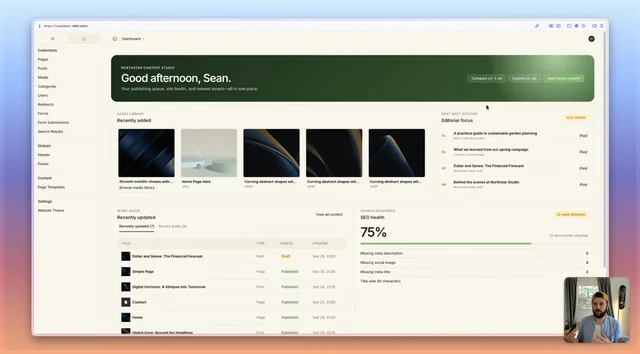
Payload v4 beta website starter with configurable admin dashboard widgets and a custom semantic admin theme
Next.js 16 and Payload starter with Clerk auth, Postgres, S3 media storage and Resend email