payload-cms-boilerplate
Blank Payload 3 and Next.js 16 starter with Postgres, Tailwind, shadcn/ui primitives and a built-in SEO module
19
v3
Next.js
Updated 2 months agoNext.js 16 and Payload 3 starter with PostgreSQL, role-based admin access, shadcn/ui and SEO helpers
A general-purpose starter combining Next.js 16 App Router with Payload CMS 3 and a PostgreSQL database. It includes Users, Media and Posts collections, an admin and user role model, and a Tailwind CSS 4 frontend built on shadcn/ui. Media is stored in Vercel Blob by default, with the S3 storage package installed for switching to S3 or R2. Requires Node 20.9 or newer, pnpm and a PostgreSQL database.
A starter template to get started with Payload 3.0
This repository is a GitHub template: create your own copy of it in one click.
Create a repository from this templateA modern, open-source starter kit built with Next.js 16 and Payload CMS 3. Ships with the Payload admin panel, a PostgreSQL-backed CMS, role-based admin access, and a clean Next.js frontend — no custom SaaS auth layer to rip out.
Payload Starter
Want user-facing authentication? These sibling templates add a full auth layer on top of the same foundation:
- payload-clerk - With Clerk authentication
- payload-workos - With WorkOS authentication
- payload-blog - Blog starter template
/admin with its own built-in authenticationadmin / user) on the Users collection/api and GraphQL at /api/graphql| Category | Technology |
|---|---|
| Framework | Next.js 16.2 with App Router |
| Runtime UI | React 19.2 |
| CMS | Payload CMS 3.85 |
| Language | TypeScript 5.7 |
| Database | PostgreSQL |
| Styling | Tailwind CSS 4 |
| Components | shadcn/ui + Radix UI |
| Storage | Vercel Blob by default, S3/R2-ready |
| Testing | Vitest |
| Package Manager | pnpm 10.12 |
typecheck and test scripts for a green baseline@/components/ds)APP_URL# Clone the repository
git clone https://github.com/brijr/payload-starter.git
cd payload-starter
# Use the pnpm version pinned in package.json
npm install -g [email protected]
# Install dependencies
pnpm install
# Set up environment variables
cp .env.example .env
# Edit .env with your credentials
# Start the development server
pnpm dev
Visit http://localhost:3000 to see the frontend, and http://localhost:3000/admin for the Payload admin panel. The first account you create at /admin becomes your CMS user — set its role to admin to access the panel.
| Command | Description |
|---|---|
pnpm dev | Start development server |
pnpm devsafe | Start dev server (clears .next cache first) |
pnpm build | Build for production |
pnpm start | Start production server |
pnpm lint | Run ESLint |
pnpm typecheck | Type-check with tsc --noEmit |
pnpm test | Run the Vitest suite once |
pnpm test:watch | Run Vitest in watch mode |
pnpm payload | Access Payload CLI |
pnpm generate:types | Generate TypeScript types from collections |
pnpm generate:importmap | Generate Payload import map |
src/
├── app/                      # Next.js App Router
│   ├── (frontend)/           # Frontend routes
│   │   └── (site)/           # Public site routes
│   └── (payload)/            # Payload CMS admin + API routes
│       ├── admin/            # Admin panel UI
│       └── api/              # Payload REST + GraphQL endpoints
├── collections/              # Payload collections (Users, Media)
│   └── Posts.ts              # Publishable posts with SEO override fields
├── components/
│   ├── site/                 # Site components (header, footer)
│   ├── theme/                # Theme provider and toggle
│   ├── ui/                   # shadcn/ui components
│   ├── rich-text.tsx         # Payload Lexical rich text renderer
│   ├── structured-data.tsx   # JSON-LD script renderer
│   └── ds.tsx                # Design system exports
├── hooks/                    # React hooks (use-mobile, ...)
├── lib/
│   ├── seo.ts                # Shared metadata, URL, sitemap, and JSON-LD helpers
│   ├── seo.test.ts           # SEO helper tests
│   ├── utils.ts              # Utility functions (cn, ...)
│   └── utils.test.ts         # Vitest smoke test
├── payload.config.ts         # Payload CMS configuration
└── payload-types.ts          # Auto-generated types
Create a .env file in the root directory:
# Public app URL used for metadataBase, canonical URLs, sitemap, robots, and JSON-LD
APP_URL=http://localhost:3000

# Database (PostgreSQL)
DATABASE_URI=postgres://user:password@localhost:5432/dbname

# Payload CMS
PAYLOAD_SECRET=your-secure-secret-key-min-32-chars
Vercel Blob is preconfigured as the default media storage backend.
# Storage (Vercel Blob)
BLOB_READ_WRITE_TOKEN=vercel_blob_xxxxxx
The S3 storage package is installed for Cloudflare R2 or AWS S3. To switch providers, update src/payload.config.ts to use @payloadcms/storage-s3, then add the relevant credentials:
R2_ACCESS_KEY_ID=your-access-key
R2_SECRET_ACCESS_KEY=your-secret-key
R2_BUCKET=your-bucket-name
R2_ENDPOINT=https://your-endpoint.r2.cloudflarestorage.com
| Route Pattern | Access | Description |
|---|---|---|
/(site)/* | Public | Marketing pages, public content |
/(payload)/* | Admin login | Payload CMS admin interface |
/api/* | Varies | Payload REST API |
/api/graphql | Varies | GraphQL endpoint |
SEO is centralized in src/lib/seo.ts so new projects can change the site name, default description, canonical host, and social images in one place.
APP_URL to the public origin for each environment. It powers metadataBase, canonical URLs, Open Graph URLs, robots.txt, sitemap.xml, and JSON-LD.src/app/(frontend)/layout.tsx uses shared defaults, including title templates, robots directives, Open Graph, and Twitter card metadata.createMetadata() or createArticleMetadata() for canonical, Open Graph, and Twitter metadata.src/app/(frontend)/(site)/sitemap.ts includes /, /posts, and published posts from Payload when DATABASE_URI is configured.src/app/robots.ts allows the public site and disallows /admin and /api.StructuredData renders escaped JSON-LD. The root layout emits WebSite and Organization schema; post pages emit Article and BreadcrumbList schema.meta.title, meta.description, and meta.image fields. If left blank, metadata falls back to the post title, excerpt, hero image, and site defaults.Authentication is handled entirely by Payload CMS's built-in auth on the Users collection — there is no custom user-facing auth layer.
/admin to reach the CMS.isAdmin access control in src/collections/Users.ts, which checks user.role === 'admin'.To add user-facing login/registration, layer an auth provider on top (see the payload-clerk / payload-workos sibling templates) or build against Payload's local API and authentication docs.
Already configured. Just add BLOB_READ_WRITE_TOKEN to your environment.
@payloadcms/storage-s3 plugin configuration in payload.config.ts| Feature | Implementation |
|---|---|
| Admin auth | Payload built-in (HTTP-only cookies) |
| CSRF Protection | Built into Payload |
| Password Hashing | bcrypt via Payload |
| Access Control | role-based on the Users collection |
| Security Headers | Configured in next.config.mjs |
| Rate Limiting | Built into Payload auth endpoints |
# 1. Create collection file
# /src/collections/Posts.ts

# 2. Add to payload.config.ts
# collections: [Users, Media, Posts]

# 3. Generate types
pnpm generate:types
# shadcn/ui components are in /src/components/ui/
# Import layout + prose primitives from the design system:
import { Section, Container, Nav } from '@/components/ds'
Vitest is configured out of the box. Co-locate *.test.ts files next to the code they cover (see src/lib/utils.test.ts) and run pnpm test.
DATABASE_URI, PAYLOAD_SECRET, APP_URL, and BLOB_READ_WRITE_TOKEN# Build the image
docker build -t payload-starter .
# Run the container
docker run -p 3000:3000 --env-file .env payload-starter
See README.docker.md for Docker Compose development setup.
pnpm devsafe # Clears .next cache and starts dev server
pnpm generate:types
DATABASE_URI format: postgres://user:password@host:5432/databaseContributions are welcome! Please feel free to submit a Pull Request.
This project is licensed under the MIT License - see the LICENSE file for details.
Created by brijr
Blank Payload 3 and Next.js 16 starter with Postgres, Tailwind, shadcn/ui primitives and a built-in SEO module
Next.js and Payload boilerplate with Better Auth, blog, cart, runtime theming and hybrid caching
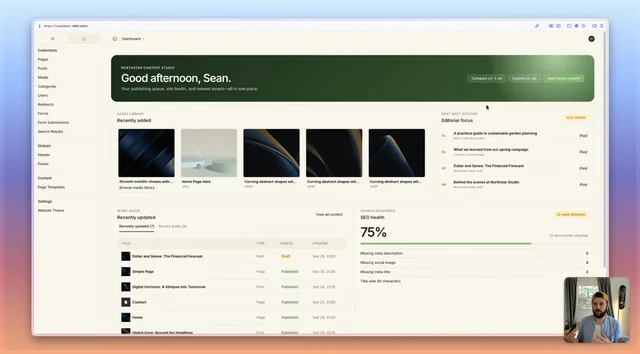
Payload v4 beta website starter with configurable admin dashboard widgets and a custom semantic admin theme