
Blank
Official
Minimal Payload starter with Next.js, MongoDB, a Users auth collection and a Media upload collection
v4
Next.js
Updated TodayPayload v4 beta website starter with configurable admin dashboard widgets and a custom semantic admin theme
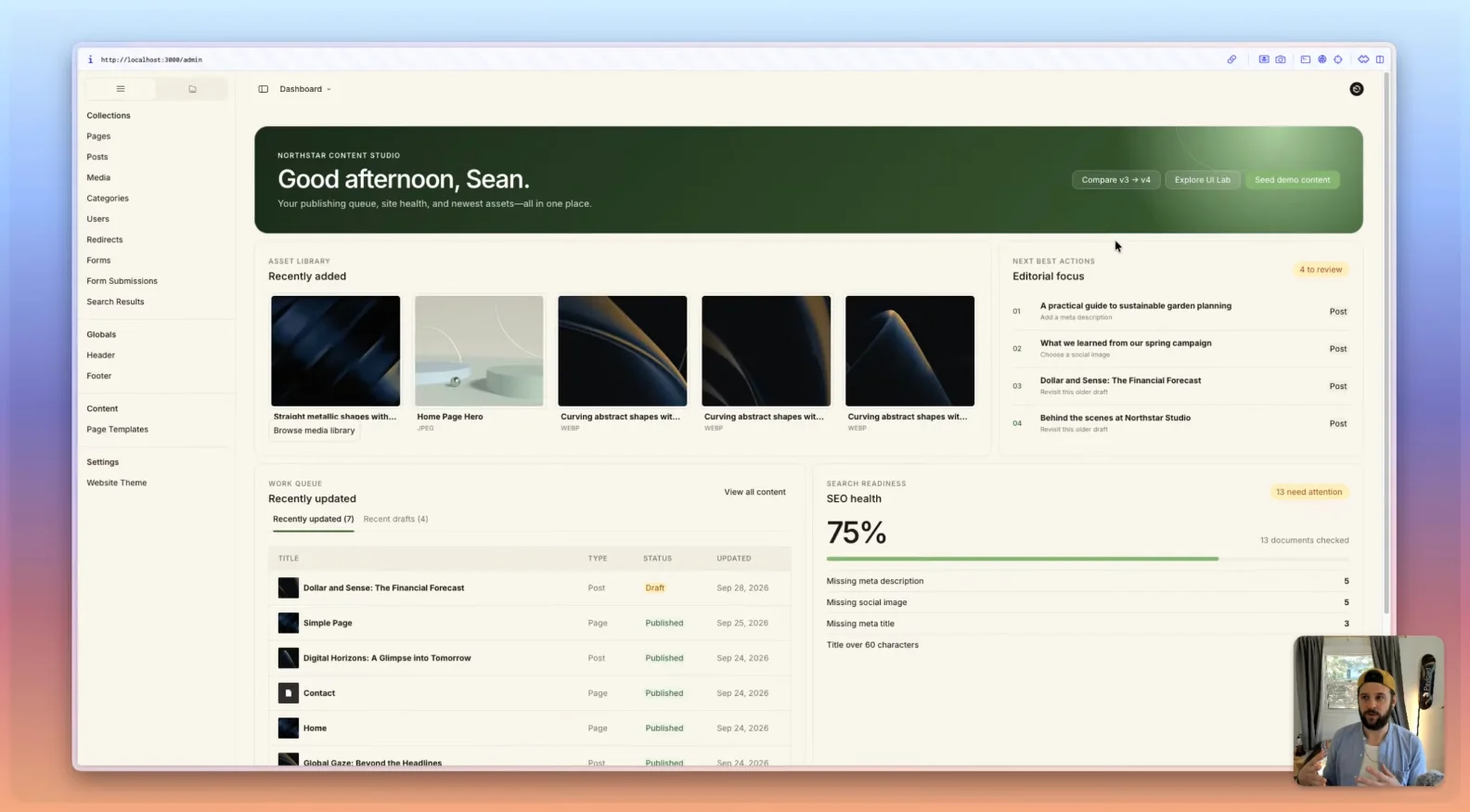
Built on Payload's website template and running on Payload 4.0.0-beta.3 with Next.js and MongoDB. It replaces the default dashboard with configurable widgets, a project-owned admin stylesheet, a custom UI Lab view and a custom headline field. It keeps the website pages, posts, forms, search, redirects and SEO setup. Requires Node.js 24.15 or newer and a MongoDB connection.
Payload v4 Admin starter with modular widgets, semantic theming, custom UI, and v3 migration examples
git clone https://github.com/zubricks/payload-playground.gitThis project starts with Payload's website template, then replaces the generic dashboard experience
with configurable widgets, custom views, project-owned Admin styling, and components from
@payloadcms/ui. It is both a usable starter and a side-by-side demonstration of the Admin UI
patterns that changed between v3 and v4.
[!IMPORTANT] This project currently uses Payload
4.0.0-beta.3. Pin the version and test the full upgrade path before applying these patterns to a production project.
Payload v3 could be customized extensively, but deep Admin styling often meant targeting internal class names and reproducing states component by component. That CSS was difficult to reason about, especially across light and dark modes, and could be fragile during upgrades.
Payload v4 provides a better foundation:
@payloadcms/ui can be used in project-owned views and widgets.The result here is deliberately more than a reskin. It demonstrates how native Payload components and custom product UI can operate as one system.
The primary dashboard uses Payload's widget system rather than a single hard-coded custom view. Editors can personalize the layout while the project supplies a useful default arrangement.
The included widgets demonstrate:
See src/components/ContentStudioDashboard and the widget
registration in src/payload.config.ts.
custom.css defines the Light Cream Admin treatment: larger type
and controls, cream surfaces, green brand roles, shared radii, and explicit light and dark values.
The file is divided by responsibility so it can be used as a starting point for another brand.
This is intentionally normal project CSS, not a runtime theme selector or an installable theme package. Every editor receives the same branded Admin treatment while Payload's light/dark color-mode preference remains available.
UI Lab is a custom Admin route built from @payloadcms/ui components. It
acts as a reference surface for fields, actions, validation, banners, drawers, and other primitives
outside Payload's standard document views.
HeadlineWorkbench shows the same approach at field level: a
native text input, Payload form state, validation feedback, and a project-specific preview composed
into one editing experience.
The public site retains the website template's pages, posts, drafts, live preview, layout blocks, forms, search, redirects, SEO, header, and footer. It also includes project-level website presets and repository-owned hero imagery. Website presentation remains separate from the Admin UI treatment.
Requirements:
24.15.0 or newercp .env.example .env
pnpm install
pnpm dev
Set DATABASE_URL and PAYLOAD_SECRET in .env, then open
http://localhost:3000/admin and create the first user.
To populate every dashboard state:
pnpm seed
[!CAUTION] The seed is destructive. It clears the template's content collections and globals before recreating them. Never run it against a database containing content you need to keep.
The seed creates pages, published and draft posts, media, incomplete SEO states, forms, submissions, header navigation, and a demonstration author:
[email protected]passwordSee src/endpoints/seed for the implementation.
Treat the repository as a set of patterns, not an all-or-nothing template.
The most reusable pieces are:
custom.csspayload.config.tsContentStudioDashboardUI LabHeadlineWorkbenchExpect to replace widget queries, copy, permissions, collection slugs, brand values, and seed data with project-specific equivalents. Keep access checks close to every Local API query and verify each widget at every width you register.
The following pieces exist primarily for evaluation and can be removed from a client delivery:
StyleComparison.tsxcustom.v3-reference.cssMinimal Payload starter with Next.js, MongoDB, a Users auth collection and a Media upload collection
Minimal Payload starter built on TanStack Start with MongoDB, a Users collection and a Media collection
Blank Payload starter for Cloudflare Workers with a D1 SQLite database and R2 media storage