payload-cms-boilerplate
Blank Payload 3 and Next.js 16 starter with Postgres, Tailwind, shadcn/ui primitives and a built-in SEO module
19
v3
Next.js
Updated 2 months agoNext.js 16 and Payload starter with Clerk auth, Postgres, S3 media storage and Resend email
A general-purpose starter for customer websites, landing pages and SaaS applications built on Next.js 16 and Payload 3. It wires Clerk authentication to the Payload Users collection, uses PostgreSQL with migration-based schema changes, and stores media in S3-compatible storage. Requires Node 22.14 or newer, pnpm and a PostgreSQL connection string.
Get started quickly with Next.js, Clerk Auth, Payload CMS and Postgres.
This repository is a GitHub template: create your own copy of it in one click.
Create a repository from this templateInternal starter template for building customer websites, landing pages, and SaaS applications on a consistent stack. Bootstrap new projects from this repo instead of starting from scratch — auth, CMS, storage, and UI conventions are already wired up.
@payloadcms/db-postgres)^22.14.0 or >=24.10.0^9, ^10, ^11, or ^12Clone the repo and install dependencies:
pnpm install
Copy the environment file and fill in the values:
cp .env.example .env
| Variable | Purpose |
|---|---|
DATABASE_URL | PostgreSQL connection string (postgres://user:pass@host:5432/db) |
PAYLOAD_SECRET | Payload's signing secret |
PREVIEW_SECRET | Secret used for live preview links |
CRON_SECRET | Secret for authenticating scheduled/cron jobs |
NEXT_PUBLIC_SERVER_URL | Public URL the app is served from |
CLERK_SECRET_KEY / NEXT_PUBLIC_CLERK_PUBLISHABLE_KEY | Clerk API keys |
CLERK_WEBHOOK_SIGNING_SECRET | Verifies incoming Clerk webhooks |
NEXT_PUBLIC_CLERK_SIGN_IN_URL, ..._SIGN_IN_FALLBACK_REDIRECT_URL, ..._SIGN_UP_FALLBACK_REDIRECT_URL | Clerk auth flow routing |
S3_BUCKET, S3_ACCESS_KEY_ID, S3_ACCESS_KEY_SECRET, S3_REGION, S3_ENDPOINT | Media storage (S3-compatible) |
RESEND_API_KEY, RESEND_FROM_EMAIL, RESEND_FROM_NAME | Transactional email |
Start the dev server:
pnpm dev
Open http://localhost:3000. Follow the on-screen instructions to log in via
Clerk and complete first-run setup.
docker-compose.yml deploys the application itself and expects an external
PostgreSQL instance. For local development you can run PostgreSQL with Docker:
Start a PostgreSQL container:
docker run --name payload-postgres -e POSTGRES_PASSWORD=postgres -p 5432:5432 -d postgres:17
Set DATABASE_URL in .env, e.g.
postgres://postgres:[email protected]:5432/payload.
Apply the schema: pnpm payload migrate.
The Postgres adapter runs with push: false, so schema changes are applied through
migrations rather than automatic dev-time pushes. After changing any collection,
global, or field config:
Generate a migration and review it:
pnpm payload migrate:create
Commit the new files under src/migrations/.
Apply pending migrations to the database:
pnpm payload migrate
CI applies migrations before building the image
(.github/workflows/push-to-ghcr.yml), and the build prerenders routes against the
database, so migrations must be committed before the workflow runs.
| Script | Purpose |
|---|---|
pnpm dev | Start the Next.js dev server |
pnpm build | Production build |
pnpm start | Serve the production build |
pnpm lint | Run ESLint |
pnpm payload | Run the Payload CLI |
pnpm generate:types | Regenerate Payload's TypeScript types from the config |
pnpm generate:importmap | Regenerate Payload's admin import map |
pnpm payload migrate:create | Generate a migration after config changes |
pnpm payload migrate | Apply pending migrations |
pnpm payload migrate:status | Show applied and pending migrations |
Run pnpm generate:types after changing any collection, global, or field config so
generated types stay in sync, and pnpm payload migrate:create so the database schema
stays in sync with the config.
src/ — application code (Next.js routes, Payload config, collections, components)context/ — living documentation (architecture, UI tokens/rules, code standards,
build plan, progress tracker) used to keep new projects built from this template
consistentdocker-compose.yml — production compose for the app (expects an external
PostgreSQL instance)See the Payload Collections docs to extend either.
When bootstrapping a new internal project from this template:
package.json name/description and this README's title.context/ and update it to describe the new project's purpose, scope, and
architecture — it should not still describe this template once customized.Internal questions: ask in the team channel. For upstream framework issues, see the Payload Discord or Payload GitHub discussions.
Blank Payload 3 and Next.js 16 starter with Postgres, Tailwind, shadcn/ui primitives and a built-in SEO module
Payload 3 starter with Better Auth, Postgres, S3 storage, a blog and composable layout and motion components
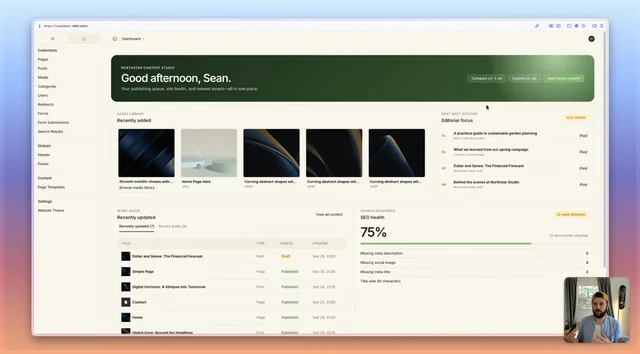
Payload v4 beta website starter with configurable admin dashboard widgets and a custom semantic admin theme