
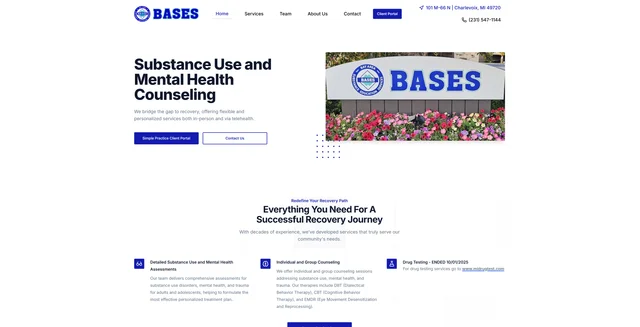
basesmi
Small business website for counseling services with Payload, Next.js, MongoDB and Cloudflare R2 storage
41
v3
Next.js
Updated 2 weeks agoStandalone website-building kit: Next.js, Payload CMS, native MCP and portable coding-agent skills.

Standalone website-building kit: Next.js, Payload CMS, native MCP and portable coding-agent skills.
This repository is a GitHub template: create your own copy of it in one click.
Create a repository from this templateAn open-source website builder powered by Next.js and Payload CMS, ready for development with Codex and Claude Code.


Use this template · Explore the Elvora demo · Read the docs · Release notes
SmartSite gives you a complete, working starting point for business websites, marketing sites, blogs and other content-rich projects. You get a Next.js frontend, a Payload CMS admin, reusable sections and templates, media management, forms, search, SEO and deployment tooling, all in one repository you own.
If you've used WordPress, the editing side will feel familiar: pages, posts, media, menus and an admin for day-to-day changes. Underneath, it is a modern TypeScript application. Sections are React components, content models are Payload schemas, and anything you want to change is ordinary source code. You extend the site by writing code, not by installing WordPress themes or plugins.
SmartSite is designed for conversational development. Open the repository in Codex or Claude Code, describe the site you want, and the agent finds what it needs inside the project: documentation, seven task-focused skills and a scoped connection to the CMS through Payload's official MCP plugin. Editors don't need any of that. The CMS works on its own, with no AI tool or model subscription required to keep the site current.
Quick start · Features · Built on Payload · AI development · Deployment · Documentation
| Requirement | Supported version |
|---|---|
| Node.js | 24.22.1 or a newer Node 24 patch (see engines in package.json) |
| pnpm | 10.34.8, pinned in packageManager |
| MongoDB | An installed MongoDB 8 mongod binary |
| Coding agent | Codex or Claude Code for the guided workflow (optional for manual development) |
Install Node and MongoDB from the official packages for your operating system and architecture. You don't need to start a database service or create a hosted database account: local setup launches its own authenticated, loopback-only MongoDB replica set for this site. The local process helpers rely on ps, and Windows lifecycle support is not yet certified. See getting started for platform notes and a pnpm fallback.
Choose Use this template, create your repository and clone it. Your repository contains the complete application, documentation and development kit.
Open the folder in Codex or Claude Code and ask:
Set up this SmartSite locally. Verify the app, admin and MCP connection, then help me plan a website for my business.
The agent follows the project's setup skill, which runs ordinary package scripts you can also run yourself:
pnpm install --frozen-lockfile
pnpm bootstrap
pnpm doctor
bootstrap generates private credentials and runtime state in the ignored .smartsite/ directory. Each clone gets its own site identity, database, ports and keys, so keep that directory out of Git and don't copy it between clones. If bootstrap reports a problem, fix it and run bootstrap again. It reuses what already exists and keeps settings you've edited.
Reconnect the generated smartsite MCP server in your client and accept its project trust prompt if one appears. Then ask the agent to call smartsiteRead with action: catalogue and check that the identity it returns matches the output of pnpm doctor. A successful tool call confirms the connection.
Open the local site and /admin in your browser, and you're ready to build.
pnpm doctor        # report database, app and MCP readiness
pnpm local:start   # start this site's local processes
pnpm local:stop    # stop them; content is preserved
Your agent can do much of the implementation. Requirements, design choices and publishing decisions stay with you, and developers can work directly in the source whenever they like.
| Area | What you get |
|---|---|
| Website application | Next.js App Router, React, TypeScript and Tailwind CSS |
| CMS | Payload admin with structured collections, rich-text editing and role-based access |
| Content models | Pages, posts, services, team, testimonials, categories and media |
| Layouts | A Templates collection for content-driven routes, plus configurable page sections |
| Site structure | Header and footer globals, nested pages and a central URI index |
| Editorial workflow | Drafts, publishing and versions on supported content types, with preview and admin links |
| Media | Local uploads, with Vercel Blob, S3, Cloudinary and UploadThing adapters |
| Forms | Payload form builder, submissions and configurable delivery |
| Search | Search indexing with results-page, command-palette and hybrid modes |
| SEO | SEO fields, metadata, redirects and sitemap generation |
| Motion | Configurable GSAP support and shared animation conventions |
| Optional features | Dark mode, localization and analytics |
| CMS access for agents | Payload's official MCP plugin with four scoped SmartSite tools |
| Agent guidance | Matching Codex and Claude skills, plus project brief and design files |
| Local operation | Bootstrap, readiness checks and isolated start/stop helpers |
| Deployment and maintenance | Managed-host guidance, Docker/VPS tooling, backups, rollback, content transfer and migrations |
Integrations such as cloud storage, email delivery and analytics need your own accounts and credentials before they do anything.
The starter ships with a compact set of editable sections:
Shared components handle layout, links, buttons, media, rich text and common UI, so new sections such as pricing tables, service cards or testimonial grids follow the same conventions. See the component catalogue and the section development guide.
Elvora shows what a customized SmartSite can become: a fully branded site with service pages, workshops, articles, team profiles and bespoke visual sections. It is a separate showcase. Its branding, content, workshop extension and custom designs are not part of the template, and none of it is seeded into a new site.
Pages are built from sections. Posts, services and team profiles have their own content models, and templates control how that content is presented. Testimonials and categories are reusable libraries, and media records hold your uploaded assets along with their descriptions.
Keeping copy separate from layout pays off as a site grows. Build a post template once from the post hero, content and related-posts sections, assign it to posts in the routing settings, and every article shares that presentation. Change the template and the articles follow.
The admin lives at /admin and brings content, site globals and settings together. Header and footer navigation are managed as globals. API keys sit under Settings, next to the other configuration entries.
CMS roles and collection/field permissions control who can do what. Visitors see published content, while signed-in editors can work on drafts wherever the content model supports them. Version history lets you restore earlier content when you need to.
Payload's official website template is a strong foundation. It already includes pages and posts, layout blocks, rich text, media, authentication, drafts and live preview, SEO, redirects, forms, search, cached data and on-demand revalidation.
SmartSite builds a fuller site architecture around those capabilities. Content types, public URLs, shared templates, cache refresh, site configuration and agent workflows are connected through common infrastructure, so you start with a working system instead of wiring those pieces together yourself.
| Area | Payload website template | SmartSite |
|---|---|---|
| Public routes | Separate page and post routes using page slugs and /posts/[slug] | One catch-all renderer backed by a URI index across configured frontend collections |
| Site hierarchy | Single-slug page routes; nested docs configured for categories | Parent/child page paths and breadcrumbs, with dependent updates when the hierarchy changes |
| Homepage and archives | The page slug home maps to /; posts have their own route directory | CMS settings choose the homepage and each collection's archive page, which shapes the paths of its content |
| Reusable layouts | Page layout blocks and a dedicated post renderer | A Templates collection, per-collection template assignments and shared section rendering |
| Cache reads | Focused helpers, including cached globals and document lookups | One cache API for URIs, documents, collection queries and globals, with consistent keys and tags |
| Cache refresh | Page/post hooks revalidate routes and sitemap tags; globals and redirects have their own hooks | Shared document and global invalidation covering old and new paths, navigation references and template usage |
| Changed URLs | Redirects plugin and redirect management | Automatic redirects for supported published URL changes |
| Content models | Pages, posts, media, categories and users, plus plugin collections | Adds services, team, testimonials, templates and the URI index |
| Configuration | Application-specific Payload config, plugins and frontend source | Direct native Payload composition, explicit website hooks and portable upgrade guides |
| Search | Search plugin for posts with a results page | Results-page, command-palette and hybrid modes |
| Storage | Media uploads, with extension points for other services | Ready-to-configure local, Vercel Blob, S3, Cloudinary and UploadThing storage |
| Agent content editing | No MCP plugin configured | Payload's official MCP plugin with four scoped tools, revision checks and operation receipts |
| Development and launch | Setup instructions, environment configuration, seed and deployment guidance | Portable Codex/Claude skills, blank-site bootstrap, isolated local lifecycle, environment identity, and content transfer, backup and recovery workflows |
Compared with the Payload website template at revision aebbf75 (October 2026) and SmartSite 4.0.2. The comparison covers what each starter ships, not everything Payload can be extended to do. Upstream reference points: page route, page revalidation hook, cached globals, plugins.
A slug is one segment of a URL, such as our-story. A URI is the complete path inside your site, such as /about/our-story. SmartSite gives every public path its own indexed record instead of making each content type responsible for its own frontend route.
Each URI record links a path to its source collection, document, publication status, template and breadcrumbs. When a request arrives, the renderer looks up the path, loads the content, applies the assigned template if the document has no sections of its own, and renders the result. Static route generation reads the same index.
In practice:
/about/our-story./insights/article-title instead of a hard-coded /posts/article-title./.Your site's structure can follow how the business thinks about its information, not how the database names its collections, and routing, breadcrumbs, templates and redirects all work from the same record. See the routing engine, URI index manager and published URI renderer.
Caching lets the site reuse earlier results instead of querying the database on every request. Invalidation tells the site which of those saved results are out of date after a change. Payload's template already uses Next.js caching and revalidation. SmartSite extends it into shared infrastructure for its broader content and routing model:
Publishing an article triggers refreshes for its page and cached collection queries. A template change uses the URI index to find published content to refresh. Developers use the same mechanisms across supported content types.
This dependency handling is explicit: it covers the relationships SmartSite knows about. When you add custom queries, external caches or new extensions, give them the appropriate tags and hooks. Bulk operations should be checked for completion and handler limits. See the cache API, revalidation handlers and the routing and caching guide.
Renaming a parent page, moving a collection's archive or editing a shared template can change many public routes at once. SmartSite detects the dependent content and hands the follow-up work to a Payload task, which the hook queues and runs straight away. That work updates the affected URIs, breadcrumbs and cached output together.
When a supported published URL changes, SmartSite can create a redirect from the old address automatically. Redirects for pages and posts point at the content record itself, so they keep following that content to its current address. Redirects for other collections store a destination URL. Redirects you've created by hand are left as they are. After a significant restructure, spot-check a few old and new URLs. See the durable publication worker, publication intent and automatic redirects.
Your agent edits layouts, components and configuration in the source files. It uses MCP to read and update the content stored in Payload.
SmartSite uses Payload's official @payloadcms/plugin-mcp for the MCP endpoint and API-key authentication, and registers four focused content tools on it. There's no separate MCP server to run, and SmartSite doesn't need an AI provider key. Your coding agent uses its own account.
| Tool | What it does |
|---|---|
smartsiteRead | Discover the site's identity, content catalogue and schemas; find, read and inspect the history of content |
smartsiteSave | Create or update one item, with an explicit publishing mode and revision check |
smartsiteUploadMedia | Upload a PNG, JPEG or WebP image with alt text |
smartsiteOperationStatus | Look up the outcome of an earlier operation |
These tools are built so that an agent works with your content safely:
Image uploads through MCP accept PNG, JPEG and WebP files up to 2 MiB and 40 million pixels. Use the CMS for larger files or other formats. Custom collections can be opted in to MCP in site configuration. See the content workflow and the MCP contract.
| Skill | Purpose |
|---|---|
smartsite-start | Set up or resume the site and verify the connection |
smartsite-build | Turn a brief into a coherent website |
smartsite-sections | Add or change section schemas and renderers |
smartsite-content | Read and edit stored content through MCP |
smartsite-data | Extend collections and handle data changes |
smartsite-repair | Diagnose problems in the actual environment |
smartsite-launch | Prepare hosting, content transfer and launch checks |
Codex skills live in .agents/skills/ and Claude skills in .claude/skills/. Each has a root entry point, AGENTS.md or CLAUDE.md, and both share the same project documentation. A bundled Payload reference skill supports deeper CMS work. Skills are guidance, not permissions: your client's trust, approval and credential settings still decide what an agent can do. Other coding agents can follow the same Markdown workflows.
src/payload.config.ts assembles the CMS using normal Payload configuration. Collections own their fields, access and hooks; the site owns every source file. Browser-safe presentation choices live in src/site.config.ts.
src/payload/collections and register it once in the Payload config. Add explicit website metadata and hooks when it needs public routes.src/components/cms.See native configuration for a complete collection example and storage recipes. Existing sites follow the upgrade guide: a reviewed source-only merge for the 4.0.2 layout update, or the versioned 3.x upgrade kit with backup/restore and content-preservation checks.
.
├── AGENTS.md / CLAUDE.md       Agent entry points
├── .agents/skills/             Codex skills and Payload reference
├── .claude/skills/             Claude skills and Payload reference
├── src/
│   ├── app/                    Next.js routes and application entry points
│   ├── components/             Website sections, fields, blocks and CMS UI
│   ├── hooks/                  Shared React hooks
│   ├── lib/                    Routing, caching, data and publication services
│   ├── payload/                Collections, globals, access, hooks, MCP and adapters
│   ├── types/                  Shared TypeScript declarations
│   ├── payload.config.ts       Native CMS assembly
│   ├── payload-types.ts        Generated content types
│   └── site.config.ts          Browser-safe presentation choices
├── docs/                       Project brief, design notes and workflows
├── scripts/                    Local lifecycle and operational helpers
├── tests/                      Unit tests and disposable integration fixtures
├── docker/                     Self-hosting and recovery tooling
├── public/                     Public assets
└── .smartsite/                 Private local state (generated, ignored)
Database. Guided setup and the MCP content tools use MongoDB with replica-set support, which provides the transactions that checked content writes rely on. Locally, bootstrap runs an isolated instance for you; hosted sites use a separately configured MongoDB. PostgreSQL adapter packages are present in the dependencies, but bootstrap, content transfer and MCP are built around MongoDB.
Media storage. Local uploads work out of the box for development. For a hosted site, choose durable storage such as Vercel Blob, S3, Cloudinary or UploadThing, supply its credentials privately and allow its hostname in the Next.js image configuration. Media files live outside the database, so moving a site means moving its assets too.
Forms and email. Forms and submissions are managed in Payload. Email delivery is inactive locally, so configure and test production delivery before relying on a contact form.
Optional features. Search, dark mode, localization, analytics and GSAP animation are switched in configuration. Some also need content, a provider account or design work. See feature toggles.
Ordinary edits publish and refresh without a cron service. Future publishing is off by default; enable it on the native Payload collections that need it and deliberately configure a runner. Background recovery is optional too. Interrupted or large refreshes can be resumed by an administrator without repeating the content save. See the deployment guide.
| Approach | Typical arrangement |
|---|---|
| Managed hosting | A Node-compatible application host, managed MongoDB and durable media storage |
| Self-hosted | A Dockerized app and authenticated MongoDB on a VPS, with deployment, backup and recovery scripts |
Read hosting modes, first launch and deployment before provisioning. Hosting, domains and third-party services are your choice and may carry their own costs.
First launch. Set up the destination as its own environment, with its own identity, secrets, administrator and scoped MCP keys. Local credentials never move to production. Choose which content to transfer: the transfer helper offers a dry run, checks references and records a receipt. Then set the public URL, database, storage and email for the destination and check the live site, admin, media, metadata and forms.
Ongoing releases. Deploy code without replacing the production database. When a schema change needs existing content to change, run a targeted migration after taking a tested backup. The self-hosted workflow includes off-server builds, promotion, status checks, backup, restore and rollback. Test a restore into a separate environment so you know your backups actually work.
| Command | Purpose |
|---|---|
pnpm bootstrap | Prepare a fresh local site, or resume setup |
pnpm doctor | Report local database, app and MCP readiness |
pnpm local:start | Start this site's local processes |
pnpm local:stop | Stop them while keeping your data |
pnpm generate:types | Regenerate Payload TypeScript types |
pnpm generate:importmap | Regenerate the admin component import map |
pnpm type-check | Check TypeScript |
pnpm lint | Check source conventions |
pnpm test:unit | Run unit tests |
pnpm build | Build the application for production |
Integration, startup, transfer and deployment tests need clean, disposable copies of the project; the development guide explains how to run them. Alongside the checks, open the app in a browser and try the things you changed.
The documentation index points each task to a focused guide:
Bug reports and focused improvements are welcome. When reporting a bug, include the SmartSite version, your operating system, the steps to reproduce it and a sanitized error message. Never attach .env files, .smartsite/ state, database dumps or API keys.
For a pull request, explain the problem it solves, keep the scope focused, and include the relevant code checks along with what you verified in the running app. The development guide covers the workflow.
SmartSite is released under the MIT license. Dependencies and bundled third-party material keep their own licenses. Elvora's branding, photography and content belong to the showcase and are not included for reuse.
SmartSite is built on Payload CMS, Next.js, React, Tailwind CSS, Radix UI, Lucide, GSAP and the wider open-source ecosystem. Attribution for the bundled Payload skill is kept alongside that material. See the releases for changes to the starter.
Small business website for counseling services with Payload, Next.js, MongoDB and Cloudflare R2 storage
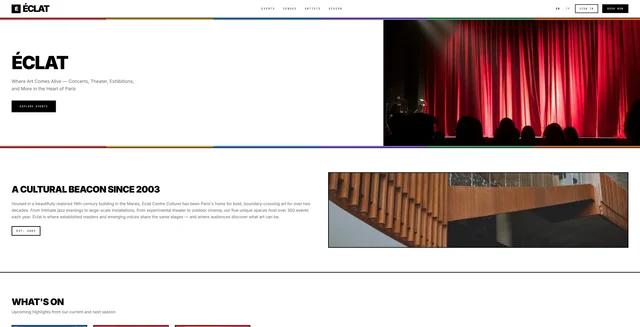
Event ticketing and venue booking app built on Payload, Next.js and the payload-reserve plugin
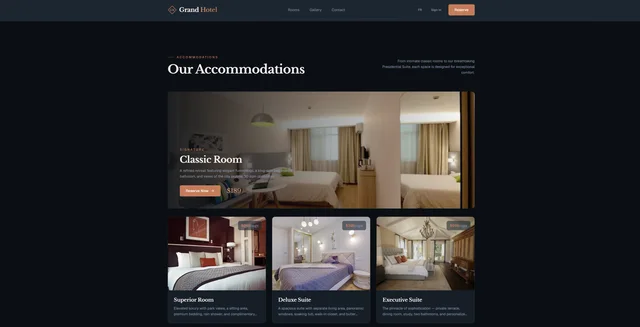
Hotel booking site with room pools, multi-night date-range reservations and Stripe checkout