payload-starter
Next.js 16 and Payload 3 starter with PostgreSQL, role-based admin access, shadcn/ui and SEO helpers
100
v3
Next.js
Updated 4 months agoAI chat agent (Eve) built inside Payload CMS on the Vercel Eve framework — MCP tools (Posts/Tasks), built-in web search, approve-before-create post preview, and hands-free Deepgram voice. Vercel-native and deployable to Vercel.
AI chat agent (Eve) built inside Payload CMS on the Vercel Eve framework — MCP tools (Posts/Tasks), built-in web search, approve-before-create post preview, and hands-free Deepgram voice. Vercel-native and deployable to Vercel.
git clone https://github.com/elghaied/payload-eve-chat.gitA working example (and starter template) of an AI chat agent built inside Payload CMS. The agent
("Eve") lives at /admin/eve, reads and writes Payload collections over MCP, and is built on the
Vercel Eve framework (vercel/eve). The model is routed through the Vercel AI Gateway
(anthropic/claude-haiku-4.5 by default — chosen so Eve's native built-in tools like
web_search work out of the box and tool calling for MCP is rock-solid). The project is
Vercel-native — every capability uses a hosted service (AI Gateway for the model, Deepgram for
voice, Eve's built-in web search) so it deploys to Vercel with no Docker/self-hosted dependencies.
In-admin chat at /admin/eve — streaming replies, durable sessions, and a native Payload v4
sidebar tab that holds your conversation history (reopen + history replay) so the chat itself
gets the full content area. Admin-only (authenticated via the Payload session).
Content tools over MCP — Eve reads and writes Posts and Tasks through Payload's MCP
server (/api/mcp) and can read Media. Users and Conversations are fully locked out of MCP;
Media is read-only there (image writes go through the image-generation tool, below).
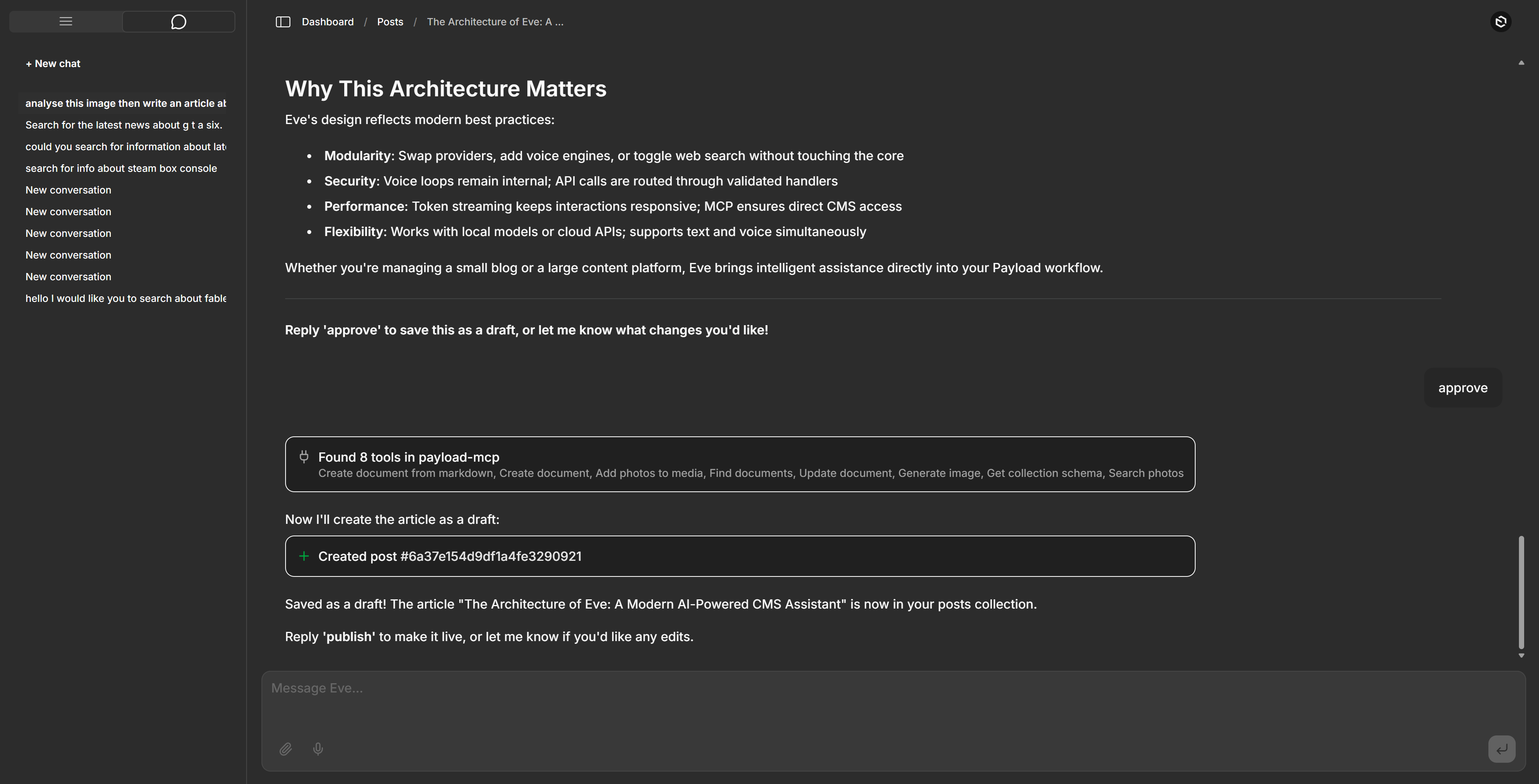
Write articles (draft → approve → publish) — ask Eve to write a post and it drafts it
inline as Markdown; you approve in chat (just say "approve") and it creates the post via
createDocumentFromMarkdown (Markdown → Lexical), then flips it to published on request. A
load-on-demand article-writing skill teaches the full Lexical vocabulary (headings, lists,
checklists, blockquotes, horizontal rules, strikethrough, code, links) and the image placeholder.
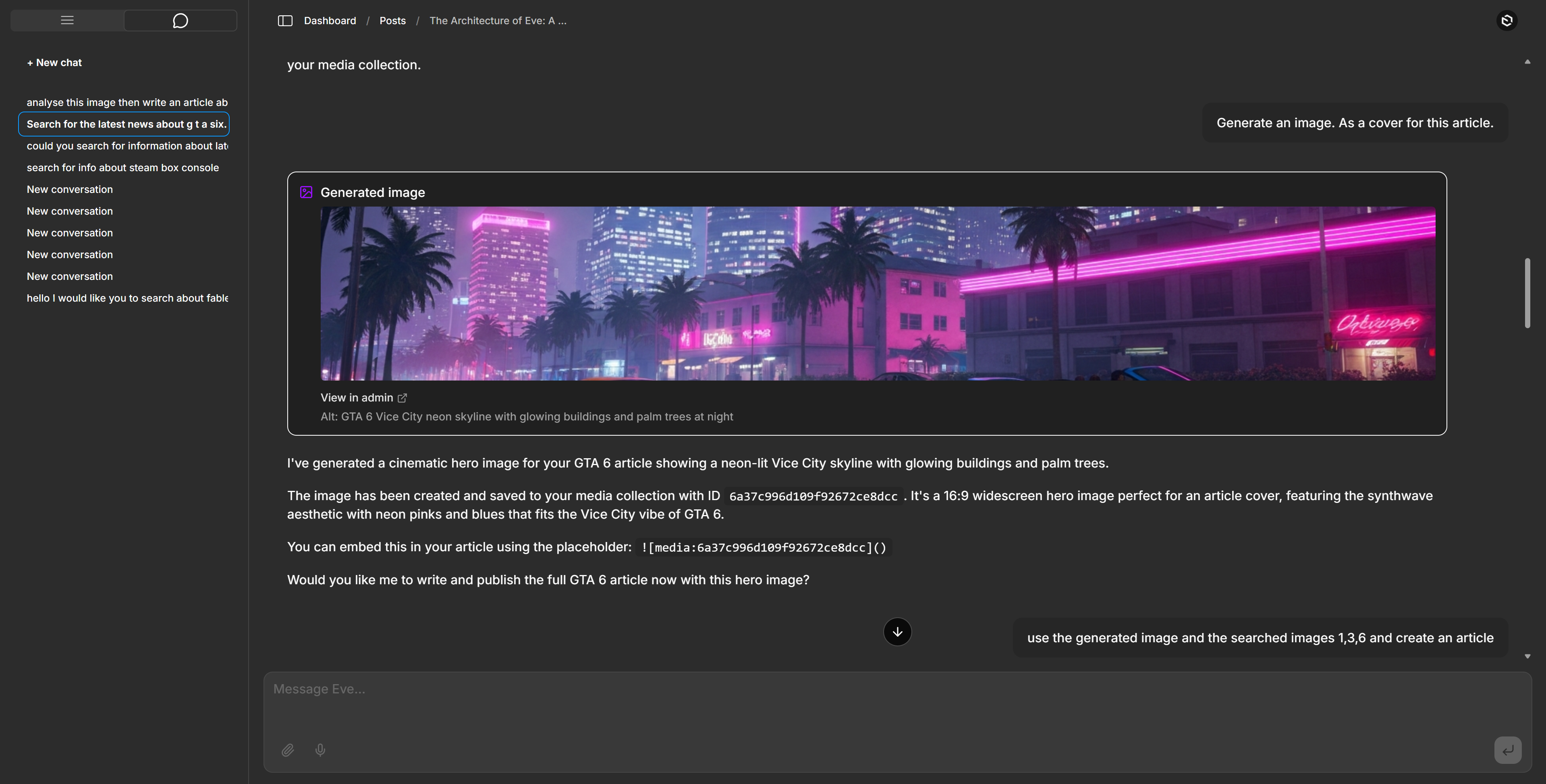
Image generation — the generateImage MCP tool calls a Vercel AI Gateway image model
(default imagen-4.0-fast, ~$0.02/image), saves the result to the Media collection, and
returns its id so Eve can embed it in an article as a hero/inline image — ![media:<id>]()
converts to a real Lexical upload node. Override with EVE_IMAGE_MODEL.
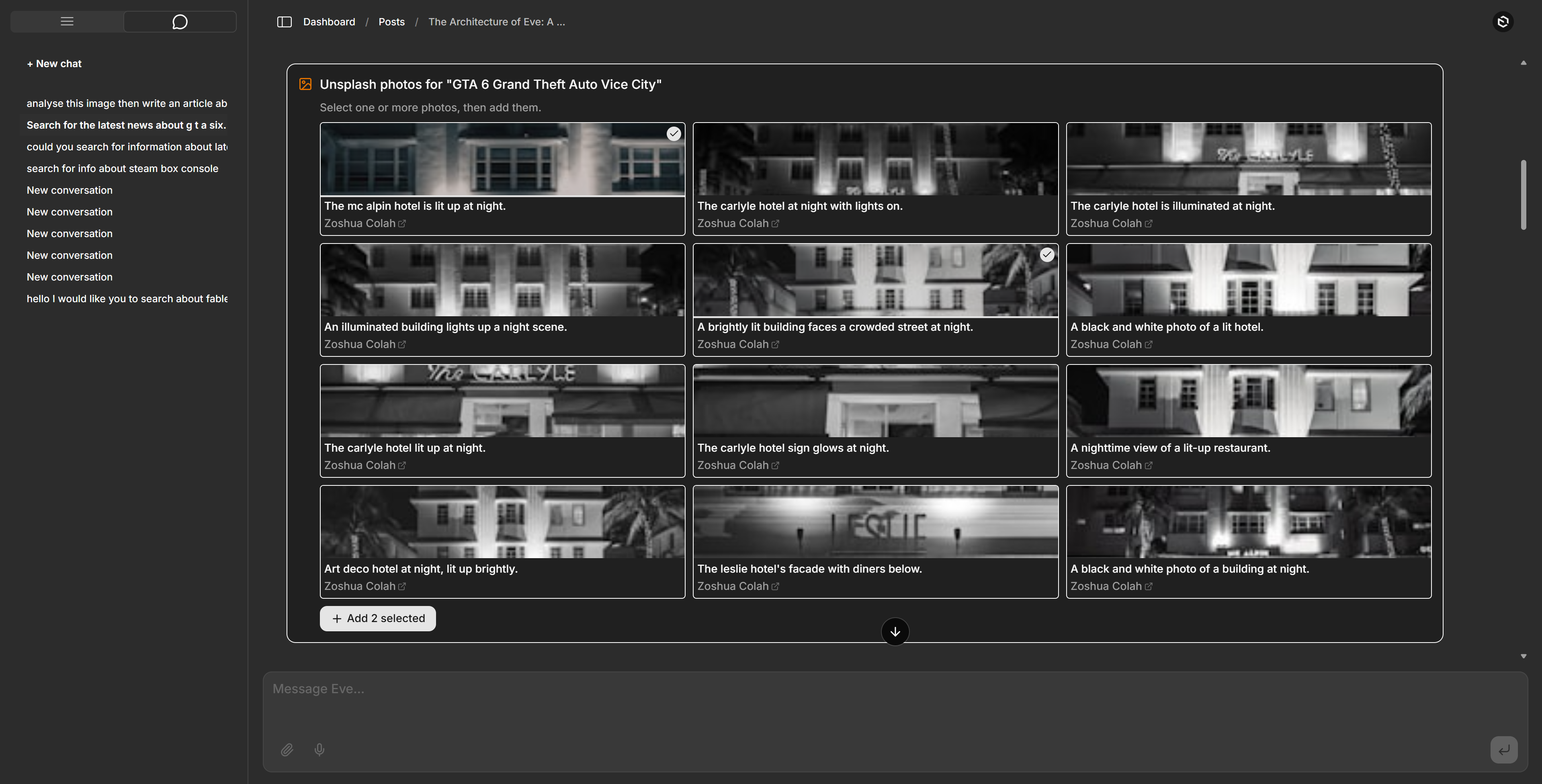
Real photos from Unsplash — the searchPhotos MCP tool
returns a thumbnail grid of real photographs; you multi-select photos in the grid and click "Add
selected", and addPhotosToMedia downloads them into Media (in one batch) with photographer
credit. Eve can embed them in an article via ![media:<id>]() with a mandatory
_Photo by [Name](url) on Unsplash_ caption. Requires UNSPLASH_ACCESS_KEY (free; 50 req/hr on
demo tier). Attribution and the ToS download trigger are handled automatically.
Media storage that fits the deploy — uploads (including generated/Unsplash images) go to
Vercel Blob in production (auto-detected via
BLOB_READ_WRITE_TOKEN) and to the local /media directory in dev. No code branch — the storage
adapter disables itself when the token is absent. See Media storage.
Attach files to chat — drop images or PDFs into the composer and Eve reads them (multimodal). Attached files go straight to the model inline; they are not stored in Payload. The attachment chips clear the moment you send.
Rich tool cards — every tool result renders as real UI — clickable web-search links, "Created post → admin link", generated-image previews, to-do checklists, discovered-tool summaries — never raw JSON. A persistent "Eve is working…" indicator covers the silent gaps while the agent calls tools, so a long turn never looks frozen.
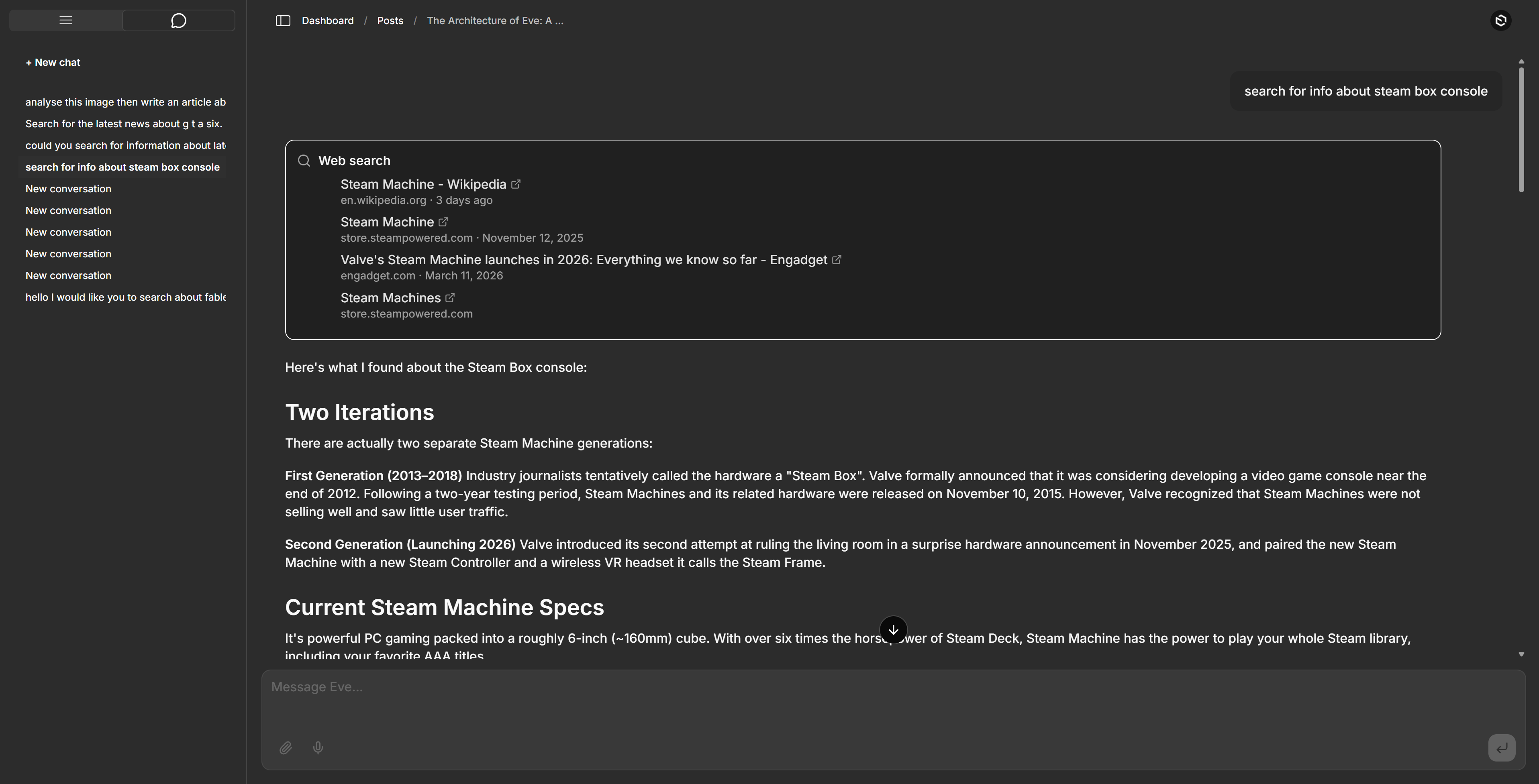
Web search + read-URL — Eve's provider-native web_search (clickable result links) and the
built-in web_fetch (fetch any URL as Markdown), both through the AI Gateway. No SearXNG, no
extra key. A client-side stall watchdog aborts a turn that goes silent for 60 s, so a stalled
provider stream (a known gateway risk for server-side tools) can't hang the chat indefinitely.
Hands-free voice — streaming speech-to-text and text-to-speech via Deepgram (Nova-3 STT
DEEPGRAM_API_KEY is set). The key
always stays server-side: STT uses a short-lived token from /api/deepgram/token (browser
opens the Deepgram WS directly); TTS is proxied through /api/deepgram/speak (Deepgram's
grant tokens are ASR-scoped only, so Aura TTS can't use them). Use a Member-role key with
default scopes — a lower role fails STT (403 Insufficient permissions), and an ASR-only-scoped
key makes TTS silent.Code-exec disabled by design — Eve's default sandbox tools (bash/read_file/write_file/
glob/grep) are turned off; the agent operates only on Payload data over MCP.
The previous Vercel AI SDK implementation (with provider-switching across Claude/GPT/Ollama) is preserved on the
ai-sdkbranch.
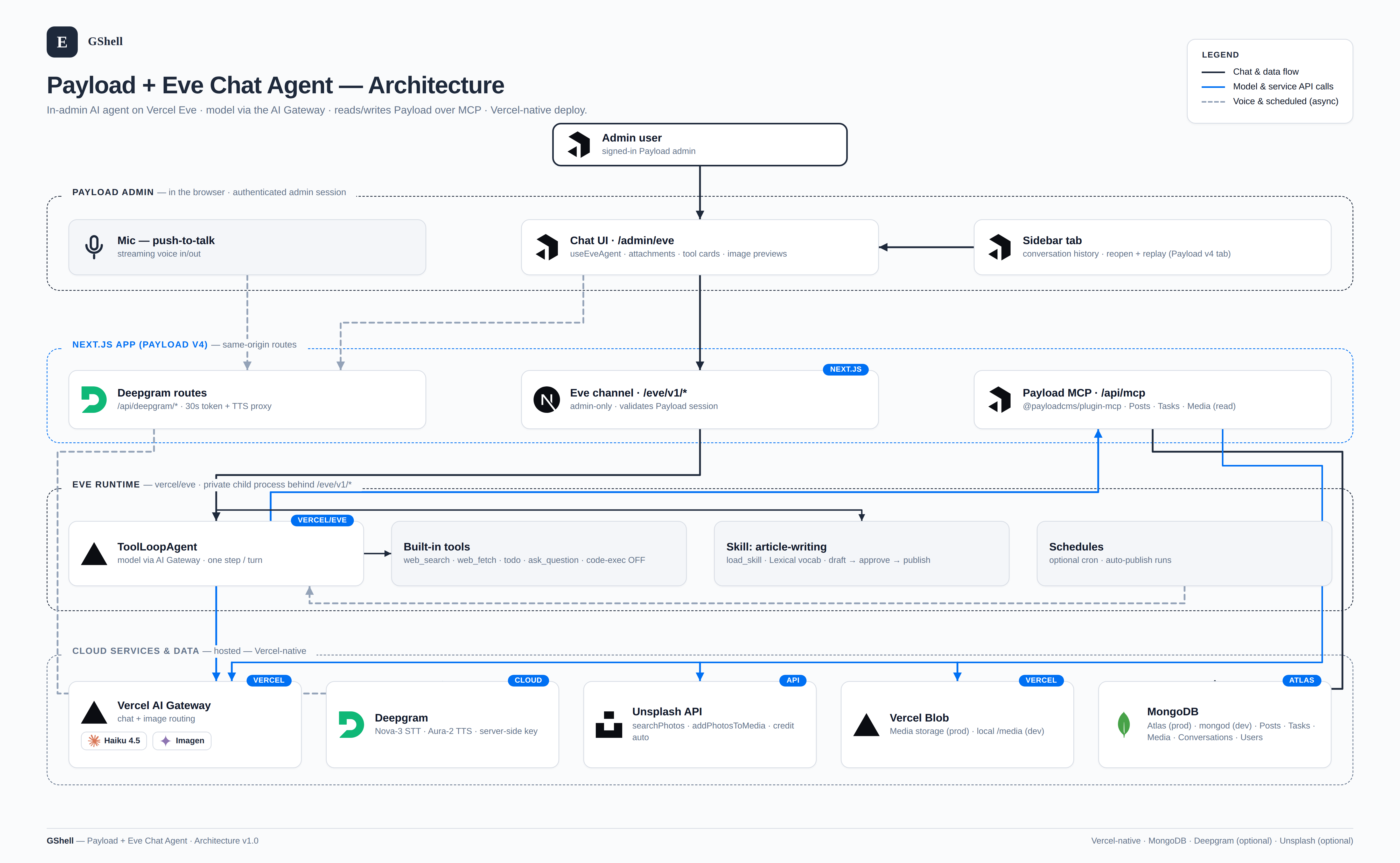
flowchart LR
    subgraph browser["Payload Admin"]
        Tab["Sidebar tab<br/>chat history"]
        UI["Chat UI /admin/eve (useEveAgent)<br/>attachments · tool cards · image previews"]
        Mic["Mic (push-to-talk)"]
    end

    subgraph next["Next.js app (Payload v4)"]
        Channel["Eve channel /eve/v1/*<br/>admin-only: validates Payload session"]
        MCP["Payload MCP /api/mcp<br/>@payloadcms/plugin-mcp"]
        DG["/api/deepgram/* (token + TTS proxy)"]
    end

    subgraph eve["Eve runtime (vercel/eve)"]
        Agent["ToolLoopAgent — model via AI Gateway"]
        Tools["built-in: web_search · web_fetch · todo · ask_question<br/>code-exec: disabled"]
        Skill["skill: article-writing (load_skill)"]
        Sched["schedules — optional cron"]
    end

    GW["Vercel AI Gateway<br/>chat (Haiku 4.5) · image (Imagen)"]
    DGcloud["Deepgram<br/>Nova-3 STT · Aura-2 TTS"]
    UN["Unsplash API"]
    Store[("Media storage<br/>Vercel Blob (prod) · /media (dev)")]
    DB[("MongoDB<br/>Atlas (prod) · mongod (dev)<br/>Posts · Tasks · Media · Conversations · Users")]

    Tab --> UI
    UI <--> Channel --> Agent
    Sched -. "cron fires" .-> Agent
    Agent --> GW
    Agent --> Tools
    Agent --> Skill
    Agent -->|"Posts/Tasks · createDocumentFromMarkdown<br/>generateImage · searchPhotos / addPhotosToMedia"| MCP --> DB
    MCP -->|"generateImage → image model"| GW
    MCP -->|"searchPhotos / addPhotosToMedia"| UN
    MCP -->|"upload bytes"| Store
    UI -. "30s token" .-> DG
    Mic <--> DG <--> DGcloud
The browser talks only to same-origin Next.js routes; the Eve runtime is a private child
process behind /eve/v1/*. All content lives in Payload (MongoDB); chat-attached files go inline to
the model and are never persisted.
Targets Payload v4 (pinned to canary); requires Node 24.15+ and TypeScript 6+. The
stable Payload 3.85.1 version is preserved on the v3 branch.
cd into it.cp .env.example .env.local (gitignored) and fill in:
DATABASE_URL — a local mongod (mongodb://127.0.0.1/payload-eve-chat) or a MongoDB Atlas
SRV string. (Atlas has a free tier; see Deploying to Vercel.)PAYLOAD_SECRET — any long random string.vercel link then vercel env pull .env.local to fetch a
VERCEL_OIDC_TOKEN (or set AI_GATEWAY_API_KEY). See Model & AI Gateway.DEEPGRAM_API_KEY — optional, enables voice. New Deepgram accounts get $200 free credit
(no credit card): sign up at https://console.deepgram.com/signup, create a key, paste it in.UNSPLASH_ACCESS_KEY — optional, enables real-photo search via Unsplash. Create a free app at
https://unsplash.com/oauth/applications and copy the Access Key (Client-ID public auth —
no secret needed). Demo tier allows 50 requests/hour. When unset, the searchPhotos and
addPhotosToMedia tools are simply not offered. Attribution (photographer credit stored on
Media and included in the article) and the Unsplash ToS download trigger are handled
automatically.pnpm install && pnpm devsafe — installs deps and starts the dev server. devsafe clears the
.next cache to avoid a Payload-v4 canary stale-RSC-cache issue; plain pnpm dev can error on
stale chunks./admin/eve) and start chatting.You need a MongoDB instance running. Either start a local mongod, or point DATABASE_URL at a
free MongoDB Atlas cluster — no Docker required.
generateImage) and Unsplash
photos (addPhotosToMedia). Stored in Vercel Blob in production, local /media in dev (see
Media storage).eveSessionId, continuationToken, streamIndex,
owner). Message bodies live in Eve, not Payload.The agent is a filesystem project under agent/:
agent/
  agent.ts                   # Eve agent definition (model via AI Gateway)
  instructions.md            # system prompt (Posts/Tasks, article + image flow, web access)
  skills/
    article-writing.md       # load-on-demand: Lexical Markdown vocab + draft→publish
  tools/
    bash.ts read_file.ts write_file.ts glob.ts grep.ts   # disableTool() — code-exec off
  connections/
    payload-mcp.ts           # Eve MCP connection → /api/mcp (Posts, Tasks, Media)
  channels/
    eve.ts                   # HTTP channel; authenticates via the Payload admin session
Two Payload-side MCP tools live in src/eve/ (they run in the Next/Payload process so they can call
both the AI Gateway and payload.create): markdown-tool.ts (createDocumentFromMarkdown) and
generate-image-tool.ts (generateImage). They're registered on the MCP plugin in
src/payload.config.ts.
withEve in next.config.ts mounts Eve's HTTP channel at /eve/v1/*. The /admin/eve page uses
Eve's useEveAgent hook to stream through that channel. The channel is admin-only — it
validates the Payload session via /api/users/me. Eve calls Posts/Tasks tools on the
Payload MCP server (@payloadcms/plugin-mcp) through the payload-mcp connection. Voice runs
entirely client-side against Deepgram, using a 30-second token minted by the Payload-auth-gated
POST /api/deepgram/token route (the raw DEEPGRAM_API_KEY never reaches the browser).
EVE_MODEL=anthropic/claude-haiku-4.5   # default: native web_search + strong tool calling
# EVE_PROVIDER=groq                     # optional serving-provider pin (only for models like
                                        # openai/gpt-oss-120b whose creator isn't the provider)
The default is chosen for strong tool calling (the MCP Posts/Tasks demo depends on it) and for
supporting Eve's provider-native web_search. Cheaper swaps: google/gemini-2.5-flash,
openai/gpt-4o-mini. Avoid models weak at tool calls (llama-3.3-70b emits malformed tool calls
and breaks the MCP demo) and models whose serving provider doesn't support native server tools
(e.g. openai/gpt-oss-120b on Groq — no web_search). Native web search returns clickable result
links; a client-side stall watchdog bounds the rare case where a server-tool stream hangs (see
Features). If native search stalls often on your chosen model, switch EVE_MODEL to a Sonnet/Opus
Anthropic model (broader server-tool support).
Auth the gateway with vercel link && vercel env pull .env.local (writes VERCEL_OIDC_TOKEN,
which expires ~12h — re-pull when gateway calls start returning auth errors) or set a stable
AI_GATEWAY_API_KEY. The gateway needs a credit card on the linked Vercel team (unlocks free
credits). Without BYOK the gateway relays to the provider via Vercel's own integration and bills
your Vercel AI Gateway credits — you don't configure the provider (e.g. Groq/Anthropic)
yourself. To bill your own provider account instead, add it under AI Gateway → Bring Your Own
Key. (Provider web search also bills a small per-search fee on top of tokens.)
Eve can generate hero images for articles using the generateImage tool registered in
src/eve/generate-image-tool.ts. The tool calls the Vercel AI Gateway image model, saves the
result to the Payload Media collection, and returns a Markdown embed placeholder
(![media:<id>]()) for use in post bodies.
Cost: ~$0.02 per image (default model: google/imagen-4.0-fast-generate-001).
Typical flow:
generateImage({ prompt: "…", alt: "…" }) → receives { id, url }.![media:<id>]().createDocumentFromMarkdown converts it to a Lexical UploadNode — a real embedded image block.Configuration:
EVE_IMAGE_MODEL=google/imagen-4.0-fast-generate-001   # default (~$0.02/image)
# EVE_IMAGE_MODEL=xai/grok-imagine-image              # also ~$0.02/image
# EVE_IMAGE_MODEL=bytedance/seedream-4.0              # ~$0.03/image
Eve only calls generateImage when the user explicitly requests a hero image or illustrated
article — not on every post. The tool description and article-writing skill both gate it.
The Media collection (admin uploads, generated images, and Unsplash photos) uses the
@payloadcms/storage-vercel-blob adapter,
registered in the Payload v4 top-level storage: [...] array in src/payload.config.ts (v4 runs
storage adapters via adapter.init(), not as a plugins[] entry):
BLOB_READ_WRITE_TOKEN and uploads go to Vercel Blob./media directory. No NODE_ENV branching.alwaysInsertFields: true keeps the Media schema identical across environments whether or not Blob
is active, so payload-types.ts doesn't drift between dev and prod.
Database URL:
db.urlresolvesDATABASE_URL → MONGODB_URI → MONGODB_URL → MONGO_URL, so the connection string injected by the Vercel MongoDB Atlas marketplace integration (commonlyMONGODB_URI) is picked up automatically — see Deploying to Vercel.
In development, /api/mcp requires no API key (a dev-only overrideAuth runs as the first
admin). In production, set MCP_API_KEY to a Bearer key created in the Payload admin under
Settings → Manage API keys.
This project is built on Vercel Eve (vercel/eve) — an open framework
for building agents as a filesystem project (everything under agent/). What it gives you, and
what this template uses:
ToolLoopAgent with the model routed through the Vercel AI Gateway
(agent/agent.ts). One step per turn; the harness drives the tool loop.web_search, web_fetch, todo, ask_question, load_skill, plus
sandbox code-exec (bash/read_file/write_file/glob/grep) that you can toggle per tool.
See the default harness.agent/connections/payload-mcp.ts); Eve discovers their tools on demand.agent/channels/eve.ts), or Slack, Discord,
GitHub, Telegram, Twilio, Teams, Linear, etc.agent/skills/article-writing.md).agent/schedules/*), great for recurring content.useEveAgent for React (also Vue/Svelte) drives the streaming chat UI.Eve schedules are files under agent/schedules/. Each exports a
cron plus exactly one of markdown (a fire-and-forget prompt the agent runs and discards the
output of) or run (a full handler). Because this template already gives Eve the tools to research,
illustrate, and publish, a daily article is just a prompt on a cron:
// agent/schedules/daily-article.ts
import { defineSchedule } from 'eve/schedules'

export default defineSchedule({
  cron: '0 8 * * *', // every day at 08:00 (server time)
  markdown: [
    'Write and publish a short blog post for today.',
    'Use web_search to pick a fresh, relevant topic, draft it with the article-writing skill,',
    'add a hero image with generateImage (or a real photo via searchPhotos), then create it with',
    'createDocumentFromMarkdown and set status to "published".',
  ].join(' '),
})
eve info lists discovered schedules; withEve deploys them so the cron fires on Vercel. Caveats:
a scheduled run bills AI Gateway credits (and image credits if it generates one), it runs as the
agent with no interactive approval, and in production it needs the MCP connection authorized
(MCP_API_KEY). Start with a low frequency and a draft-only prompt (status: "draft") while you
tune it. Full reference: https://eve.dev/docs/schedules.
The app is Vercel-native; withEve deploys the Eve runtime as a private service automatically.
MONGODB_URI — the config reads it automatically), or create a free Atlas cluster manually,
allow Vercel's network (or 0.0.0.0/0 for a quick start), and set DATABASE_URL to the
mongodb+srv://… string yourself.BLOB_READ_WRITE_TOKEN; Media uploads then go to Blob automatically (see
Media storage).vercel link (this repo). Eve's model routing already uses the AI
Gateway, so no provider keys are needed in code.MONGODB_URI (from the Atlas integration) or DATABASE_URL = the mongodb+srv://… stringBLOB_READ_WRITE_TOKEN = set automatically by the linked Blob store (no manual entry needed)PAYLOAD_SECRET = a long random stringMCP_API_KEY = a production MCP key (see above)DEEPGRAM_API_KEY = your Deepgram key (for voice, optional)UNSPLASH_ACCESS_KEY = your Unsplash Access Key (real
photos, optional)AI_GATEWAY_API_KEY).PAYLOAD_INTERNAL_URL — not required. The Eve runtime validates the admin session by
calling the app's /api/users/me, and auto-detects the deployment URL on Vercel
(VERCEL_PROJECT_PRODUCTION_URL / VERCEL_URL). Only set this if the auto-detected URL
isn't reachable from the Eve service (e.g. a custom internal hostname, or Vercel
Deployment Protection is on — exempt the production domain or set this to a reachable
URL). If a chat turn returns "Authorization is required for this route," this is why.vercel deploy (or push to a connected Git branch). withEve runs eve build
and serves the agent at the private /_eve_internal/eve service; /eve/v1/* is rewritten to it
same-origin.A future Vercel Sandbox code-exec tool would re-enable the sandbox tools with a
vercel()backend inagent/sandbox/sandbox.ts— seedocs/superpowers/notes/eve-tools-findings.md.
All commands are safe to run locally. Note: the end-to-end agent test calls the live model through the AI Gateway and bills credits — run it deliberately, not in a loop.
pnpm test:int        # Vitest — collections, routes, helpers, the Deepgram token route
pnpm exec tsc --noEmit
node_modules/.bin/eve info   # compiles the agent graph; should report 0 diagnostics
pnpm devsafe         # start the app (the Eve runtime is a child process; keep it up)
pnpm test:e2e        # admin.e2e.spec.ts (no model calls) + eve-chat.e2e.spec.ts (LIVE model)
eve-chat.e2e.spec.ts seeds its own admin, asks Eve to create a Task, and asserts it persisted —
this one spends AI Gateway credits. It needs VERCEL_OIDC_TOKEN/AI_GATEWAY_API_KEY set and a
reachable MongoDB. Playwright runs serially (workers: 1) because specs share one admin user.DEEPGRAM_API_KEY): open /admin/eve, hold the mic button (or
the keyboard shortcut) to talk — push-to-talk — and confirm Eve transcribes it, replies, and
speaks the reply aloud. (Uses Deepgram credit, not the AI Gateway.)For questions about Payload itself, see the Payload Discord. For anything specific to this project — bugs, ideas, setup help — open an issue.
Next.js 16 and Payload 3 starter with PostgreSQL, role-based admin access, shadcn/ui and SEO helpers
Minimal Payload starter with Next.js, MongoDB, a Users auth collection and a Media upload collection
Minimal Payload starter built on TanStack Start with MongoDB, a Users collection and a Media collection