
Overview
Summary generated from the READMEAdds a crop area and a focus area to upload collections without changing the original file. Image sizes are rebuilt from the crop, and a signed endpoint serves cropped copies. Individual upload fields can set their own crop, and frame rules per breakpoint place the subject away from text. Requires Payload 3.39 or later with sharp, and ships a Next.js image component and server helpers.
Features
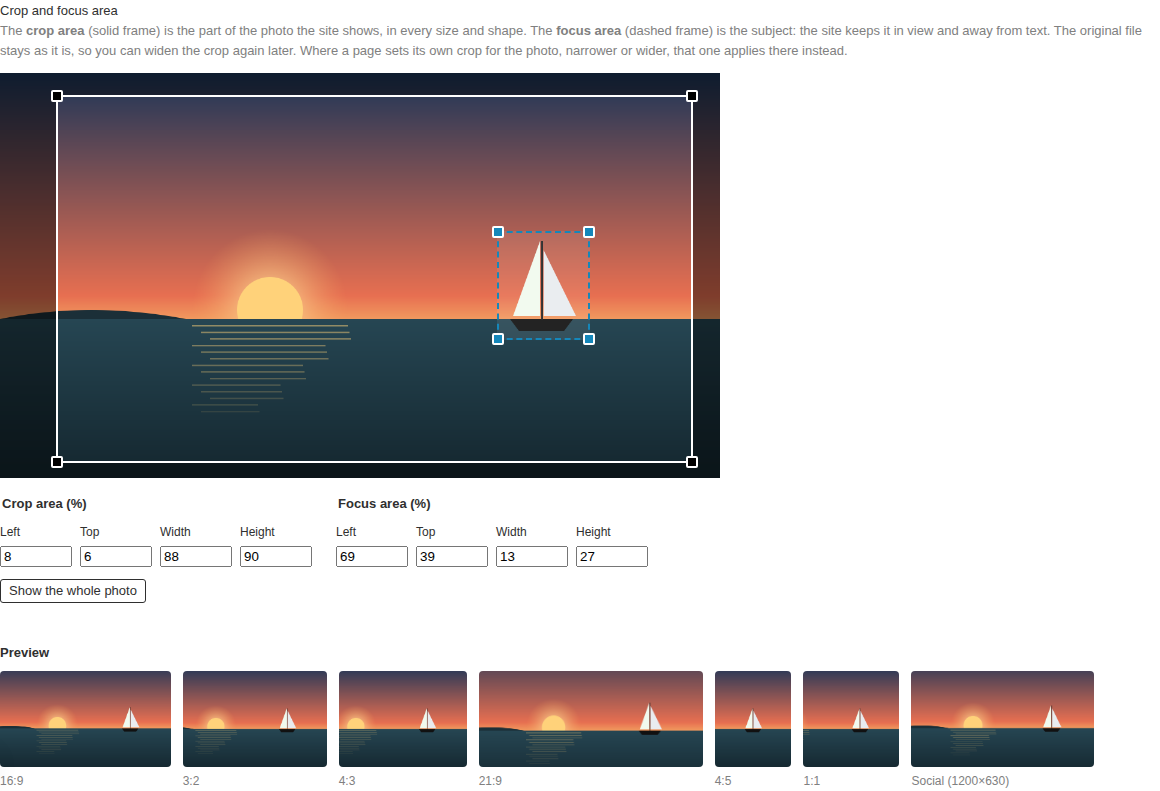
- Crop area and focus area editors in the media admin with previews in common shapes
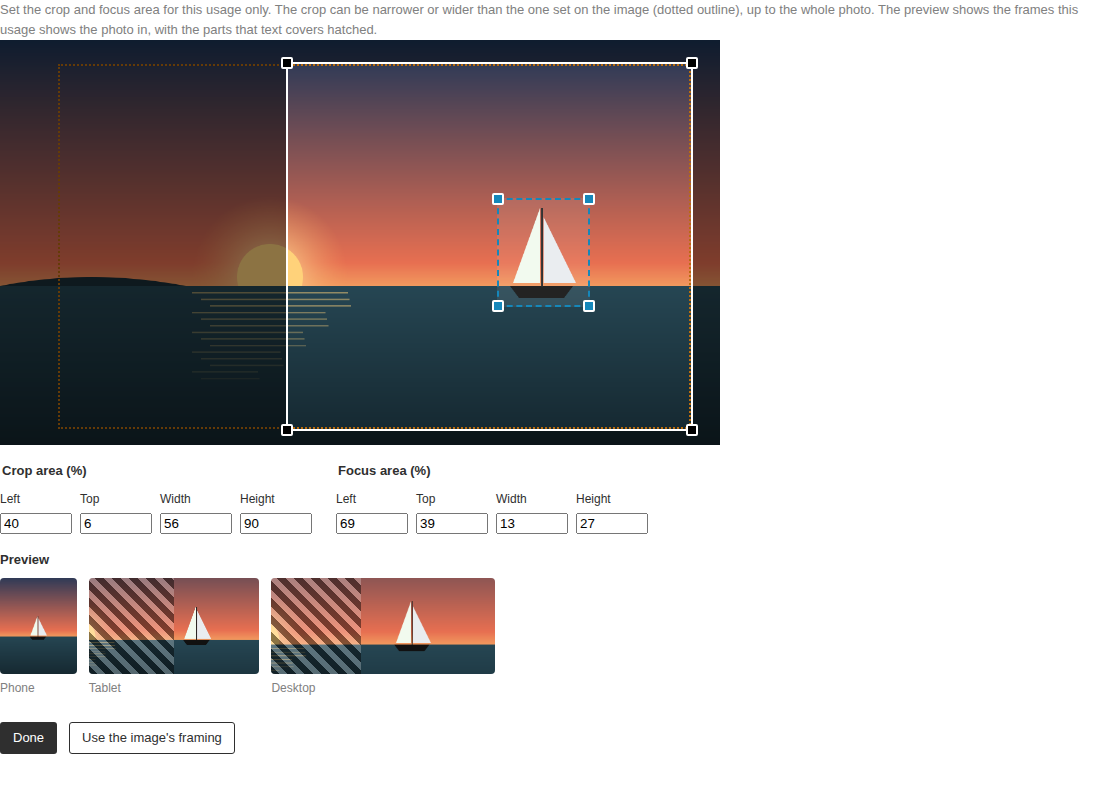
- Per-usage overrides for pages, blocks and globals, narrower or wider than the media crop
- Frame rules per breakpoint with cover areas that keep the subject out from under text
- Rebuilds generated image sizes from the crop area using sharp
- Signed crop endpoint that serves cropped copies with long-lived caching
- FramedImage component for Next.js and frameImage helper for any server
Use cases
- Keep the subject of a photo visible across phone and desktop layouts with text overlays
- Set a different crop for one page header or block without altering the shared media
- Serve framed images to a headless frontend through a computed framing field
From the author
Non-destructive crop and focus areas for Payload CMS uploads, with per-usage overrides and cover areas
Installation
npm i @wolffc80/payload-image-framing0
Stars
0
Forks
3
Open Issues
Today
Last Updated
0
Weekly Downloads
v0.1.0-beta.0
npm Version
419.8 KB
Unpacked Size
0
Dependencies
Trends (last 90 days)
Trends appear after 7 days of data. Daily snapshots have not started yet.
Trends appear after 7 days of data. Daily snapshots have not started yet.
Each point is npm's rolling 7-day download count.
Health Score
Composite score based on GitHub activity, stars, npm downloads, publish recency, dependency count, and package size.
Badge for your README

[](https://payloaddirectory.dev/plugins/1429098068-root)<a href="https://payloaddirectory.dev/plugins/1429098068-root"><img src="https://payloaddirectory.dev/badge/1429098068-root.svg" alt="Payload Directory"></a>README
Payload image framing
Non-destructive crop and focus areas for Payload CMS upload collections: editors set the part of a photo a site may show and its subject, and every image size, layout and breakpoint shows that part, with the subject in view and away from text. Any place that uses a photo can set its own crop, narrower or wider, and the original file is never changed.
npm install @wolffc80/payload-image-framing
Contents
Why · Requirements · Install · Quick start · Concepts · Plugin options · Usage paths · Rendering · Generated image sizes · The crop endpoint and caching · Storage · Security · Database and migrations · Admin translations · Limitations · Compatibility · Troubleshooting · Examples · Contributing
Why
Payload's built-in crop overwrites the uploaded file, so a crop can't be undone or widened later, and its focal point is a single point: a layout can't tell how much of the subject must stay in view, or keep it out from under a headline.
| Payload's crop and focal point | This plugin | |
|---|---|---|
| Original file | Overwritten by the crop | Never changed: the crop is data |
| Undo or widen a crop | No | Yes, any time |
| Subject | One point | An area that frames keep in view |
| Image sizes | From the cropped file, around the point | Rebuilt from the crop area, fixed shapes framed around the subject |
| Different crop for one page, block or global | No | Yes, narrower or wider than the media's |
| Text over the photo | Subject may end up under it | Frames keep the subject in the part text leaves free |
| Responsive frames | object-position from the point | One position per breakpoint, from the subject and the frame shape |
Requirements
- Payload
^3.39.0, withsharpin the Payload config: the plugin crops and resizes with Payload's sharp and doesn't install its own. Localized usages need Payload 3.80 or later (see Limitations). - Any Payload database adapter: Postgres, SQLite and MongoDB are tested.
- React 19. Next.js 15.2.3 or later or 16 for the admin panel; for the site, Next.js is optional:
frameImageruns on any server. - Node.js 20.18.1 or later. TypeScript 5.4 or later, if you use the types.
Install
-
Install the package:
npm install @wolffc80/payload-image-framing -
Add the plugin, and
sharpif your config doesn't have it yet:// payload.config.ts import { imageFramingPlugin } from '@wolffc80/payload-image-framing' import sharp from 'sharp' export default buildConfig({ sharp, plugins: [imageFramingPlugin({ collections: ['media'] })], // … }) -
Generate the import map, so the admin panel finds the editors (again after updating the package):
npx payload generate:importmap -
With Postgres or SQLite in production, create and run a migration for the new fields (MongoDB needs none):
npx payload migrate:create image-framing npx payload migrate -
With
next/image, allow the crop route next to the file route innext.config:images: { localPatterns: [{ pathname: '/api/media/file/**' }, { pathname: '/api/media/crop/**' }], }
Quick start
With the plugin installed as above, render a framed photo in a server component:
import { FramedImage } from '@wolffc80/payload-image-framing/next'

// `post.image` is the media document (depth ≥ 1).
export const PostImage = ({ post }: { post: Post }) => (
  <FramedImage
    media={post.image}
    frames={{ base: { aspect: 16 / 9 } }}
    secret={process.env.PAYLOAD_SECRET!}
    sizes="(min-width: 1100px) 1100px, 100vw"
  />
)
The photo is cut to its crop area and shown in a 16:9 box, placed so that the focus area stays in view. Without Next.js, use frameImage (see Rendering). The quick-start example is a complete app.
Concepts

- Crop area: the part of the photo a site may show, in every size and shape. Set on the media document; the whole photo by default.
- Focus area: the subject. Every frame keeps it in view where the frame's shape allows. By default 30 % of the photo around Payload's focal point.
- Usage: a place that shows a photo, an upload field you name in the plugin options, e.g. a page header or an image in a block. A usage can set its own crop and focus area (the override): narrower or wider than the media's, up to the whole photo. Without one, it shows the media's.
- Frame: the shape a layout shows a photo in, as an aspect ratio, per breakpoint. A frame rule picks the frames by the values of the fields next to the image:
{ when: { layout: 'wide' }, frames: { base: { aspect: 4 / 5 }, md: { aspect: 21 / 9 } } }. The plugin uses the rules for the previews in the admin, the site the same rules for rendering (matchFrames). - Cover area: a band along one edge of a frame that the layout covers, e.g. with text:
{ edge: 'left', size: 40 }is the left 40 % of the frame. The subject is kept out of it. - Breakpoints:
base(phones) and every other breakpoint from its minimum width up;mdfrom 768 px by default. A breakpoint without a frame of its own uses the next smaller one's.
How a frame shows a photo: it is the largest rectangle of the frame's shape inside the crop area, so it fills the crop along one side and only slides along the other. It slides to put the focus area in the middle of the part of the frame no cover area takes, and stops at the crop's edges. Rendering crops the copy to the crop area and moves it with object-position, so the frame needs nothing but CSS.
Plugin options
Every option is optional except collections; the defaults are the behaviour without it.
| Option | Type | Default | Description |
|---|---|---|---|
collections | CollectionSlug[] or { [slug]: true | CollectionFramingOptions } | (required) | Upload collections that get a crop and a focus area. The object form takes per-collection options, which replace the plugin-wide ones below. |
previewShapes | PreviewShape[] | DEFAULT_PREVIEW_SHAPES (16:9, 3:2, 4:3, 21:9, 4:5, 1:1, 1200×630) | Shapes the media editor previews. Plugin-wide or per collection. |
storage | (collection, doc, req) => FramingStorage | localDiskStorage on the collection's staticDir | File access for the size rebuild and the cropped copies (see Storage). Plugin-wide or per collection. |
rebuildSizes | boolean | string[] | true | Which generated image sizes are rebuilt from the crop: all, none (false: Payload's sizes stay made from the whole photo), or the listed size names. Plugin-wide or per collection. |
endpoint | false | { path?: string; cacheControl?: string } | { path: '/crop', cacheControl: 'public, max-age=31536000, immutable' } | The cropped-copy endpoint. false leaves it out (e.g. an image service crops from the signed rect); with another path, pass routePrefix to frameImage. Plugin-wide or per collection. |
maxSize | number | 4000 | The longest side of a cropped copy in pixels; larger crops are scaled down. Pass the same value to frameImage. Plugin-wide or per collection. |
access | { create?, read?, update? } (field access functions) | none | Field access for the added fields: crop, focusArea and the usage groups. The editors follow it: read-only without update access, hidden without read access. Plugin-wide, per collection or per usage. |
secret | string | the Payload config's secret | Signs the cropped-copy URLs; frameImage needs the same value. |
usages | { [path]: UsageOptions } | {} | Upload fields that get their own crop and focus area (see Usage paths). |
framing | FramingConfig from defineFraming | base + md from 768 px | The breakpoints the usage drawer previews; pass the same config to frameImage. |
translations | { [language]: { [key]: string } } | English and German | Admin texts to override or add, by key (see Admin translations). |
editorPath | string | '@wolffc80/payload-image-framing/client#FramingEditor' | Component path of the media editor, to use your own. |
usageEditorPath | string | '@wolffc80/payload-image-framing/client#UsageFramingField' | Component path of the usage editor, to use your own. |
disabled | boolean | false | Turns the plugin off but keeps its fields, so the database stays the same: no hooks, endpoint or editors. |
UsageOptions, per entry in usages:
| Option | Type | Default | Description |
|---|---|---|---|
frames | FrameRule[] | [] | The frames the usage shows the photo in, per breakpoint: the first rule whose when matches the fields next to the image. For the previews. |
name | string | 'imageFraming' | Name of the group next to the upload field that stores the usage's crop and focus area. |
label | string or { [language]: string } | 'Framing for this usage' | Title of the usage's drawer. |
admin.description | string or { [language]: string } | none | Shown under the usage's framing summary and in its drawer. |
expose | boolean or { name?: string } | false | Adds a virtual field with the computed framing, for headless frontends (see Rendering). |
access | { create?, read?, update? } | the plugin's access | Field access for the usage's group. |
The plugin checks its configuration at startup and throws with the reason when a collection in collections doesn't exist or isn't an upload collection; a framed collection already has a field named framing, crop or focusArea (the media fields can't be renamed, since frameImage reads them); a usage's group name is taken on its level; a usage path matches no upload field, or one with several relationTo collections, hasMany, or a collection without framing; a frame rule names an undefined breakpoint; or sharp or the secret is missing.
The size of a default focus area (30 % of each side) and the smallest crop or focus area (1 %) are fixed: frameImage and the editors apply the same defaults without knowing the plugin's options.
Usage paths
A key in usages names an upload field by its data path:
| Path | Upload field |
|---|---|
pages.image | image at the top of the pages collection |
pages.hero.image | in the hero group, or the named tab hero |
pages.items.image | in every row of the items array |
header.logo | in the header global |
block:card.image | in the card block, wherever it is used: in a blocks field, a nested block, or through blockReferences and the config's blocks |
block:gallery.items.image | in the items array of the gallery block |
Unnamed tabs, rows and collapsibles don't count, since they don't nest the data. The plugin adds an imageFraming group (crop, focusArea) right after the upload field, with the same localization: a localized upload field gets a localized group, unless a parent is already localized. A usage path that matches no upload field fails at startup, so a renamed field can't silently drop the overrides.
imageFramingPlugin({
  collections: ['media'],
  usages: {
    'pages.header.image': {
      label: 'Header image',
      frames: [
        {
          when: { layout: 'wide' },
          frames: {
            base: { aspect: 4 / 5 },
            md: { aspect: 21 / 9, cover: [{ edge: 'left', size: 45 }] },
          },
        },
        { when: { layout: 'split' }, frames: { base: { aspect: 4 / 3 }, md: { aspect: 1 } } },
      ],
    },
    'block:cta.image': { frames: [{ when: {}, frames: { base: { aspect: 3 / 2 } } }] },
  },
})
Rendering
frameImage from @wolffc80/payload-image-framing/server turns a media document, a usage's override and its frames into what an image needs. It needs neither Next.js nor Payload, only the secret, so call it on a server.
import { frameImage } from '@wolffc80/payload-image-framing/server'

const { resource, style, focus } = frameImage({
  media: page.header.image, // the media document (depth ≥ 1)
  override: page.header.imageFraming, // the usage's own crop and focus area, if any
  frames: matchFrames(headerFrames, page.header), // the frame per breakpoint
  framing, // the breakpoints, as for the plugin (default: base + md)
  secret: process.env.PAYLOAD_SECRET!, // the plugin's secret
})
| Option | Description |
|---|---|
media | The media document: id, url, filename, mimeType, width, height, updatedAt, crop, focusArea, focalX/focalY. |
override | The usage's imageFraming group; missing values mean "as on the media". |
frames | The frame per breakpoint ({ base, md?, … }). Without frames, style is empty: a photo shown in its own shape. |
framing | The breakpoints (defineFraming). Default: base and md from 768 px. |
secret | Signs the URL; the plugin's secret. |
maxSize | The plugin's maxSize, so width/height match the served copy. Default: 4000. |
routePrefix | Where the crop route is, when the media url isn't Payload's file route (see The crop endpoint). |
baseUrl | Serve the copies from another origin, e.g. a CDN. |
variable | Prefix of the CSS variables. Default: --frame-pos. |
It returns resource (url of the cropped copy, or the original when the crop is the whole photo; width and height of that image; alt, filename, mimeType, updatedAt), style (the object-position per breakpoint as CSS variables: --frame-pos, --frame-pos-md, …) and focus (the focus area in percent of the served image, for layouts that draw around the subject). The rects themselves stay on the server.
Next.js: <FramedImage> from ./next wraps next/image in a box of the frame's shape, positioned per breakpoint, with one small stylesheet per breakpoint config, so no Tailwind is needed. It takes frameImage's options and next/image's props; boxClassName/boxStyle style the box, shaped={false} leaves its size to you, and without frames it renders the cropped photo in its own shape.
import { matchFrames } from '@wolffc80/payload-image-framing/core'
import { FramedImage } from '@wolffc80/payload-image-framing/next'

export const Header = ({ page }: { page: Page }) => (
  <FramedImage
    media={page.header.image}
    override={page.header.imageFraming}
    framing={framing}
    frames={matchFrames(headerFrames, page.header)}
    secret={process.env.PAYLOAD_SECRET!}
    sizes="100vw"
    priority
  />
)
Tailwind: framedImageClasses(framing) gives the classes for the configured widths, e.g. object-[var(--frame-pos)] min-[768px]:object-[var(--frame-pos-md)]. Tailwind only generates classes it finds in your source: copy the string into your code or safelist it.
Without Next.js: an <img> with object-fit: cover, and the CSS helpers from ./core, which write the media queries for the configured breakpoints ({ query: 'container' } writes container queries):
const { resource, style } = frameImage({ framing, frames, media, override, secret })

<div className="frame" style={{ ...style, ...frameAspectVariables(framing, frames) }}>
  <style>{framePositionCss(framing, '.frame img') + frameAspectCss(framing, '.frame')}</style>
  <img src={resource.url} width={resource.width} height={resource.height} alt={resource.alt ?? ''}
    style={{ width: '100%', height: '100%', objectFit: 'cover' }} />
</div>
The same works in any template language; examples/without-next has React and Astro. A <picture> with one source per breakpoint isn't needed: one cropped copy serves every breakpoint, and the breakpoints only move it. For responsive sizes, pass resource.url to your image service.
Headless frontends that only see Payload's REST or GraphQL API can't call frameImage: it needs the secret. Set expose: true on the usage, and every read returns the computed framing in a virtual field next to the upload field (imageFramed for an upload field image): { url, width, height, alt, mimeType, style, focus }, made on the server with the frames of the rule that matches. With depth: 0 it costs one extra query per read. See examples/headless.
Static pages (SSG/ISR): the cropped URL contains the media version (updatedAt). After a media change, old URLs still work but show the old crop, so revalidate the pages that show the image when the media changes, e.g. with revalidatePath or revalidateTag in an afterChange hook of the media collection.
Breakpoints
By default a usage has a frame for phones (base) and one from 768 px up (md). Define your own breakpoints once and share them between the plugin (the drawer previews one frame per breakpoint) and the rendering:
// framing.config.ts, imported by payload.config.ts and by the site
import { defineFraming } from '@wolffc80/payload-image-framing/core'

export const framing = defineFraming({
  breakpoints: {
    base: { label: 'Phone' }, // always present, mobile first
    md: { minWidth: 768, label: 'Tablet' },
    lg: { minWidth: 1280, label: { en: 'Desktop', de: 'Desktop' } },
  },
})

// payload.config.ts: imageFramingPlugin({ collections: ['media'], framing, usages })
// the site: frameImage({ framing, frames: { base: …, lg: … }, … }) gives
// --frame-pos, --frame-pos-md (the same as base) and --frame-pos-lg
The frames are typed from the config (FrameRule<BreakpointName<typeof framing>>): a frame for an undefined breakpoint is a type error, and a frame rule naming one fails at startup. A usage has one crop; the breakpoints only choose the visible part of it. See examples/breakpoints.
Generated image sizes
After a change to a media document's crop, focus area or file, the plugin rebuilds its generated image sizes from the crop area, under the file names Payload gave them:
- sizes with a fixed shape (
widthandheight, e.g. a square thumbnail or a social image) show the part a frame of that shape picks around the focus area; - sizes with only a width or a height show the whole crop area at that size.
So og images, admin thumbnails and anything else that reads doc.sizes show the crop. rebuildSizes: false (or a list of size names) leaves Payload's sizes alone, e.g. when the site only uses frameImage. To rebuild the sizes of existing media once, save each with context: { imageFraming: { rebuild: true } } (script).
The crop endpoint and caching
frameImage points at a cropped copy served by the plugin, next to Payload's file route:
<api>/<collection>/crop/<id>/<rect>.<signature>/<filename>
/api/media/crop/7/1000-0-8000-10000.Xy3k…/beach.jpg
- The rect is in hundredths of a percent; the signature covers the media id, the rect and the media's
updatedAt. So only URLs made byframeImagewith the secret work, and a URL changes with every new version of the media. - Any rect inside the photo can be served, since a usage's crop may be wider than the media's; the signature keeps out made-up ones.
- Responses are
Cache-Control: public, max-age=31536000, immutable: what a URL shows never changes. Put a CDN in front of the route if you like. - Copies are cached in
.crops/next to the uploads (or in the bucket, see Storage) and removed when the media changes or is deleted. Copies larger thanmaxSizeon the long side are scaled down. - The route derives from the media
url, so another collection slug,routes.apior an absoluteserverURLneed no options. For media whoseurlpoints elsewhere (e.g. straight to a bucket), passroutePrefix: '/api/media/crop'toframeImage; for another origin,baseUrl. - SVGs and other files that aren't raster images get no cropped copy.
Storage
By default the plugin reads originals from, and writes rebuilt sizes and cropped copies (in .crops/) to, the collection's staticDir.
With a storage plugin (@payloadcms/storage-*, disableLocalStorage):
- S3, R2, MinIO:
storage: s3FramingStorage({ bucket, config })from@wolffc80/payload-image-framing/s3(needs@aws-sdk/client-s3, which@payloadcms/storage-s3installs) reads and writes the bucket that@payloadcms/storage-s3uses: sizes are rebuilt in the bucket, cropped copies are cached underimage-framing-cache/<collection>/and removed when the document changes or is deleted. See examples/cloud-storage. - Any other adapter, without a
storageoption: the plugin reads originals through the collection's upload handlers (the storage plugin's; not registered withdisablePayloadAccessControl), so the crop endpoint works, and caches cropped copies on local disk (the system's temp directory). It can't write to the bucket, so the image sizes stay made from the whole photo; it warns unlessrebuildSizes: false. - Your own backend: implement
FramingStorage(readOriginal,writeSize,readCached,writeCached,clearCached) and pass a factory(collection, doc, req) => FramingStorage.
The plugin order doesn't matter: storage plugins upload the original in their afterChange hook, and the plugin moves its size rebuild after them when Payload starts. On hosts without a lasting disk (serverless), use a bucket cache or a CDN in front of the crop route.
Security
- The crop endpoint only serves rects signed with the secret, so nobody can request arbitrary crops of your photos.
- It serves a copy only to whoever may read the media document: the collection's read access applies, as for the file route.
- The secret defaults to the Payload config's
secret. It must stay on the server: callframeImagethere, never in client code. For frontends without a server of their own, useexpose. - Rotating the secret invalidates every cropped URL rendered before: dynamic pages get new ones on their next render, statically generated pages keep broken ones until they are rebuilt or revalidated.
- The rects themselves never reach the browser, only the URL, sizes and positions derived from them.
Database and migrations
The plugin adds to each framed collection the groups crop and focusArea (x, y, width, height in percent of the original), and to the parent of each usage's upload field an imageFraming group with the same two groups. It sets upload.crop and upload.focalPoint to false, which turns off Payload's crop tool; without image sizes, that also removes the focalX/focalY fields.
- SQL adapters (Postgres, SQLite): create a migration after adding the plugin, or a usage (
npx payload migrate:create). MongoDB needs none. - Existing projects: nothing to backfill. Media without rects show the whole photo, with a focus area around Payload's focal point; the rects are stored on the next save, and an optional backfill script stores them at once. Photos cropped with Payload's tool before stay cropped: the cut-off parts are gone from the file. See examples/existing-project.
- Removing the plugin:
disabled: truekeeps the fields, so the schema stays the same, while hooks, endpoint and editors are gone. To remove it completely, delete it from the config and create a migration, which drops the stored crops; the generated sizes keep their last crop until regenerated, and pages that used cropped URLs fall back to whatever your code renders withoutframeImage.
Admin translations
The editors' texts go through Payload's i18n, in English and German, and follow the admin language: add de to i18n.supportedLanguages to offer German. Override single texts, or add a language, with the translations option, by key from translations.en:
imageFramingPlugin({
  collections: ['media'],
  translations: { de: { done: 'Schließen' }, fr: { done: 'Terminé', preview: 'Aperçu' } },
})
Texts in your config's own i18n.translations under imageFraming win over the option. A supported language without texts of its own gets the English ones. Labels you pass in (breakpoints, preview shapes, a usage's label and admin.description) take a string or one per language, like Payload's labels.
Limitations
- Uploads in Lexical rich text aren't reachable as usages: they show the media's own framing.
- Polymorphic and
hasManyupload fields can't be usages; the plugin names the field at startup. The media's own crop still applies to them. - SVGs aren't framed: they keep no crop URL, get no cropped copy, keep the sizes Payload made, and the editors say so. Other non-image files are left alone too.
- Animated GIFs and WebPs stay animated: every frame is cropped the same way.
- Localized usages need Payload 3.80 or later. Before 3.80, Payload shares the values of a group nested in a localized group between locales, and a usage's group nests its crop and focus area.
- One crop per usage: breakpoints only choose the visible part of it; per-breakpoint crops (art direction) aren't supported.
- Cropped copies are capped at 4000 px on the long side (
maxSize). ChangingmaxSizedoesn't change the URLs: purge a CDN in front of the crop route. - Quick saves of one document rebuild its sizes in save order within one server process. With several processes saving the same image at the same moment, the last write wins.
- Storage adapters other than S3 can't have their sizes rebuilt in the bucket by default (see Storage).
Compatibility
The package supports Payload ^3.39.0. CI tests the lowest supported version and the latest on every change, on Postgres, SQLite and MongoDB, and a weekly run tries Payload's newest release. A new Payload 3 minor that breaks the plugin gets a patch release; raising the lowest supported Payload version is a minor release and listed in the changelog. Payload 4 will get a new major version of this package.
Beyond Payload's public API, the plugin relies on:
- the admin form state holding the upload fields
url,mimeType,widthandheight(the editor's preview); payload.db.updateOnestoring the rebuilt sizes without a new version (Payload 3.39 sets a newupdatedAtanyway; the plugin returns the stored one);- the generated sizes'
filenameindoc.sizes, which it overwrites; - the REST route
<api>/<collection>/<id>?depth=0, from which the usage drawer reads the media document; @payloadcms/plugin-cloud-storageuploading inafterChangeand registering itsstaticHandlerinupload.handlers.
The integration tests cover these on every database adapter.
Troubleshooting
| Problem | Cause and fix |
|---|---|
| The media editor or the usage's "Adjust the framing" doesn't show | The import map lacks the editors: run npx payload generate:importmap and restart. importMap.js must list @wolffc80/payload-image-framing/client#FramingEditor. |
imageFraming: set sharp in the Payload config | Add sharp (import sharp from 'sharp') to buildConfig. |
imageFraming: no upload field found for usage "…" | The path doesn't match: check the collection or block slug and the named groups, arrays and tabs on the way (see Usage paths); unnamed tabs, rows and collapsibles don't count. |
| A cropped URL answers 404 | frameImage got another secret than the plugin; or the page was rendered from an older version of the media (the signature includes updatedAt: revalidate it); or the visitor may not read the media (collection read access); or the file is an SVG. |
next/image: "url … is not configured under images" or hostname not allowed | Add the crop route to images.localPatterns (/api/<collection>/crop/**), or to remotePatterns with an absolute serverURL or baseUrl. |
frameImage: can't tell where the cropped copies … are served | The media url isn't Payload's file route (a bucket URL, disablePayloadAccessControl): pass routePrefix, e.g. '/api/media/crop'. |
| Image sizes aren't rebuilt, a warning says the storage can't write | A storage plugin keeps the files elsewhere: use s3FramingStorage for S3, R2 or MinIO, or implement FramingStorage with writeSize; or set rebuildSizes: false. |
| A localized usage's crop changes in every locale | Payload before 3.80: upgrade (see Limitations). |
Examples
examples/ has runnable apps and focused snippets: quick start, per-usage overrides with frame rules and cover areas, custom breakpoints, adding the plugin to an existing project, cloud storage, without Next.js, several collections and a custom API route and headless frontends.
Contributing
Development runs in Docker, with a Payload + Next dev app, unit, integration and end-to-end tests: see CONTRIBUTING.md. Changes are listed in CHANGELOG.md.
License
MIT, see LICENSE.
Credits
Built for weflyhome.com and extracted from it with its history.
Similar plugins

payload plugin aspect preview
Live multi-aspect-ratio previews with crop and focal point editing for Payload upload collections
7534/wk6v3

images
On-demand Sharp image transforms with focal-point cropping, built-in LQIP placeholders and a favicons collection
571/wk37v3

payload media
Search and import Unsplash, Pexels and Pixabay stock images and videos into Payload upload collections
80302/wk8v4

blur data urls
Generate blur placeholder data URLs automatically for images uploaded to Payload media collections
6966/wk83v3

payloadcms plugin image optimizer
Client-side pre-resize, ThumbHash blur placeholders, filename strategies and bulk regeneration for Payload uploads
62564/wk27v3

payload blurhash
Generates a tiny base64 WebP blur placeholder automatically for image uploads in Payload collections
615/wk1v3