
Overview
Summary generated from the READMEReplaces the upload UI of selected Payload collections with an editor that combines cropping, focal point selection and a live preview grid. Editors see how one image fits several configured aspect ratios such as hero, card and mobile before saving. It is added through a plugin config listing upload collection slugs. Requires Payload and @payloadcms/ui 3.85 or later, React 19 and Node 20.9 or later.
Features
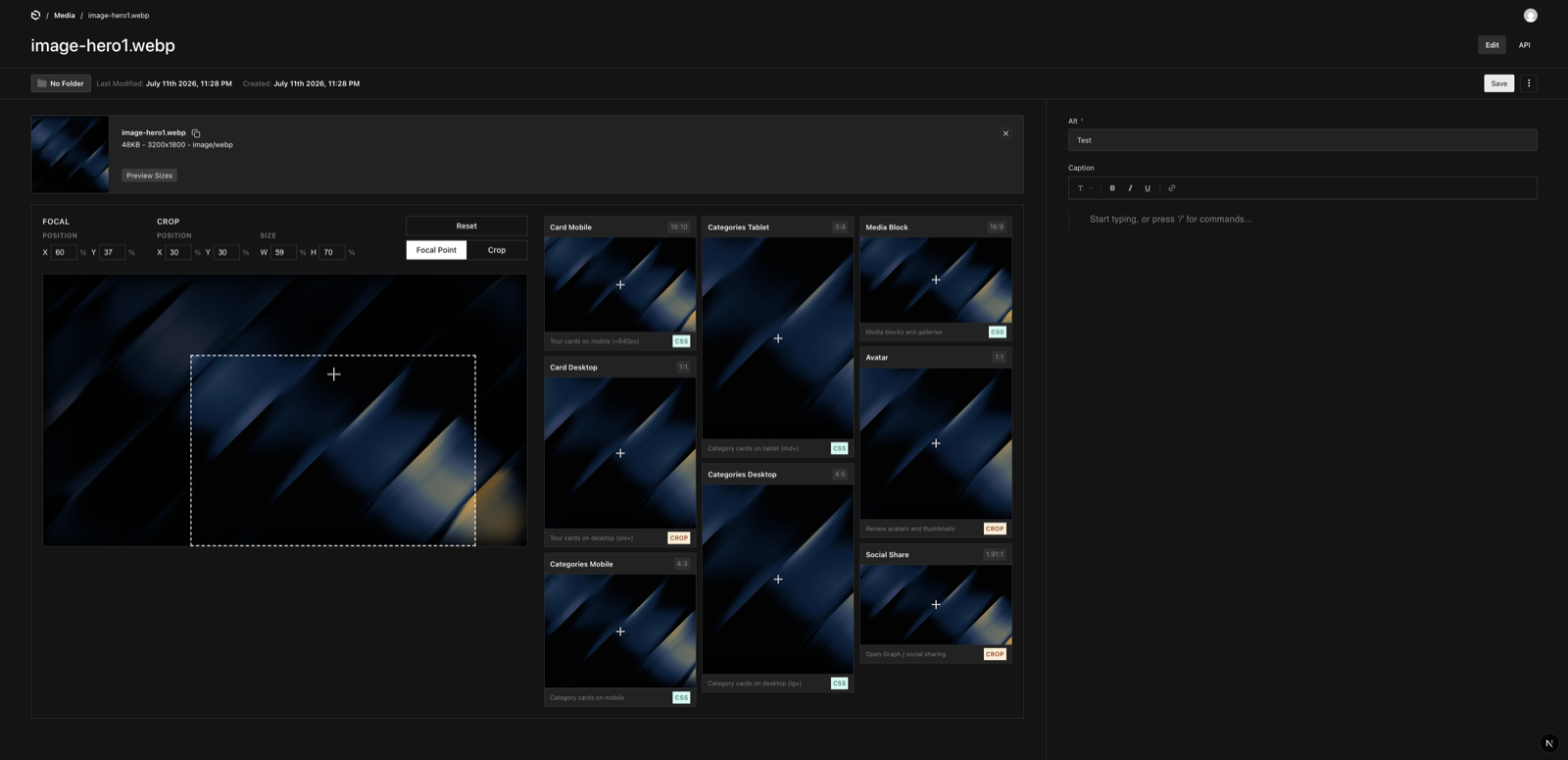
- Live preview grid showing one image across multiple aspect ratios
- Focal point and crop editing with previews updating as you edit
- Configurable aspect ratios with names, usage descriptions and badges
- Six default ratios including square, 4:3, 16:9, portrait and social share
- Works on new uploads before the document is saved
- Can be disabled while keeping the schema field
Use cases
- Check that a photo keeps its subject in a wide hero, square card and portrait mobile layout
- Choose crop and focal point in the media editor using the frontend's real image ratios
- Add aspect ratio previews to several upload collections such as media and avatars
From the author
Payload CMS plugin for image cropping, focal point editing, and live responsive image previews across hero, card, and mobile aspect ratios.
Installation
npm i payload-plugin-aspect-preview6
Stars
0
Forks
0
Open Issues
1 weeks ago
Last Updated
34
Weekly Downloads
v0.2.3
npm Version
84.9 KB
Unpacked Size
1
Dependencies
Trends (last 90 days)
Trends appear after 7 days of data. Daily snapshots have not started yet.
Trends appear after 7 days of data. Daily snapshots have not started yet.
Each point is npm's rolling 7-day download count.
Health Score
Composite score based on GitHub activity, stars, npm downloads, publish recency, dependency count, and package size.
Badge for your README

[](https://payloaddirectory.dev/plugins/1297786125-root)<a href="https://payloaddirectory.dev/plugins/1297786125-root"><img src="https://payloaddirectory.dev/badge/1297786125-root.svg" alt="Payload Directory"></a>README
Payload CMS Image Preview Plugin


See how your photo fits before you save it.
One photo might need to work in a wide hero, a square card, and a portrait mobile layout. Image Preview for Payload CMS lets editors check those formats side by side, adjust the crop or focal point, and watch every preview update as they edit.
payload-plugin-aspect-preview is a Payload CMS plugin for image cropping, focal point editing, and responsive image previews. It adds a live aspect ratio preview grid to upload collections, so editors can check several image formats on one screen in the Payload admin.
Install the plugin · Configure your website's image formats
Help editors choose images that fit
A photo can look great in the media library and lose its subject when it fills a different shape on the website. Editors need to see what stays in the frame while they choose the image's crop and focal point.
- Check several formats at once. Compare hero, card, thumbnail, and mobile aspect ratios in a live preview grid.
- Keep the subject in view. Move the focal point and see how the framing changes across the configured ratios.
- Crop with the result in sight. Draw a crop while watching the previews on the same screen.
- Preview new images before saving. The editor appears as soon as you select an image, including on a new upload.
- Use labels your editors recognize. Configure formats such as “Homepage hero” or “Product card” with descriptions of where they are used.
Developers add the plugin to their upload collections and configure the ratios used by their frontend. Editors get the previews directly in Payload. Six common ratios are included to get started: square, 4:3, 3:2, 16:9, portrait 9:16, and a 1200 × 630 social share format.
Installation
pnpm add payload-plugin-aspect-preview
Quick start
import { buildConfig } from 'payload'
import { aspectPreviewPlugin } from 'payload-plugin-aspect-preview'

export default buildConfig({
  // ...
  plugins: [
    aspectPreviewPlugin({ collections: ['media'] }),
  ],
})
Your media collection must have uploads enabled. To use Payload's image processing and persist focal points, configure sharp in your Payload config, keep focalPoint enabled, and define imageSizes or resizeOptions on the collection. See Payload's upload configuration.
For editors
- Select a new image or open an existing image in the configured upload collection.
- Move the focal point or draw a crop. Compare the live previews for your image formats.
- Save the document when you are happy with the framing. Payload applies the image edits through its upload workflow.
Preview your website's image formats
Give each preview the name of the component where the image will appear. Set its proportions to match your frontend:
aspectPreviewPlugin({
  collections: ['media'],
  aspectRatios: [
    { name: 'Homepage hero', ratio: '21:9', width: 21, height: 9, source: 'css', usage: 'Wide banner at the top of the homepage' },
    { name: 'Product card', ratio: '1:1', width: 1, height: 1, source: 'css', usage: 'Square images in the product grid' },
    { name: 'Mobile feature', ratio: '9:16', width: 9, height: 16, source: 'css', usage: 'Portrait image in the mobile layout' },
  ],
})
The previews simulate image framing using cover sizing and focal positioning. Configure the ratios yourself and use the saved focal point in your frontend's image positioning. The plugin previews the image inside each shape; it does not render your website's components or detect their styles automatically.
Configuration
| Option | Type | Required | Default | Description |
|---|---|---|---|---|
collections | string[] | yes | — | Upload collection slugs to enhance. |
aspectRatios | AspectRatioConfig[] | no | DEFAULT_ASPECT_RATIOS | Ratios shown in the preview grid. |
disabled | boolean | no | false | Keep the schema field but disable the upload override. |
AspectRatioConfig
| Field | Type | Required | Description |
|---|---|---|---|
name | string | yes | Display label (e.g. "Social Share"). |
ratio | string | yes | Display token (e.g. "16:9"). |
width | number | yes | Ratio numerator (or absolute px width). |
height | number | yes | Ratio denominator (or absolute px height). |
source | 'css' | 'crop' | no | Display badge describing the intended use. Does not change image processing. |
usage | string | no | Description shown in the card footer. |
category | string | no | Optional metadata label. Does not group cards in the current UI. |
Examples
Multiple collections
aspectPreviewPlugin({ collections: ['media', 'avatars'] })
Disable without dropping the schema
aspectPreviewPlugin({ collections: ['media'], disabled: true })
How it works
The plugin replaces the configured collections' upload UI with CustomUpload and adds an aspectPreview UI field rendered by FocalPointEditor. Crop and focal point edits flow through Payload's upload-edits context. Payload applies the crop on save and persists focal coordinates as focalX and focalY.
The preview grid uses cover sizing equivalent to object-fit: cover and object-position based on the focal point. When a crop is active, the grid previews that crop region with the focal point measured relative to it.
Frequently asked questions
When should I use this plugin?
payload-plugin-aspect-preview adds live previews of multiple aspect ratios to Payload upload collections. Use it when one image needs to fit several formats, such as hero banners, product cards, thumbnails, and portrait mobile images. Configure aspectPreviewPlugin with your collection slugs and the ratios your frontend uses.
How does it differ from Payload's built-in crop and focal point tools?
Payload already supports image cropping, focal points, and generated image size previews. This plugin brings crop and focal point editing together with a preview grid that updates as you edit. Its preview ratios can represent your frontend's image containers, even when you do not generate separate files for those ratios.
Does it generate a separate crop for each preview?
No. The grid shows how one shared crop and focal point fit different aspect ratios. Adding a preview does not create a new image size. Configure generated image sizes through Payload's imageSizes option.
Is this a full page live preview?
It previews image framing inside the media editor. Use Payload's page live preview for the rest of your layout, text, and components.
Will the previews match my website?
They model cover sizing with focal positioning at your configured aspect ratios. Your frontend must use the corresponding ratios and saved focal coordinates. Different fit modes, additional crops, overlays, or image processing can change the result.
Requirements and compatibility
- Payload and
@payloadcms/ui^3.85.0 - React
^19.0.0 - Node.js
>=20.9.0
The replacement upload UI uses @payloadcms/ui internals (FileDetails, Dropzone, PreviewSizes, …). These are not a stable public API, so a Payload minor upgrade may require a plugin update. Pin your Payload version and test after upgrades.
License
MIT © Sebastian Kolbusz
Topics
Similar plugins

blur data urls
Generates blur placeholder data URLs for images uploaded to Payload media collections
6966/wk83v3

payload media
Search Unsplash, Pexels and Pixabay stock images and videos from Payload upload collections
680/wk8v4

images
On-demand Sharp image transforms with focal points, built-in blur placeholders and a favicons collection
570/wk37v3
payload icons
SVG icon upload collection with automatic optimization and a server component to render icons inline
560/wk18v3
payload images
On-demand Sharp image transforms with focal-point cropping, placeholders and a responsive image component
550/wk18v3

payloadcms plugin image optimizer
Client-side pre-resize, ThumbHash blur placeholders, filename strategies and bulk regeneration for Payload image uploads
480/wk27v3