
Overview
Summary generated from the READMEAdds AI generation to Payload collections and globals through a plugin plus a Lexical editor feature. It composes, proofreads, translates and rephrases text, and generates images and voice for upload fields. Provider keys come from environment variables or plugin config, with support for OpenAI, Anthropic, Google, ElevenLabs and MiniMax. Requires Payload 3.
Features
- Compose, proofread, translate and rephrase text and rich text fields
- Image generation for upload fields using OpenAI models
- Voice generation using ElevenLabs or OpenAI
- Field-level prompts with a prompt editor and seeded default prompts
- Access control for generation and settings, with multi-tenant support
- Custom models, language options and a resolver for reference images
Use cases
- Draft blog post content directly inside the Payload editor from a prompt
- Generate meta descriptions and translated copy for multilingual sites
- Create images or voiceovers for media uploads without leaving the admin
From the author
AI Plugin is a powerful extension for the Payload CMS, integrating advanced AI capabilities to enhance content creation and management.
Installation
npm i @ai-stack/payloadcms558
Stars
67
Forks
1
Open Issues
Today
Last Updated
1.7k
Weekly Downloads
v4.0.1
npm Version
795.6 KB
Unpacked Size
25
Dependencies
Trends (last 90 days)
Trends appear after 7 days of data. Daily snapshots have not started yet.
Trends appear after 7 days of data. Daily snapshots have not started yet.
Each point is npm's rolling 7-day download count.
Health Score
Composite score based on GitHub activity, stars, npm downloads, publish recency, dependency count, and package size.
Badge for your README

[](https://payloaddirectory.dev/plugins/829724738-root)<a href="https://payloaddirectory.dev/plugins/829724738-root"><img src="https://payloaddirectory.dev/badge/829724738-root.svg" alt="Payload Directory"></a>README
Payload AI Plugin
Upgrading to 4.0.0? Read the migration guide. Reference images and extracted prompt attachments now require an explicit storage resolver.
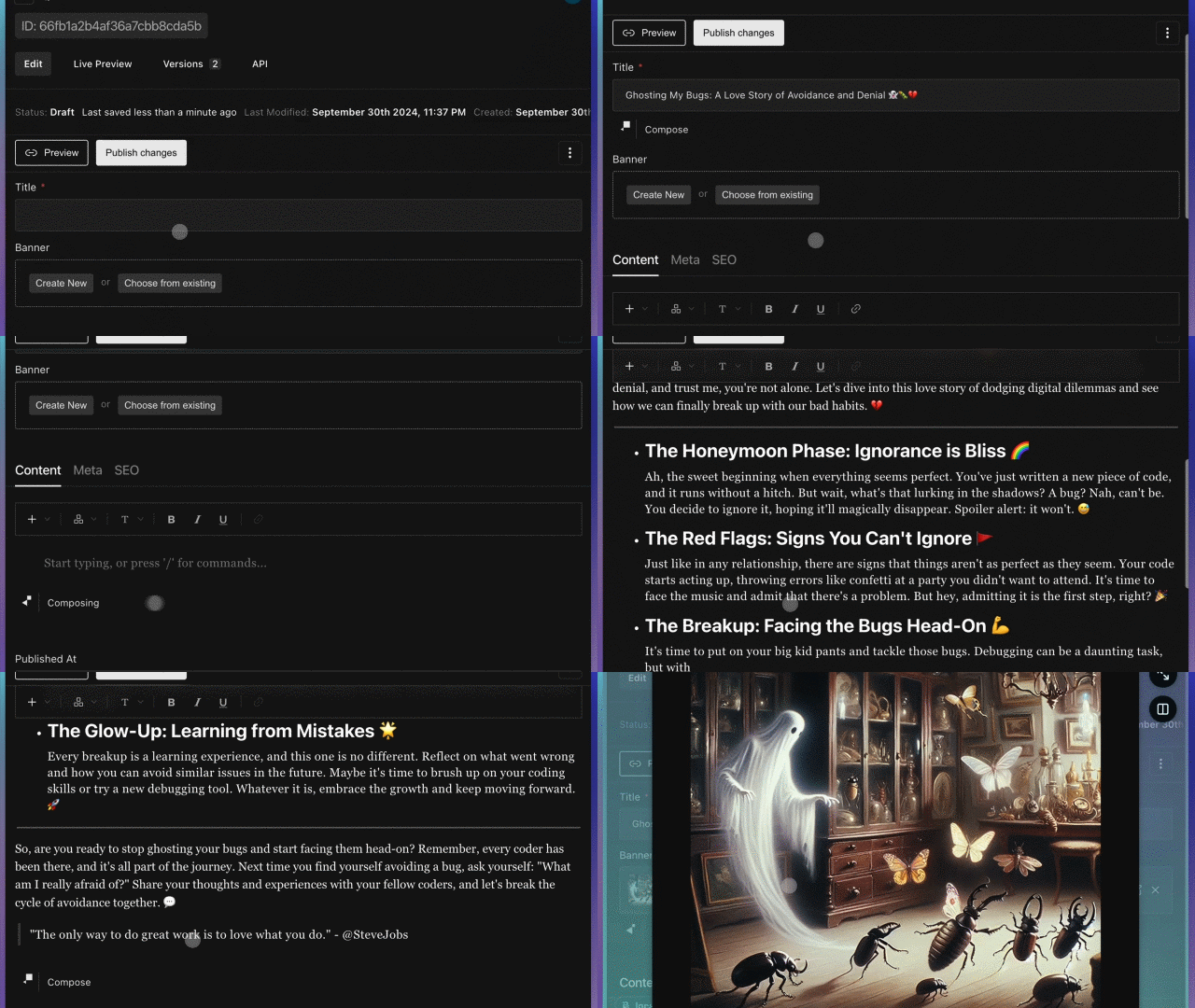
Transform content creation with intelligent automation — your models, your way

🚀 What is this?
The Payload AI Plugin is your secret weapon for turbocharged content creation. It seamlessly integrates cutting-edge AI capabilities directly into Payload CMS, turning your content workflow from tedious to tremendous.
🎥 See It in Action
- Quick Demo - Watch the magic happen
- Extended Demo - Deep dive into all features
- Customization Guide - Make it your own
⚠️ Beta Notice
This plugin is actively evolving. We're constantly shipping improvements and new features. Tested with Payload v3.88.0.
Quick Start Tip: Try it out with Payload's website template for the smoothest experience.
✨ Features
📝 Text & RichText Fields
Content Generation Magic:
- ✅ Compose - Generate content from scratch
- ✅ Proofread - Polish your prose (Beta)
- ✅ Translate - Break language barriers
- ✅ Rephrase - Find better ways to say it (Beta)
- 🔜 Expand - Elaborate on ideas
- 🔜 Summarize - Distill the essence
- 🔜 Simplify - Make complex things clear
🎨 Upload Fields
- 🎙️ Voice Generation - Powered by ElevenLabs & OpenAI
- 🖼️ Image Generation - Powered by OpenAI (DALL-E & GPT-Image-1)
🔧 Power User Features
- 🔌 Bring Your Own Model - Not limited to our defaults
- 🎛️ Field-Level Prompts - Customize AI behavior per field
- 🔐 Access Control - Lock down who can use AI features
- 🧠 Prompt Editor - Fine-tune AI instructions
- 🌍 i18n Support - Works with your multilingual setup
- 🎨 Custom Components - Extend with your own UI
🔜 Coming Soon
- 📊 Document Analyzer
- ✅ Fact Checking
- 🔄 Automated Workflows
- 💡 Editor Suggestions
- 💬 AI Chat Assistant
📦 Installation
pnpm add @ai-stack/payloadcms
That's it! Now let's configure it.
🛠️ Quick Setup
Step 1: Configure the Plugin
Add to src/payload.config.ts:
import { payloadAiPlugin } from '@ai-stack/payloadcms'

export default buildConfig({
  plugins: [
    payloadAiPlugin({
      collections: {
        [Posts.slug]: true,
      },
      debugging: false,
    }),
  ],
  // ... rest of your config
})
Step 2: Enable AI in Your Fields
Add to your RichText fields (e.g., src/collections/Posts/index.ts):
import { PayloadAiPluginLexicalEditorFeature } from '@ai-stack/payloadcms'

fields: [
  {
    name: 'content',
    type: 'richText',
    editor: lexicalEditor({
      features: ({ rootFeatures }) => {
        return [
          HeadingFeature({ enabledHeadingSizes: ['h1', 'h2', 'h3', 'h4'] }),
          // Add this line:
          PayloadAiPluginLexicalEditorFeature(),
        ]
      },
    }),
  },
]
Step 3: Add Your API Keys
Payload AI can read provider credentials in two ways:
- Environment variables.
- Plugin config, useful when credentials are resolved before Payload starts, such as per-instance multi-tenant setups, external secret managers, or tests.
Option A: Environment Variables
Create a .env file in your project root. Add the keys for the providers you want to use:
# Text Generation - Choose your provider(s)
OPENAI_API_KEY=your-openai-api-key           # OpenAI models (GPT-4, etc.)
ANTHROPIC_API_KEY=your-anthropic-api-key     # Claude models
GOOGLE_GENERATIVE_AI_API_KEY=your-google-key # Gemini models
MINIMAX_API_KEY=your-minimax-api-key         # MiniMax M3 / M2.7 models

# Image Generation - Choose your provider(s)
OPENAI_API_KEY=your-openai-api-key           # DALL-E (uses same key as above)
# OPENAI_ORG_ID=your-org-id                  # Required only for GPT-Image-1 model
GOOGLE_GENERATIVE_AI_API_KEY=your-google-key # Imagen (uses same key as above)

# Audio/Voice Generation - Choose your provider(s)
ELEVENLABS_API_KEY=your-elevenlabs-api-key   # ElevenLabs voices
OPENAI_API_KEY=your-openai-api-key           # OpenAI TTS (uses same key as above)

# Optional: Use custom OpenAI-compatible endpoint
# OPENAI_BASE_URL=https://api.openai.com/v1
You only need the keys for the providers you plan to use. Mix and match based on your preferences!
Option B: Plugin Config
If you prefer to resolve secrets yourself at startup, pass them through providers. Config values take priority over environment variables, and omitted values still fall back to .env.
payloadAiPlugin({
  collections: {
    [Posts.slug]: true,
  },
  providers: {
    openai: {
      apiKey: process.env.PAYLOAD_AI_OPENAI_API_KEY,
      baseURL: process.env.PAYLOAD_AI_OPENAI_BASE_URL,
      orgId: process.env.PAYLOAD_AI_OPENAI_ORG_ID,
    },
  },
})
Supported provider keys: openai, anthropic, google, elevenLabs, and minimax.
Important: Restart your server after updating .env or plugin settings!
You may also need to regenerate the import map:
payload generate:importmap
⚙️ Advanced Configuration
🔐 Access Control & Multi-Tenant Setup
Generation requires authentication and permission from access.generate. Source documents,
instructions, and built-in media creation also enforce the caller's collection, field, and
per-document permissions. Configure overrideInstructions.access to restrict who can read
or edit instructions; access.settings controls the settings UI and does not replace these
collection rules. Custom mediaUpload callbacks must enforce their own access checks, as
shown below. Trusted initialization and instruction seeding run separately from user requests.
Reference images and storage
Reference images now require a server-side resolveReferenceImage callback. This is a
breaking change for image editing with sample images or image URLs in prompts, and for
text generation with extractAttachments enabled. Text-to-image
generation without references is unchanged. The plugin does not fetch reference URLs,
forward login credentials, or require Node DNS/HTTP APIs for reference resolution.
For selected sample images, the plugin reloads the media document from
uploadCollectionSlug (default: media) with the caller's Payload read permissions and
depth: 0 before invoking the resolver. Use that document's ID to retrieve bytes from a
fixed storage bucket or other application-controlled store. Do not use a document's URL
or filename as an unchecked network destination or filesystem path. Fields hidden by access
control will not be available to the resolver.
The resolver receives { source, request, signal, maxBytes } and must return a PNG, JPEG,
or WebP Blob. source.kind is media (with collection and the authorized document)
or url (with an untrusted URL extracted from a prompt). Reject URL sources unless your
application can map them to an explicitly approved storage object and authorize access.
Merely checking that a URL uses HTTPS is insufficient. Prefer storage SDKs with a fixed
bucket/account over arbitrary URL fetching; do not forward request cookies or tokens.
For example, connect your application's storage reader:
resolveReferenceImage: async ({ source, signal, maxBytes }) => {
  if (source.kind !== 'media') {
    throw new Error('Only selected media can be used as reference images.')
  }
  // Application-owned helper: map this authorized ID to your fixed bucket/object key.
  // Enforce maxBytes during loading and honor signal to cancel outstanding work.
  return readReferenceBlobFromStorage({
    collection: source.collection,
    id: source.document.id,
    signal,
    maxBytes,
  })
},
readReferenceBlobFromStorage above is an application helper, not a Payload or plugin API.
Its implementation depends on your storage adapter. The plugin validates the returned Blob,
rejects empty files or files over 20 MiB, and stops waiting after 30 seconds. The resolver
must enforce the limit while loading to avoid buffering oversized objects; cancellation is
cooperative and requires honoring signal. MIME checks do not verify image file contents.
Built-in text models resolve extracted attachments through the same callback and pass bytes
to the AI SDK. Automatic SDK attachment downloads are disabled. URLs remain ordinary text
when attachment extraction is disabled.
Custom generation models remain responsible for any network requests they make themselves.
import { payloadAiPlugin } from '@ai-stack/payloadcms'

export default buildConfig({
  plugins: [
    payloadAiPlugin({
      collections: {
        [Posts.slug]: true,
      },

      // Enable AI for globals too
      globals: {
        [Home.slug]: true,
      },

      // Development helpers
      debugging: false,
      disableSponsorMessage: false,
      generatePromptOnInit: process.env.NODE_ENV !== 'production',

      // Specify media collection for GPT-Image-1
      uploadCollectionSlug: 'media',

      // Lock down AI features
      access: {
        generate: ({ req }) => req.user?.role === 'admin',
        settings: ({ req }) => req.user?.role === 'admin',
      },

      // Customize language options
      options: {
        enabledLanguages: ['en-US', 'zh-SG', 'zh-CN', 'en'],
      },

      // Reference additional fields in prompts
      promptFields: [
        {
          name: 'url',
          collections: ['images'],
        },
        {
          name: 'markdown',
          async getter(doc, { collection }) {
            return docToMarkdown(collection, doc)
          },
        },
      ],

      // Control initial prompt generation
      seedPrompts: ({ path }) => {
        if (path.endsWith('.meta.description')) {
          return {
            data: {
              prompt: 'Generate SEO-friendly meta description: {{markdown}}',
            },
          }
        }
        if (path.endsWith('.slug')) return false // Disable for slugs
        return undefined // Use defaults
      },

      // Custom media upload (useful for multi-tenant)
      mediaUpload: async (result, { request, collection }) => {
        return request.payload.create({
          collection,
          data: result.data,
          file: result.file,
          overrideAccess: false,
          req: request,
        })
      },
    }),
  ],
})
🎨 Custom Components & Fields
Custom fields don't automatically inherit AI capabilities. If your AI-enabled fields don't show Compose settings, manually add this component path:
@ai-stack/payloadcms/fields#ComposeField
Debug Tip: Enable debugging: true in your plugin config to see which fields have AI enabled.
📚 Documentation
Need more details? Check out the Complete Setup Guide for:
- Custom model configuration
- Advanced prompt engineering
- Field-specific customization
- Troubleshooting tips
🤝 Support This Project
Built with ❤️ in my free time. If this plugin saves you hours of work, consider fueling future development!
Buy Me A CoffeeEvery coffee keeps the AI models running and new features shipping. Thank you! 🙏
👥 Contributing
We love contributors! Whether you're fixing typos, suggesting features, or building new capabilities, all contributions are welcome.
Ways to Contribute
- 🐛 Report bugs
- 💡 Suggest features
- 📖 Improve documentation
- 🔧 Submit pull requests
Join the conversation on Payload's Discord and let's build something amazing together!
Local Development
Want to hack on the plugin? Here's how:
Prerequisites
- Node.js (version in
.nvmrc) - pnpm
- Database connection (Postgres or MongoDB)
- Optional: AI provider API keys
Setup
# 1. Install dependencies
pnpm install

# 2. Set up environment
cp dev/.env.example dev/.env
# Edit dev/.env with your DATABASE_URI, PAYLOAD_SECRET, and API keys

# 3. Start development server
pnpm dev
# Admin UI available at http://localhost:3000

# 4. Generate types/importmap if needed
pnpm generate:importmap
pnpm generate:types
Development Workflow
- Plugin source:
src/ - Test app:
dev/ - Edit files in
src/and refresh to see changes
Testing & Quality
pnpm test                    # Run all tests
pnpm lint                    # ESLint
pnpm prettier --write .      # Format code
pnpm build                   # Build plugin
Test in Another Project
pnpm pack
# In your other project:
pnpm add /path/to/ai-plugin-*.tgz
Project Structure
├── src/              # Plugin source code
├── dev/              # Test Payload app
│   ├── int.spec.ts   # Integration tests
│   └── e2e.spec.ts   # E2E tests
└── README.md         # You are here!
Made with ❤️ and ☕ by the community
Topics
Similar plugins

payload ai manager
Generate product titles, descriptions, attributes and translations in chosen fields with Claude, ChatGPT, Gemini or Kimi
585/wk1v3

payload ai agent
Chat assistant in the Payload admin that runs panel actions from natural language via LLM tool calling
470/wk1v3

payload ai plugin
Admin dashboard AI assistant with multi-provider support and signed, access-controlled action proposals
460/wk4v3

payload agent
Chat agent that queries and manages Payload content from Telegram, Slack, WhatsApp and other messaging platforms
520/wk17v3

payload plugin translator
Translate localized Payload content with an AI provider from document, collection or field controls in the admin
550/wk29v3

payload ai admin
Chat panel in the Payload admin where an AI reads and edits content within a config-defined allowlist
450/wk3v3