
Overview
Summary generated from the READMEAdds a colorPickerField helper that you place in a collection's fields array to give editors a color selection control in the admin panel. It accepts the usual field options such as name, label, required and admin settings. Colors are stored in HEX format. Targets Payload 3.
Features
- Color picker field usable in any collection
- Supports HEX color format
- Accepts standard field options like required, label and admin position
- Includes a self-seeding demo project for development
Use cases
- Let editors choose a brand or theme color for each page
- Add an accent color selector to a sidebar field in a collection
From the author
The Payload Color Picker that enables an easy color selection field for your Payload projects.
Installation
npm i @innovixx/payload-color-picker-field41
Stars
5
Forks
7
Open Issues
6 months ago
Last Updated
0
Weekly Downloads
v2.0.4
npm Version
475.6 KB
Unpacked Size
1
Dependencies
Trends (last 90 days)
Trends appear after 7 days of data. Daily snapshots have not started yet.
Trends appear after 7 days of data. Daily snapshots have not started yet.
Each point is npm's rolling 7-day download count.
Health Score
Composite score based on GitHub activity, stars, npm downloads, publish recency, dependency count, and package size.
Badge for your README

[](https://payloaddirectory.dev/plugins/666027944-root)<a href="https://payloaddirectory.dev/plugins/666027944-root"><img src="https://payloaddirectory.dev/badge/666027944-root.svg" alt="Payload Directory"></a>README
Payload Color Picker Field

A field for Payload that enables an easy color selection field for your Payload projects.
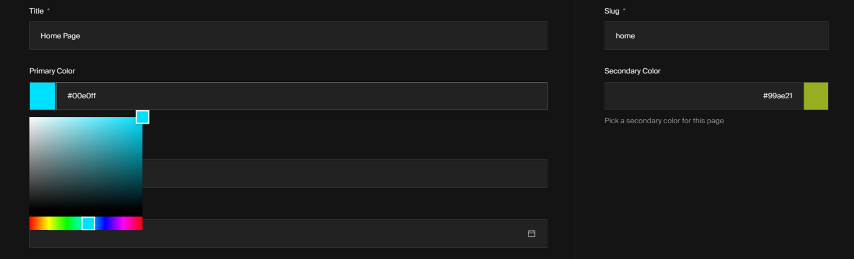
Core features:
- Add a color picker field to your Payload collections
- Supports HEX color formats
Installation
  yarn add @innovixx/payload-color-picker-field
  # OR
  npm i @innovixx/payload-color-picker-field
Basic Usage
import type { CollectionConfig } from 'payload/types'

import { colorPickerField } from '@innovixx/payload-color-picker-field'

const Pages: CollectionConfig = {
  slug: 'pages',
  admin: {
    useAsTitle: 'title',
  },
  fields: [
    colorPickerField({
      name: 'primaryColor',
      label: 'Primary Color',
      required: true,
      admin: {
        position: 'sidebar',
        description: 'Choose a color for this page',
      },
    }),
  ],
}

export default Pages
Development
To actively develop or debug this plugin you can either work directly within the demo directory of this repo, or link your own project.
-
Internal Demo
This repo includes a fully working, self-seeding instance of Payload that installs the plugin directly from the source code. This is the easiest way to get started. To spin up this demo, follow these steps:
- First clone the repo
- Then,
cd YOUR_PLUGIN_REPO && yarn && cd demo && yarn && yarn cleanDev - Now open
http://localhost:3000/adminin your browser - Enter username
[email protected]and passwordPa$$w0rd!
That's it! Changes made in
./srcwill be reflected in your demo. Keep in mind that the demo database is automatically seeded on every startup, any changes you make to the data get destroyed each time you reboot the app.
Topics
Tags
Similar plugins

payload better fields plugin
Enhanced admin field types for Payload such as slug, combo, number, pattern, range, telephone, colour and date
531.4k/wk294v3

payload color picker
Color picker field for the Payload admin that stores the selected color as a string
420/wk1v3

encrypted fields
Encrypt field values at rest in the database with a drop-in encryptedField helper
6955/wk83v3

payload icon picker
Icon picker field with searchable dropdown or drawer grid that stores the icon name and raw SVG
690/wk52v3

payload phone number plugin
Phone number field with country selection, formatting and validation powered by libphonenumber-js
64114/wk16v3

payload plugin json form builder
Edit a Payload JSON field as real admin fields using a builder inside the admin panel
580/wk29v3