
plugin emails
Transactional emails defined in code, with copy editors can change, preview and test-send from the admin.
EmailOverview
Summary generated from the READMELets developers declare each transactional email in TypeScript while editors change the subject and body in the Payload admin. The plugin creates one document per email, renders React Email templates with Lexical copy, and exposes a typed send call on the payload object. Requires Payload 3.88 or newer and the Lexical editor.
Features
- Typed payload.emails.send, render, sync and orphans API generated through generate:types
- One admin document per email with drafts, Lexical body, Button block and an enabled switch
- Variable validation that rejects unknown tokens in the copy
- Preview and test-send tab with sample data, locale, and desktop or mobile views
- Email Settings global and opt-in Email Log collection with retention
- Optional delivery through Payload Jobs, plus hooks such as shouldSend and afterSend
Use cases
- Let non-developers edit welcome or password reset email copy without a deploy
- Send type-checked transactional emails from hooks and server code
- Keep branded email design in code while auditing every send in a log
From the author
Code-defined transactional emails for Payload CMS with admin-editable copy, typed send API, preview and test-send.
Installation
npm i @payload-solutions/plugin-emails2
Stars
0
Forks
0
Open Issues
Today
Last Updated
2
Weekly Downloads
v0.1.1
npm Version
507.2 KB
Unpacked Size
2
Dependencies
Trends (last 90 days)
Trends appear after 7 days of data. Daily snapshots have not started yet.
Shared by 5 plugins in mpresecan/payload-solutions.
Trends appear after 7 days of data. Daily snapshots have not started yet.
Each point is npm's rolling 7-day download count.
Health Score
Composite score based on GitHub activity, stars, npm downloads, publish recency, dependency count, and package size.
Badge for your README

[](https://payloaddirectory.dev/plugins/1356812914-plugin-emails)<a href="https://payloaddirectory.dev/plugins/1356812914-plugin-emails"><img src="https://payloaddirectory.dev/badge/1356812914-plugin-emails.svg" alt="Payload Directory"></a>README
@payload-solutions/plugin-emails
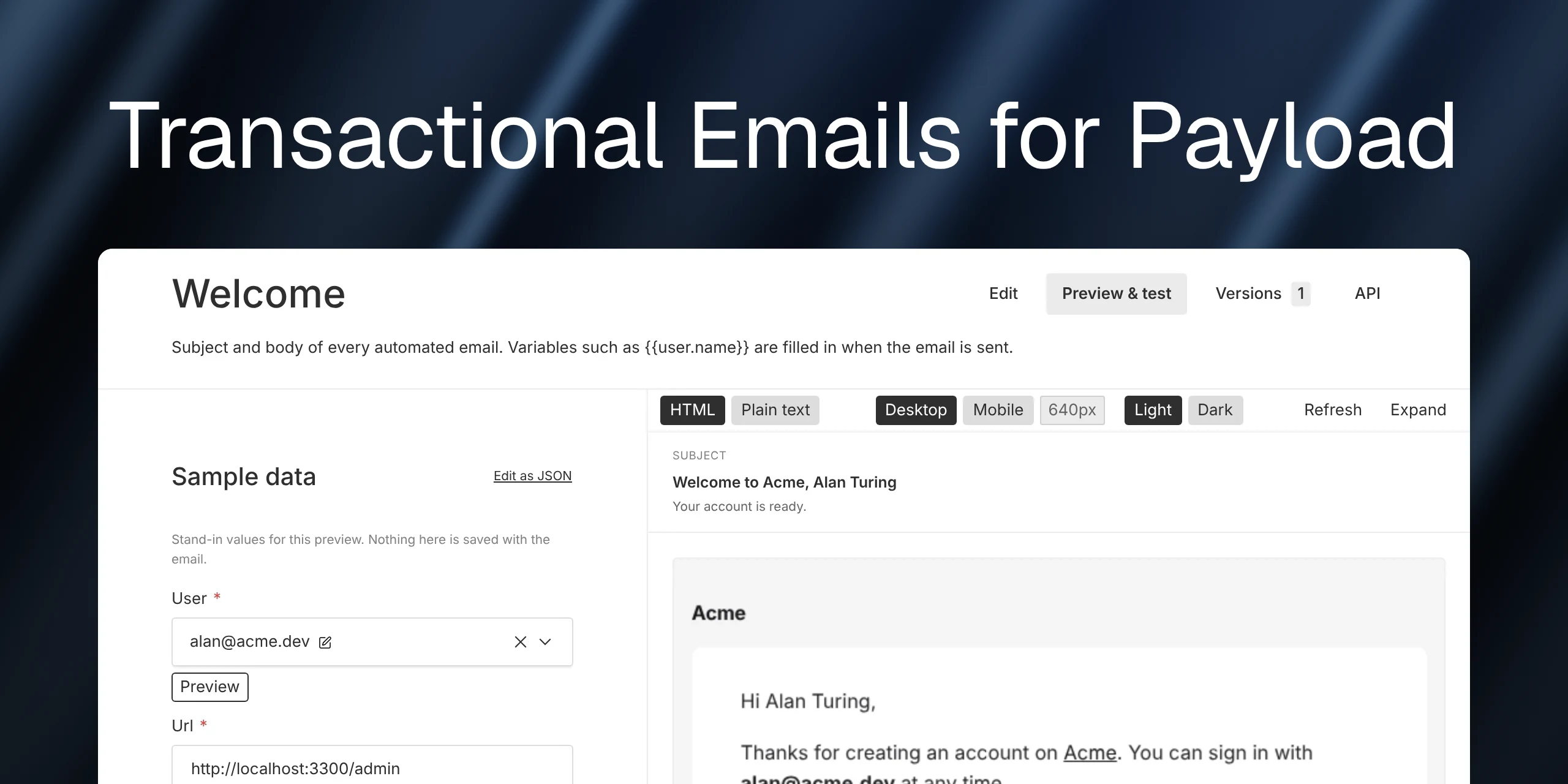
Code-defined transactional emails for Payload CMS. You declare each email once in TypeScript — its key, the input callers pass, the variables editors may use, and default copy. The plugin keeps one document per email in the admin, where non-developers edit the subject and body, preview it with sample data, send themselves a test, and switch non-critical emails off. Application code sends with one typed call.
await payload.emails.send('welcome', { input: { user, url } })
Ported from the Klick17 WordPress K7P_Email framework and rebuilt on Payload primitives: collections, versions, localization, Lexical, the email adapter, jobs, and generate:types.
Screenshots

Editors change the copy; the sidebar lists the variables this email may use. |

One document per email declared in code. |

Email Settings — the Template tab previews the design that lives in code. |

Every send, test sends included. |
More in the documentation: https://payload.solutions/docs/plugins/payload-emails
Install
pnpm add @payload-solutions/plugin-emails
Peer dependencies: payload ^3.88, @payloadcms/richtext-lexical, @payloadcms/ui, react, react-dom. Rendering uses @react-email/components and @react-email/render, which ship with the plugin.
1. Declare an email
// src/emails/welcome.ts
import { defineEmail, populate } from '@payload-solutions/plugin-emails'

export const welcome = defineEmail({
  slug: 'welcome',
  label: 'Welcome',
  description: 'Sent once after a user creates an account.',
  trigger: 'users afterChange hook (operation: create)',
  group: 'Auth',
  audience: 'user',

  // What callers pass. Payload fields → a typed `input` in payload-types.ts.
  inputSchema: [
    { name: 'user', type: 'relationship', relationTo: 'users', required: true },
    { name: 'url', type: 'text', required: true },
  ],

  // What editors may write in the copy.
  variables: {
    'user.name': { description: 'Display name', example: 'Ada Lovelace' },
    'user.email': { example: '[email protected]' },
    url: { type: 'url', example: 'https://app.example.com/dashboard' },
  },

  // input → variables. Typed both ways.
  resolve: async ({ input, payload }) => {
    const user = await populate(payload, 'users', input.user) // id or document
    return { 'user.name': user.name || user.email, 'user.email': user.email, url: input.url }
  },

  to: ({ variables }) => variables['user.email'],

  // Seeded into the document on first start; also the fallback if the document is missing.
  defaults: {
    subject: 'Welcome to {{site.name}}, {{user.name}}',
    preheader: 'Your account is ready.',
    body: `
Hi {{user.name}},

Thanks for creating an account on [{{site.name}}]({{site.url}}).

<Button label="Open your dashboard" url="{{url}}" />
`,
  },

  sample: { url: 'https://app.example.com/dashboard', user: 'some-user-id' },
})
2. Register the plugin
// payload.config.ts
import { emailsPlugin } from '@payload-solutions/plugin-emails'
import { welcome, passwordReset } from './emails'

plugins: [
  emailsPlugin({
    emails: [welcome, passwordReset],
    settings: { adminRecipients: ['[email protected]'], mediaCollection: 'media' },
    log: { enabled: true, retentionDays: 90 },
  }),
]
Then payload generate:types and payload generate:importmap.
3. Send
const result = await payload.emails.send('welcome', {
  input: { user, url },     // typed; unknown keys and missing fields are compile errors
  locale: req.locale,       // optional
  to: '[email protected]', // optional
  req,                      // optional: transaction / locale inheritance
})
// { status: 'sent' | 'skipped' | 'queued' | 'failed', reason?, messageId?, logId? }

await payload.emails.render('welcome', { input })  // { subject, html, text, to, variables }
await payload.emails.sync()                        // re-seed / refresh; runs on init
await payload.emails.orphans()                     // documents no longer defined in code
send returns a status for expected outcomes (disabled, no recipient, adapter failure) and throws only for programmer errors (unknown slug, invalid input).
Templates
The design lives in code, as a React Email component. It owns the branding — colours, spacing, the wordmark, the shell — so every email looks the same and no editor can drift it.
import { Body, Container, Head, Html, Section, Text } from '@react-email/components'
import type { EmailTemplate } from '@payload-solutions/plugin-emails'

export const BrandTemplate: EmailTemplate = ({ children, footer, settings, subject }) => (
  <Html>
    <Head />
    <Body style={{ backgroundColor: '#0b0b0c', fontFamily: 'Inter, sans-serif' }}>
      <Container style={{ maxWidth: 600 }}>
        <Section style={{ backgroundColor: '#fff', borderRadius: 12, padding: 40 }}>{children}</Section>
        {footer}
      </Container>
    </Body>
  </Html>
)

// Make the editors' copy match the template.
BrandTemplate.styles = { text: { color: '#1a1a1a', fontSize: '15px' }, button: { backgroundColor: '#ff5a1f' } }
emailsPlugin({ emails, templates: { default: BrandTemplate } })
children is the editor's copy, already rendered to React Email elements (paragraphs, headings, lists, links, buttons) with {{variables}} filled in. A definition can pick a different one with template: 'receipt'. Both the HTML and the plain-text part come from the same tree, so they never disagree.
What you get in the admin
- Transactional Emails collection — one document per definition, with drafts. Editors change subject, preheader, body (Lexical with a Button block), recipients and the
enabledswitch. Unknown{{tokens}}— and tokens broken up by bold/italic — fail validation with the list of allowed variables. - Sidebar variable chips (click to copy) and an About this email panel with the key, trigger, audience and an orphan badge.
- Preview & test tab — a form built from the email's
inputSchema(relationships offer real documents to pick from; there's a JSON escape hatch), the rendered email in a sandboxed iframe (desktop/mobile, HTML/plain text, draft/published, locale), the resolved recipients and variables, and a test send to any address. - Email Settings global — sender and reply-to, admin recipients, site name and URL, the footer, and a Template tab that previews the active template and points editors at their developers for design changes.
- Email Log collection (opt-in) — every send with status, recipient and reason.
How code and database stay in sync
Code owns metadata (label, description, trigger, group, audience, required, the variable manifest); the database owns copy. On init the plugin creates a published document for every new definition from defaults, refreshes stored metadata whose hash changed, renames documents listed in previousSlugs, and flags documents whose key is gone as orphans. Copy is never overwritten by a deploy, and refreshes never create versions or drafts.
Typing
The plugin adds a typescript.schema hook, so payload generate:types emits:
export interface Config {
  emails: { welcome: EmailWelcome; 'password-reset': EmailPasswordReset }
}
export interface EmailWelcome {
  input: { user: number | User; url: string }
  variables: { 'user.name': string; 'user.email': string; url: string }
}
payload.emails.send and defineEmail derive from that, the same way Payload types jobs tasks. Before the first generation everything falls back to permissive types, so a fresh project still compiles.
Options
| Option | Default | |
|---|---|---|
emails | — | Required. The definitions. |
collectionSlug | transactional-emails | |
settings | {} | false to skip the global; adminRecipients, mediaCollection, slug. |
log | off | { enabled, slug, retentionDays, storeHtml, storeVariables, includeTests }. |
queue | off | { enabled, default, queue, retries } — deliver through Payload Jobs. |
templates | { default: DefaultTemplate } | React Email components; pick per definition with template. |
editor | email-safe Lexical | Replace the editor used for body. |
globalVariables | site/support/year | Variables available in every email. |
versions | { drafts: true } | |
seed | always | development or false. |
validateInput | development | always / never. |
access | admin users | read / update / delete. |
hooks | — | shouldSend, beforeRender, beforeSend, afterSend. |
Development
pnpm install
pnpm dev              # dev app on http://localhost:3300/admin ([email protected] / test)
pnpm test:unit        # interpolation, definitions, validation
pnpm test:int         # real Payload + SQLite: seeding, sending, endpoints, orphans
pnpm build            # dist/ via tsc + swc
pnpm generate:types   # regenerate dev/payload-types.ts
The dev app (dev/) registers three example emails in dev/emails.ts and logs every send to stdout through dev/helpers/testEmailAdapter.ts. Creating a user in the admin fires the welcome and admin-notification emails.
MIT © Payload Solutions. Not affiliated with Payload CMS.
Topics
Similar plugins

plugin resend broadcasts
Newsletters from the Payload admin: any collection becomes subscribers, then compose, test and send via Resend.
630/wk2v3

payload usesend
Email adapter that sends Payload emails through the open-source, self-hostable useSend API
83457/wk8v3

payload order emails
Transactional emails on Payload order creation and status changes, with overridable templates
570/wk1v3

eusend payload
Payload email adapter that sends transactional email through the eusend REST API from the EU
543/wk1v3 v4

payload plugin
Email advocacy and contact management with broadcasts, forms and letter campaigns inside the Payload admin
515/wk1v3

payload email ahasend
Email adapter that sends Payload CMS emails through the AhaSend API, with support for API v1 and v2
371/wk1v3