
Overview
Summary generated from the READMEAdds a compact admin badge that displays the status of the latest Cloudflare Workers Build. It registers a server endpoint that queries the Cloudflare API, so credentials stay on the server. It is display-only and does not trigger deploys or add schema. Requires Cloudflare account ID, API token and a Worker tag or name in environment variables.
Features
- Admin action badge with states such as queued, building, live, failed, canceled and error
- Server endpoint that fetches build status without exposing Cloudflare secrets to the browser
- Polls every 10 seconds only while a build is queued or running
- Watches every 2 seconds for up to 30 seconds after a Payload save
- Select the Worker by tag or by name, resolved server-side
- Configurable endpoint path, component path, poll interval and disable switch
Use cases
- Check whether an Astro static frontend deployed through Cloudflare Workers Builds has finished after saving content
- Give editors in a headless Payload setup visible feedback on site rebuild progress
From the author
Cloudflare Worker build status badge for Payload admin
Installation
npm i payload-cloudflare-build-status0
Stars
0
Forks
0
Open Issues
4 months ago
Last Updated
9
Weekly Downloads
v1.1.0
npm Version
74.7 KB
Unpacked Size
0
Dependencies
Trends (last 90 days)
Trends appear after 7 days of data. Collecting since Oct 22 — 2 daily snapshots so far.
Trends appear after 7 days of data. Collecting since Oct 22 — 2 daily snapshots so far.
Each point is npm's rolling 7-day download count.
Health Score
Composite score based on GitHub activity, stars, npm downloads, publish recency, dependency count, and package size.
Badge for your README

[](https://payloaddirectory.dev/plugins/1220893268-root)<a href="https://payloaddirectory.dev/plugins/1220893268-root"><img src="https://payloaddirectory.dev/badge/1220893268-root.svg" alt="Payload Directory"></a>README
Payload Cloudflare Build Status
Payload admin plugin that shows the latest Cloudflare Workers Build status as a compact admin badge.
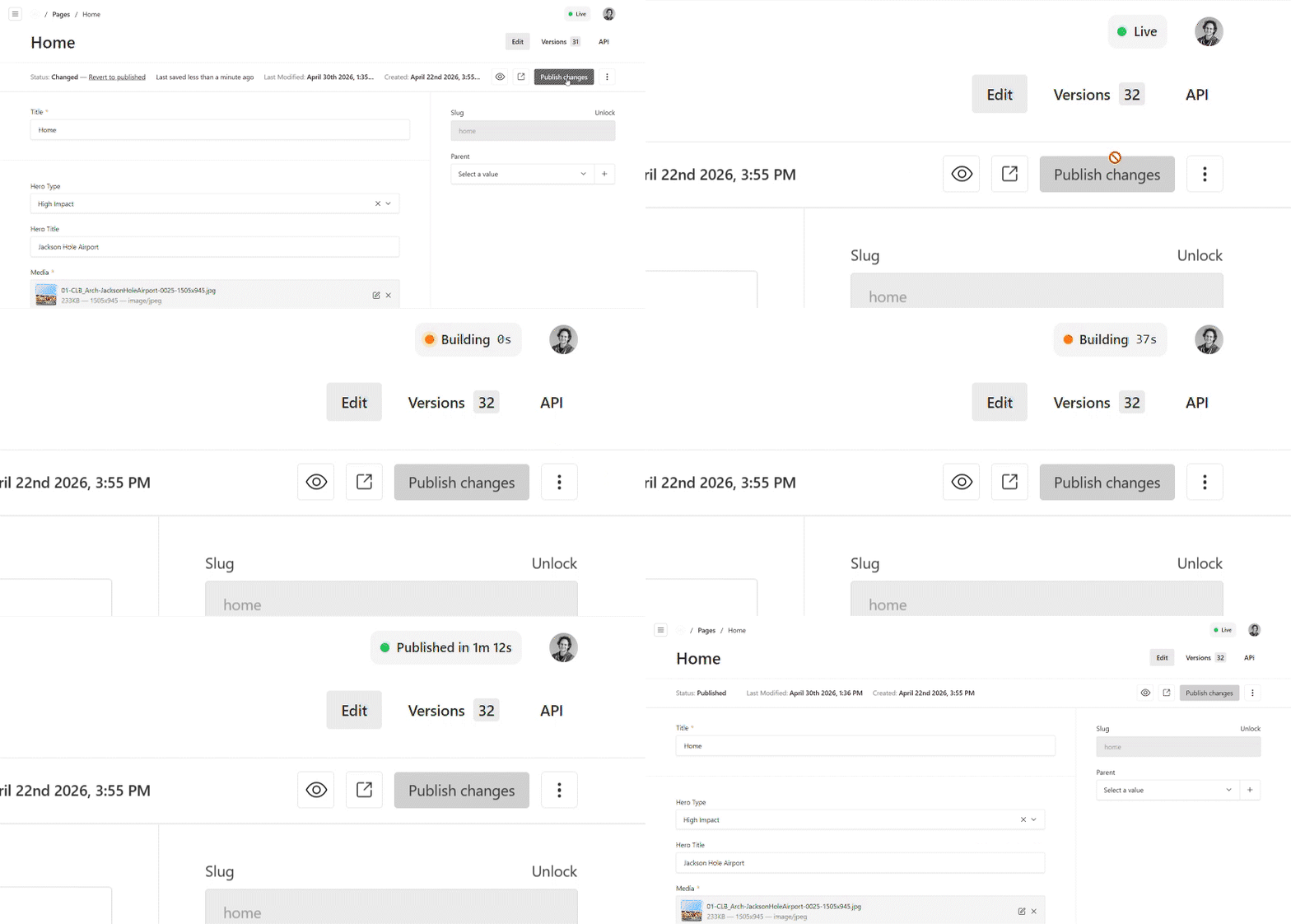
Built for headless Payload setups, especially Payload plus an Astro SSG frontend deployed through Cloudflare Workers Builds. It is display-only: it does not trigger deploys, add schema, or expose Cloudflare secrets to the browser.
Tested with Payload 3.84 and Next.js 16.2.
Install
pnpm add payload-cloudflare-build-status
Quick Setup
Add cloudflareBuildStatusPlugin() to your Payload config file src/payload.config.ts:
// src/payload.config.ts
import { buildConfig } from 'payload'
import { cloudflareBuildStatusPlugin } from 'payload-cloudflare-build-status'

export default buildConfig({
  plugins: [
    cloudflareBuildStatusPlugin(),
  ],
})
Add the Cloudflare credentials to your server environment file, usually .env:
CLOUDFLARE_ACCOUNT_ID=your-account-id
CLOUDFLARE_API_TOKEN=your-api-token
CLOUDFLARE_WORKER_TAG=your-worker-tag
If you prefer selecting the Worker by name instead of tag, use CLOUDFLARE_WORKER_NAME instead of CLOUDFLARE_WORKER_TAG.
If needed, refresh the generated Payload admin import map file, usually app/(payload)/admin/importMap.js:
pnpm payload generate:importmap
Environment
Required server-side env vars:
CLOUDFLARE_ACCOUNT_IDCLOUDFLARE_API_TOKEN
Worker selector:
CLOUDFLARE_WORKER_TAGis preferredCLOUDFLARE_WORKER_NAMEcan be used instead; the plugin resolves it to the immutable Worker tag on the server
Optional live-site link:
PUBLIC_SITE_URL
The Cloudflare token needs Workers Builds Configuration edit access. If using CLOUDFLARE_WORKER_NAME or fetching the tag manually, it also needs Workers Scripts read access.
Get the Worker Tag
Cloudflare's Builds API calls this value external_script_id. The Workers Scripts API returns it as tag.
Use a token with Workers Scripts read access, then list your Workers.
PowerShell:
$accountId = "your-account-id"
$token = "your-api-token"

$response = Invoke-RestMethod `
  -Uri "https://api.cloudflare.com/client/v4/accounts/$accountId/workers/scripts" `
  -Headers @{ Authorization = "Bearer $token" }

$response.result | ForEach-Object {
  [pscustomobject]@{
    name = $_.id
    tag = $_.tag
  }
}
Bash:
curl -s "https://api.cloudflare.com/client/v4/accounts/$CLOUDFLARE_ACCOUNT_ID/workers/scripts" \
  --header "Authorization: Bearer $CLOUDFLARE_API_TOKEN" \
  | jq '.result[] | {name: .id, tag: .tag}'
Copy the tag for your Worker into .env:
CLOUDFLARE_WORKER_TAG=1a2b3c4d5e6f7a8b9c0d1e2f3a4b5c6d
After CLOUDFLARE_WORKER_TAG is set, the plugin does not need Workers Scripts read access for the Worker-name lookup.
What It Adds
- a Payload admin action badge
GET /api/cloudflare-build-status- status labels for loading, building, queued, live, failed, canceled, ready, config missing, and error
- one initial status fetch when the admin loads
- polling every 10 seconds only while a Worker build is queued or running
- short post-save watching: every 2 seconds for up to 30 seconds after a Payload save
Configuration
// src/payload.config.ts
cloudflareBuildStatusPlugin({
  endpointPath: '/cloudflare-build-status',
  componentPath: 'payload-cloudflare-build-status/client#CloudflareBuildStatus',
  pollIntervalSeconds: 10,
  disabled: false,
})
Options:
endpointPath: Payload API endpoint path registered by the plugin.componentPath: Payload admin import-map path for the badge component.pollIntervalSeconds: polling interval, in seconds, while a Cloudflare build is queued or running.disabled: disables the plugin without changing the rest of your Payload config.
Development
For local plugin development, use the internal dev/ app:
pnpm install
pnpm dev
pnpm generate:types
pnpm generate:importmap
Plugin source is in src/. The internal test app is in dev/, with its Payload config at dev/payload.config.ts.
The dev app maps payload-cloudflare-build-status/* package imports back to ../src/* in dev/tsconfig.json, so the generated admin import map works before the package has been built to dist/.
For checks:
pnpm test:int
pnpm lint
Test in Another Project
For release validation, test the packed artifact instead of a live source-folder dependency:
pnpm build
pnpm pack
Then in the external consumer app:
pnpm add /path/payload-cloudflare-build-status-*.tgz
Similar plugins

payload theme
shadcn-style admin theme with dashboard, command palette, grouped sidebar and live customizer
69909/wk26v3

compass payload plugin
Checks a site for brand drift against an ontology and a simulated Figma agent, with admin and on-site flags
250v3

payload plugin presets
Save block configurations as reusable presets and apply them from an enhanced blocks drawer in the admin
7810.5k/wk29v3

payload nav studio
Replaces the Payload admin sidebar with a drag and drop navigation that each user can customize
7366/wk13v3

theme management
Theme presets, live preview and accessibility audit for restyling a Next.js site from the Payload admin
7339/wk9v3

payload puck
Integrates the Puck drag-and-drop visual page builder into the Payload admin for building pages
721.0k/wk108v3