
Overview
Summary generated from the READMEAdds MongoDB backup and restore to Payload v3 apps, with a Backups dashboard in the admin panel. Archives are stored in Vercel Blob or AWS S3 and S3-compatible stores such as R2 and MinIO, so no extra database is needed. It requires the MongoDB adapter, Next.js 15+ and Node 20.9+, and supports scheduled backups via an authenticated cron endpoint.
Features
- Scheduled cron backups with configurable retention and automatic pruning of older archives
- Manual backups with per-collection selection and optional media bundled into a tar.gz archive
- Restore with collection filters, merge upsert mode and a per-collection preview
- Dashboard shown after the admin dashboard to list, download, restore and delete backups
- Storage in Vercel Blob or S3-compatible buckets, with self-describing backup names
- Role-based access control for the dashboard and a programmatic API for backups
Use cases
- Schedule nightly MongoDB backups for a production Payload site and keep the latest archives
- Create a manual checkpoint before running a migration and restore it if something fails
- Clone production data into a staging environment using selective restore
From the author
Payload CMS plugin for MongoDB backup and recovery via Vercel Blob or AWS S3 (S3-compatible: R2, MinIO)
Installation
npm i @trieb.work/payload-plugin-backup-mongodb5
Stars
0
Forks
1
Open Issues
1 months ago
Last Updated
0
Weekly Downloads
v0.2.0
npm Version
875.6 KB
Unpacked Size
4
Dependencies
Trends (last 90 days)
Trends appear after 7 days of data. Daily snapshots have not started yet.
Trends appear after 7 days of data. Daily snapshots have not started yet.
Each point is npm's rolling 7-day download count.
Health Score
Composite score based on GitHub activity, stars, npm downloads, publish recency, dependency count, and package size.
Badge for your README

[](https://payloaddirectory.dev/plugins/1219138434-root)<a href="https://payloaddirectory.dev/plugins/1219138434-root"><img src="https://payloaddirectory.dev/badge/1219138434-root.svg" alt="Payload Directory"></a>README
Experimental. Originated in the Payblocks template, now maintained as a standalone package. Running in production at 20+ projects from TRWK agency. Feedback and PRs welcome.
@trieb.work/payload-plugin-backup-mongodb

A Payload CMS v3 plugin for MongoDB only — not Postgres, SQLite, or other database adapters. It handles Mongo + media backup, restore, and scheduled retention with zero meta-database and a built-in admin UI. Backups live in Vercel Blob Storage (default) or AWS S3 / S3-compatible stores (R2, MinIO, etc.), so a fresh install can list and restore any prior backup without bootstrapping a database first.
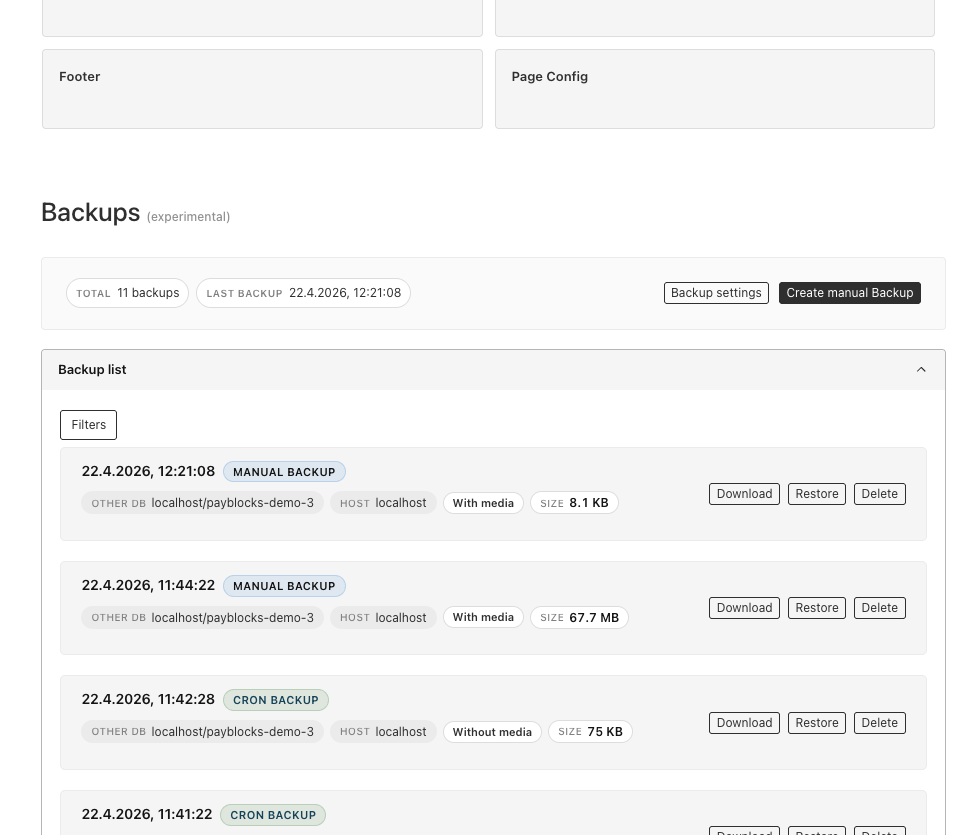
A first-class Backups section lives right below the Payload dashboard: browse every archive sorted by creation time, see at a glance which host and database it belongs to, whether media is bundled and how big it is, then download, restore or delete any backup with one click. Read more on how it originated at TRWK> Case Study.
Highlights
- No meta database. Every backup is self-describing in its blob name
(
type---db---host---{collectionCount}-{timestampMs}.{ext}). A brand new project can list and restore any backup straight from blob storage. - Scheduled (cron) and on-demand backups. Wire
/api/backup-mongodb/cron/runto Vercel Cron or any HTTP scheduler. Retention is configurable (N most recent cron backups are kept; older ones are pruned automatically). - Full database coverage. Dumps every MongoDB collection via the Payload
mongoose adapter — including hidden system collections like
users,payload-preferences,payload-migrations. Individual collections can be excluded per backup from the UI or via API. - Optional media bundling. Cron or manual backups can include Payload
mediablobs in a.tar.gzarchive alongside the MongoDB dump. - Restore with filters. Restore any backup with an optional collection
blacklist and
mergeDataupsert mode. Partial restores keep the running admin session / tasks collection intact. - Native admin dashboard. Adds a
BackupDashboardwidget to the Payload admin (afterDashboard): list / sort / filter / search backups, trigger manual backups or restores, configure retention and storage, and live-poll long-running tasks. - Payload REST, not Next.js route files. All endpoints are registered as
Payload custom endpoints and served by the default
/api/[...slug]handler — you do not addapp/.../route.tsfiles for this plugin. - Pluggable blob storage. Uses
BLOB_READ_WRITE_TOKENby default (the same store you often use with@payloadcms/storage-vercel-blob), or point backups at a dedicated Vercel Blob store in the admin. Alternatively setBACKUP_STORAGE=s3and use AWS S3, Cloudflare R2, MinIO, etc. Both public and private access stores are supported; a validation step detects which modes the store accepts. - Resumable long-running tasks. Manual backups and restores are tracked in a
hidden
backup-taskscollection (TTL, 30 min). The UI polls progress with a short-livedpollSecretso long jobs stay observable even across reloads. - Tested. Vitest covers archive, backup, restore, task progress, blob I/O, endpoint auth, cron parsing, and blob-name helpers.
Requirements
- Node.js 20.9+ (Node 18 is no longer supported).
- Payload v3+ (same major as your other
@payloadcms/*packages). - MongoDB with Payload’s mongoose adapter (
@payloadcms/db-mongodb). - MongoDB server (any version supported by that adapter).
- A backup target:
- Vercel Blob:
BLOB_READ_WRITE_TOKEN(the default target). Vercel hosting is not required — any Node runtime that can reach Vercel Blob works. - S3:
BACKUP_STORAGE=s3plusBACKUP_S3_BUCKET(and optionally credentials). Requires Node 20+ for the optional AWS SDK peer packages. See Choosing a backup target.
- Vercel Blob:
- Next.js 15+ and React 19+ (the usual Payload 3 + App Router stack).
Environment variables
| Variable | Required | Purpose |
|---|---|---|
MONGODB_URI | yes | MongoDB connection string (used by Payload and to label backups with the DB name). |
BACKUP_STORAGE | optional | Backup target: vercel-blob (default) or s3. See Choosing a backup target. |
BLOB_READ_WRITE_TOKEN | for Vercel Blob | Default Vercel Blob store for backups and media. Required when BACKUP_STORAGE=vercel-blob (the default). Can be overridden in admin settings. |
CRON_SECRET | for cron | Bearer token for every /api/backup-mongodb/cron/* call. Vercel Cron can supply this. |
NEXT_PUBLIC_SERVER_URL | optional | Used to label backups with the current host. Falls back to VERCEL_URL when set. |
BACKUPS_TO_KEEP | optional | Default retention for cron backups if the settings document has not been edited. Default 10. |
PAYLOAD_BACKUP_ALLOWED_ROLES | optional | Comma-separated role slugs that may see the Backups dashboard (case-insensitive). Use * to allow any authenticated user. When unset, the plugin falls back to requiring a role with slug admin, or allows everyone when the users collection has no roles field. Overridden by the access plugin option. |
Choosing a backup target (Vercel Blob or S3)
Backups can be stored in Vercel Blob (default) or AWS S3. The S3 target also works with any S3-compatible store — Cloudflare R2, MinIO, etc. — because they share the same API; only the configuration differs, never the plugin code.
Select the target with BACKUP_STORAGE. When unset it stays vercel-blob, so
existing deployments are unaffected.
Using S3
S3 is enabled when BACKUP_STORAGE=s3. Install the AWS SDK (declared as
optional peer dependencies, so Vercel-only installs don't pull it in):
pnpm add @aws-sdk/client-s3 @aws-sdk/lib-storage @aws-sdk/s3-request-presigner
| Variable | Required | Purpose |
|---|---|---|
BACKUP_STORAGE | yes | Set to s3. |
BACKUP_S3_BUCKET | yes | Target bucket name. |
BACKUP_S3_REGION | optional | Region. Falls back to AWS_REGION, then us-east-1. |
BACKUP_S3_ENDPOINT | optional | Custom endpoint for S3-compatible stores (R2, MinIO). Omit for AWS S3. |
BACKUP_S3_FORCE_PATH_STYLE | optional | Path-style addressing. Defaults to true when an endpoint is set (needed for MinIO and some R2 setups). |
BACKUP_S3_PREFIX | optional | Key namespace prepended to every object (for sharing a bucket). Backups still list/restore by their backups/… name. |
BACKUP_S3_ACCESS_KEY_ID | optional | Access key. Falls back to AWS_ACCESS_KEY_ID. Omit to use the AWS default credential chain (IAM roles, etc.). |
BACKUP_S3_SECRET_ACCESS_KEY | optional | Secret key. Falls back to AWS_SECRET_ACCESS_KEY. |
BACKUP_S3_SESSION_TOKEN | optional | Session token for temporary credentials. Falls back to AWS_SESSION_TOKEN. |
Credentials are optional: when omitted, the AWS SDK's default provider chain is used (environment, shared config, or instance/role credentials — recommended on AWS).
AWS S3
BACKUP_STORAGE=s3
BACKUP_S3_BUCKET=my-payload-backups
BACKUP_S3_REGION=eu-central-1
# Credentials via IAM role (recommended) or:
# BACKUP_S3_ACCESS_KEY_ID=...
# BACKUP_S3_SECRET_ACCESS_KEY=...
Cloudflare R2
BACKUP_STORAGE=s3
BACKUP_S3_BUCKET=my-payload-backups
BACKUP_S3_REGION=auto
BACKUP_S3_ENDPOINT=https://<account-id>.r2.cloudflarestorage.com
BACKUP_S3_FORCE_PATH_STYLE=true
BACKUP_S3_ACCESS_KEY_ID=<r2-access-key-id>
BACKUP_S3_SECRET_ACCESS_KEY=<r2-secret-access-key>
Backups are stored under the same backups/… keys (see
Blob naming), so listing and restore work identically across
targets. Downloads stream through the plugin's authenticated endpoint, so the
bucket does not need to be public.
Note on media: the "include media" option bundles files from your Payload Vercel Blob upload store (
BLOB_READ_WRITE_TOKEN). The configurable target above governs where backup archives live only; media is always read from and restored to the upload store, even whenBACKUP_STORAGE=s3.
Installation and getting started
Use this flow when adding the plugin to an existing Payload 3 + Next.js app that already has MongoDB and a blob/S3 store configured.
1. Add the package
pnpm add @trieb.work/payload-plugin-backup-mongodb
# npm install @trieb.work/payload-plugin-backup-mongodb
# yarn add @trieb.work/payload-plugin-backup-mongodb
Peer dependencies: @payloadcms/db-mongodb, payload,
@payloadcms/ui, next, and react. (all expected in a Payload
3 + MongoDB + Next.js app).
2. Register the plugin
// payload.config.ts
import { buildConfig } from 'payload'
import { backupMongodbPlugin } from '@trieb.work/payload-plugin-backup-mongodb'

export default buildConfig({
  // your db adapter, collections, etc.
  plugins: [
    backupMongodbPlugin({
      // all options optional — see "Plugin options"
    }),
  ],
})
The plugin will register the backup collections, mount the dashboard, and add
/api/backup-mongodb/* endpoints. Import paths resolve to a published or
linked dist/ build; after local changes to the package, run pnpm build in
the plugin repo (or reinstall) so dist/ is up to date.
3. Regenerate types and the import map
So Payload picks up the new admin components and collections:
pnpm payload generate:types
pnpm payload generate:importmap
4. (Optional) Schedule cron backups
Vercel: add a cron in vercel.json. Path must match your API; default is
under /api/…:
{
  "crons": [
    {
      "path": "/api/backup-mongodb/cron/run",
      "schedule": "0 3 * * *"
    }
  ]
}
Vercel Cron sends header Authorization: Bearer $CRON_SECRET. Other hosts
(k8s, GitHub Actions, etc.): GET the same URL on your schedule with that same
authorization header.
Checklist
- Package installed
-
backupMongodbPlugininpluginsarray -
generate:typesandgenerate:importmaprun -
MONGODB_URIandBLOB_READ_WRITE_TOKENset in the environment - (Optional)
CRON_SECRETand cron job (vercel.json) if you want scheduled backups
Start your dev server, open /admin, sign in as an admin, and you should see
Backups below the dashboard.
Admin UI
After the first login as an admin user, a Backups section appears below the default Payload dashboard. Day-to-day tasks — create, download, restore, delete, schedule — all happen in the UI below.
Who can see it? The visibility rules, in precedence order:
- If the plugin is registered with an
accessfunction, it wins (see Plugin options). - Otherwise, if
PAYLOAD_BACKUP_ALLOWED_ROLESis set, it is used as a comma-separated allow-list of role slugs (case-insensitive). Use*for "any authenticated user". Example:PAYLOAD_BACKUP_ALLOWED_ROLES=admin,superadmin. - Otherwise, the historical default applies: users with a
rolewhose slug isadminsee the dashboard; projects that don't use arolesfield at all get the dashboard for any authenticated user.
Scheduled (cron) vs on-demand (manual) backups
- Scheduled / cron backups follow shared settings: retention, media toggle, and collections to skip. Older cron archives are pruned when the keep-count is exceeded. They appear in the list as CRON BACKUP (or similar).
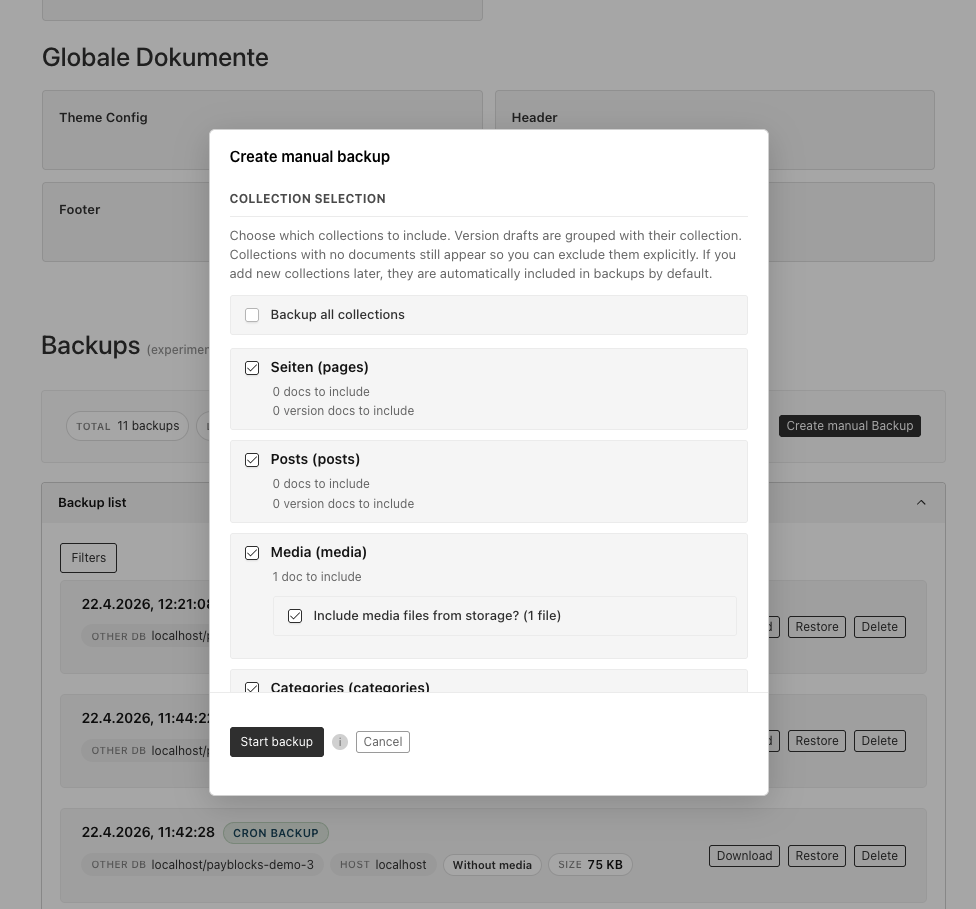
- Manual / on-demand backups are configured per run — per-collection
toggles, optional media in a
.tar.gzarchive. Manual backups are not auto-pruned; use them as checkpoints before migrations.
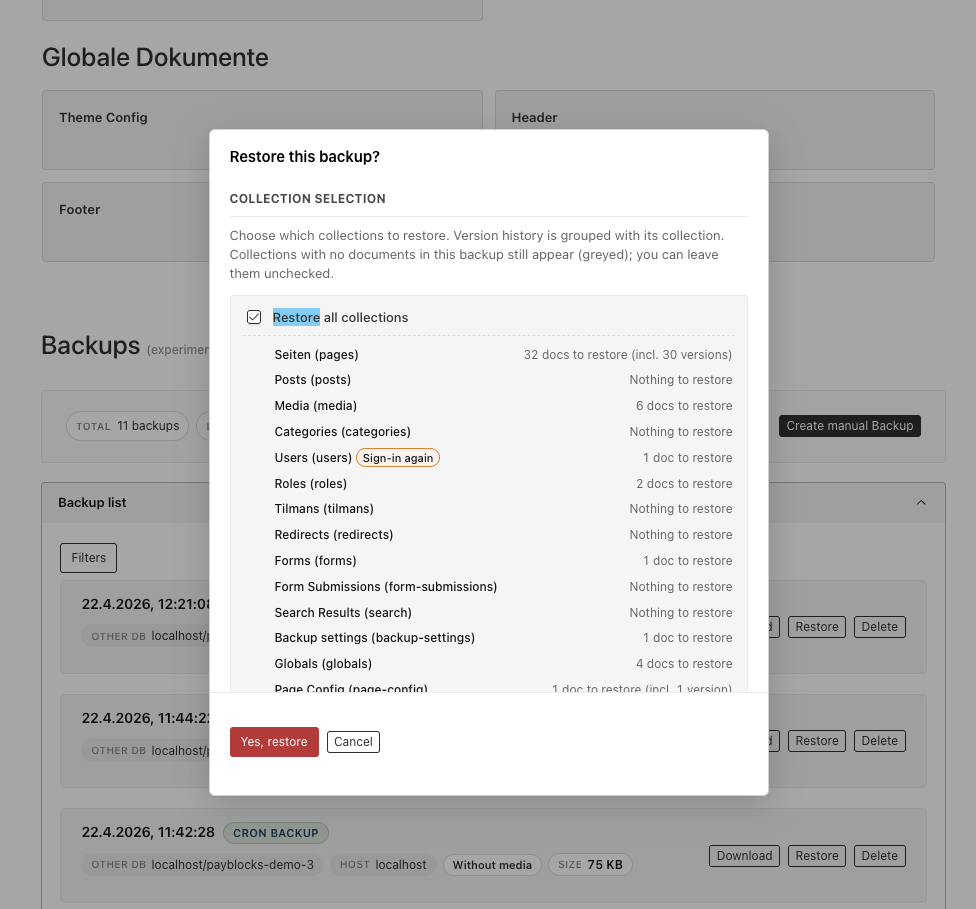
Selective restore with per-collection preview
Restore opens a preview of the archive before any write. You can restore
everything, cherry-pick collections, or skip media from .tar.gz when you only
need database rows. Restoring from a different host or database is supported;
filters help when cloning production into staging.
Scheduled backup settings
Retention, storage token, and cron collection skip list live in one modal:
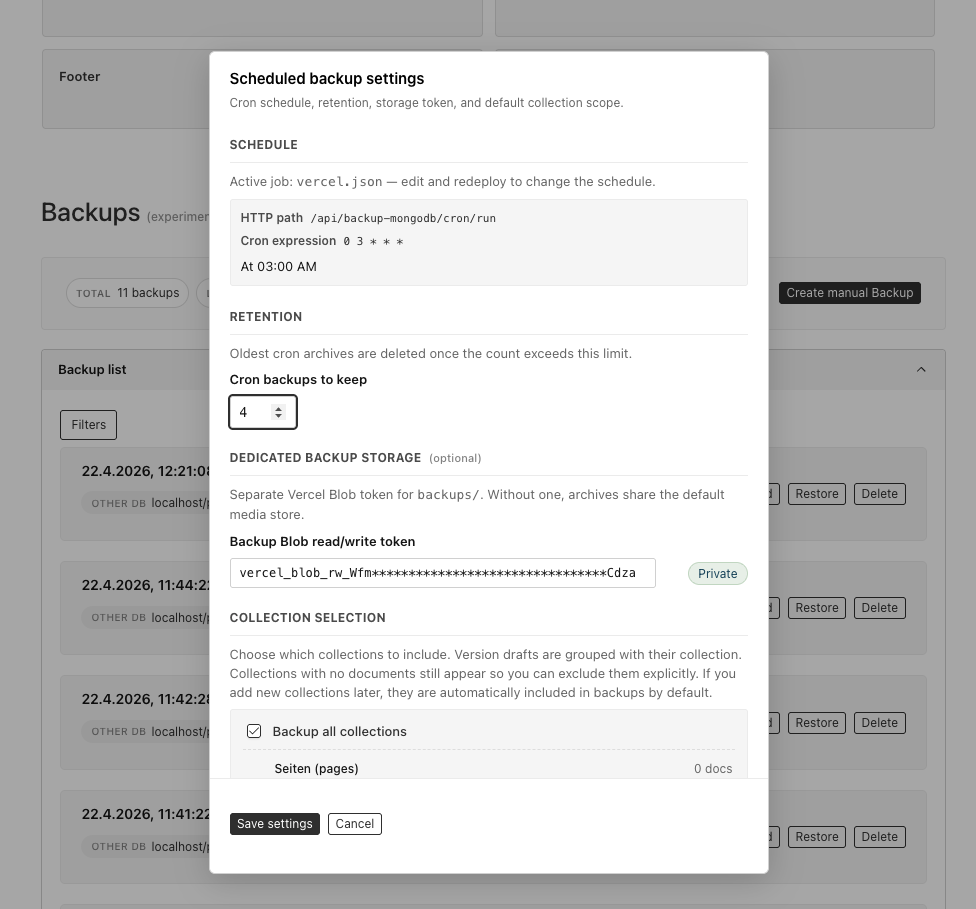
- Schedule: when
vercel.jsonis present, the plugin can show a human-readable cron description (via cronstrue). - Retention: how many cron archives to keep; manual backups are not pruned by this.
- Dedicated backup storage (optional): a separate Vercel Blob read/write
token (when
BACKUP_STORAGE=vercel-blob) so backups can live in a different store than media. The UI can validate the token and optionally copy existingbackups/*objects to the new store. For S3, configure the target bucket via environment variables. - Collection selection for cron: defaults to all collections, with per-collection opt-out.
Plugin options
type BackupPluginOptions = {
  /**
   * Set to `false` to disable the plugin (no collections, endpoints, or admin UI).
   * Omit or leave unset to keep the plugin active.
   */
  enabled?: boolean

  /** Default cron retention when no value is stored in settings. Falls back to `BACKUPS_TO_KEEP` or `10`. */
  backupsToKeep?: number

  /**
   * Custom access check for admin routes and the dashboard. Overrides the
   * `PAYLOAD_BACKUP_ALLOWED_ROLES` env var when provided.
   *
   * Default (env-based): see the `PAYLOAD_BACKUP_ALLOWED_ROLES` entry in the
   * environment variables table. When neither is configured, the check falls back
   * to a role with slug `admin`, or allows any authenticated user in projects
   * without a `roles` field.
   */
  access?: (user: Record<string, unknown> | null) => boolean
}
HTTP API (Payload REST)
All routes are served by Payload’s /api/[...slug] handler under
/api/backup-mongodb/…. The backup-mongodb prefix avoids clashing with a
collection slug. The admin UI uses the same URLs; use the exported
backupPluginPublicApiPaths helper in client code.
Cron / external (Bearer CRON_SECRET)
GET  /api/backup-mongodb/cron/run        # enqueue a cron backup
GET  /api/backup-mongodb/cron/list     # list backups
POST /api/backup-mongodb/cron/restore  # body: { "url": "https://…" }
Authorization: Bearer <CRON_SECRET>
Admin (session cookie, or pollSecret for /task/:id where applicable)
| Method | Path |
|---|---|
POST | /api/backup-mongodb/admin/manual |
POST | /api/backup-mongodb/admin/restore |
POST | /api/backup-mongodb/admin/backup-preview |
POST | /api/backup-mongodb/admin/restore-preview |
POST | /api/backup-mongodb/admin/delete |
GET | /api/backup-mongodb/admin/backup-download |
GET | /api/backup-mongodb/admin/task/:id |
GET / POST | /api/backup-mongodb/admin/settings |
POST | /api/backup-mongodb/admin/validate-blob-token |
Programmatic API
For scripts, hooks, and tests:
import {
  createBackup,
  listBackups,
  restoreBackup,
} from '@trieb.work/payload-plugin-backup-mongodb'

// Example: manual backup from a one-off script
await createBackup(payload, { cron: false, includeMedia: true })

// Example: restore from a URL, skipping `users`
await restoreBackup(payload, downloadUrl, ['users'], false)

// Example: list backup archives (token from backup-settings + env, same as create/restore)
const blobs = await listBackups(payload)
Blob storage model
Blob naming
backups/{type}---{dbName}---{hostname}---{collectionCount}-{timestampMs}.{json|tar.gz}
type:cronormanual(and legacy-style labels where applicable).dbName/hostname: derived from your MongoDB URL and public server URL; URL-encoded in the name.collectionCount+timestampMs: sort key for listing; legacy blob names are still supported.
Public vs private stores
A validation step probes the bucket and records whether the store behaves as public or private. New uploads use the right access mode. Restore and preview flows handle both.
Overriding the backup store
To keep backups in a different Vercel Blob project than media (when
BACKUP_STORAGE=vercel-blob), open Backup settings in the admin, paste a
dedicated BLOB_READ_WRITE_TOKEN, validate, and optionally migrate existing
backups/* objects to the new store before switching. For S3, the target is
controlled entirely by environment variables.
Removed demo seed API (intentional)
Earlier releases exposed an optional demo seed route (seedDemoDumpUrl,
/backup-mongodb/admin/seed, and the restoreSeedMedia export). That was
removed on purpose: a backup plugin should not ship a public “seed my database”
API. Use your own migration/seed tooling instead.
Running the tests
pnpm test:int
E2E (Playwright)
End-to-end tests live in tests/e2e/ and target the dev/ Next + Payload app.
Locally, start Mongo (or rely on the in-memory replica set when
DATABASE_URL / MONGODB_URI are unset), then either run pnpm dev and
pnpm test:e2e in another shell (Playwright reuses the server when not in
CI), or run only pnpm test:e2e so Playwright starts pnpm dev for you.
CI (.github/workflows/e2e.yml, same pattern as the reference e2e.yml in
executive-search: MongoDB 7 service, pnpm run build then pnpm run build:dev,
then Playwright against next start). Optional secret
BLOB_READ_WRITE_TOKEN for fuller blob behaviour.
Optional: deploy dev/ to Vercel
.github/workflows/deploy-dev-vercel.yml runs when dev/ (or related paths)
change on main, or via workflow_dispatch, only if VERCEL_TOKEN,
VERCEL_ORG_ID, and VERCEL_PROJECT_ID are set. Configure the Vercel project
Root Directory to dev (dev/vercel.json wires install/build from the repo
root).
The repo includes a dev/ Payload + Next app (MongoDB Memory Server when no URI
is set): pnpm dev → http://localhost:3000/admin (login in
dev/helpers/credentials.ts). In unit tests, external services like
@vercel/blob and bson are often mocked with vi.mock().
Publishing (npm)
Versioning uses Changesets: add a
file with pnpm changeset, open a PR to main, and merge. The Release
workflow opens a “version packages” PR or runs pnpm run release (build +
changeset publish) when the set of changesets is ready. PRs need a new
.changeset/*.md unless you add the no-changeset label (e.g. docs-only).
Roadmap / ideas
- Multipart / very large backup uploads (Vercel Blob supports large objects; may need to switch past single-part limits). (S3 uploads already use multipart.)
- Additional storage adapters (filesystem, etc.). (AWS S3 and S3-compatible stores such as R2/MinIO are supported — see Choosing a backup target.)
- Scheduler-agnostic display when not using Vercel (
vercel.jsonis currently used for the schedule summary where available). - Streaming restore for very large databases.
- Configurable
backups/prefix or bucket layout. - add support for tenant plugin and partial backups per tenant
License
MIT
Built and maintained by TRWK>, formerly trieb.work.
Similar plugins

payload plugin janitor
Find orphaned files, missing uploads and unreferenced documents, then delete only what you approve
7031/wk5v4

switch env
Switch the local admin between development and production databases and copy production data into development
590/wk15v3

cloud storage
Official Payload plugin for storing uploads in third-party cloud storage through a pluggable adapter interface
100426.0k/wk45.4kv3

payload upstash
Upstash Redis key-value adapter for Payload's built-in KV store
690/wk7v3

payload revalidate
Field-driven Next.js cache revalidation and tagged cached finders for Payload collections and globals
67151/wk18v3
seed
Seed an Atomic Payload database from a dashboard button backed by a POST /api/seed endpoint
570/wk37v3