
Overview
Summary generated from the READMEExtends Payload live preview with hover overlays that label blocks by type, index and name. Clicking a block in the admin scrolls the preview to it, and clicking in the preview focuses and expands the matching admin row, including nested blocks and Lexical rich text blocks. Requires data attributes on block wrappers and a client component on the frontend page. Rich text block sync needs Payload 3.81 or newer.
Features
- Hover overlay with label badge showing block type, index and name
- Bi-directional scroll and focus sync between admin and preview
- Works at any block nesting depth, including blocks inside Lexical rich text
- Lexical feature that stamps block IDs in the editor
- Configurable accent color, scroll alignment and scroll offset
- Opt-out of sync on specific elements via a data attribute
Use cases
- Help editors find the matching block in the form while viewing a draft preview
- Make nested layout blocks easy to locate in complex page builders
- Highlight rich text blocks in Next.js draft previews
From the author
Better live preview for Payload CMS — hover highlighting with block identification, bi-directional admin/preview sync, and smooth transitions.
Installation
npm i payload-better-preview16
Stars
1
Forks
1
Open Issues
4 months ago
Last Updated
0
Weekly Downloads
v2.1.3
npm Version
98.6 KB
Unpacked Size
0
Dependencies
Trends (last 90 days)
Trends appear after 7 days of data. Daily snapshots have not started yet.
Trends appear after 7 days of data. Daily snapshots have not started yet.
Each point is npm's rolling 7-day download count.
Health Score
Composite score based on GitHub activity, stars, npm downloads, publish recency, dependency count, and package size.
Badge for your README

[](https://payloaddirectory.dev/plugins/1164837193-root)<a href="https://payloaddirectory.dev/plugins/1164837193-root"><img src="https://payloaddirectory.dev/badge/1164837193-root.svg" alt="Payload Directory"></a>README
payload-better-preview




⚠️ Consider using the successor
payload-better-editor. It offers the same as this plugin, but also adds a side-by-side overlay with a sidebar of native Payload fields, viewport switching (Desktop / Tablet / Mobile / Responsive / Fullscreen), undo/redo, in-sidebar block actions (move, duplicate, add-below, delete), drag-resizable sidebar, an interact mode for clicks inside the preview, and aBetterEditorSettingsglobal so admins can tune sidebar position, hover colours, and breakpoints live without a re-deploy.
Better live preview for Payload CMS — hover highlighting with block identification, bi-directional admin/preview sync, and smooth transitions.
Found a bug? Please open an issue with steps to reproduce, your Payload version, and a minimal example. PRs welcome too.
Features
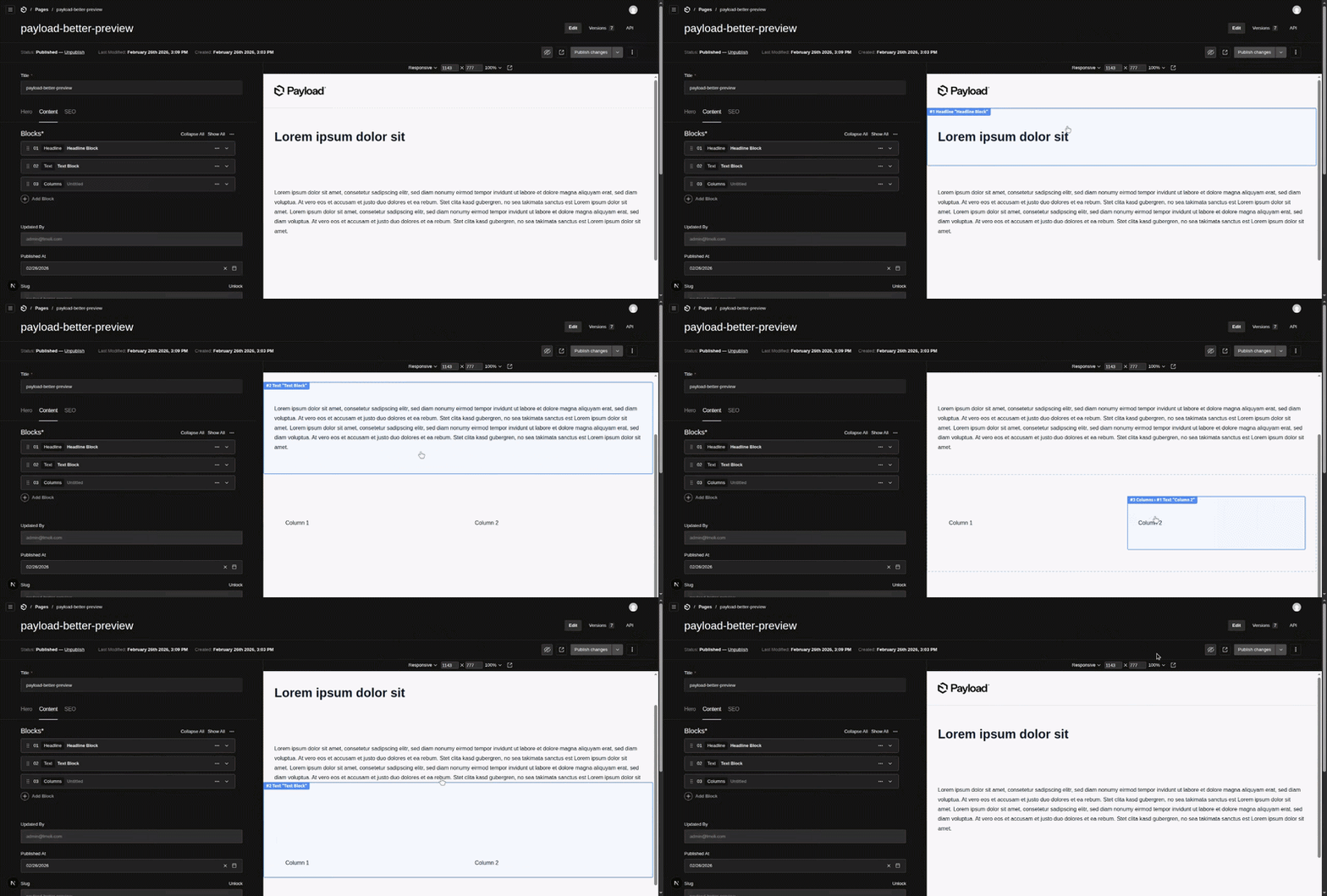
Hover Highlighting
Blue overlay marks the block under the cursor with a label badge showing block type, index, and name. Nested blocks get a dashed parent overlay with breadcrumb labels.
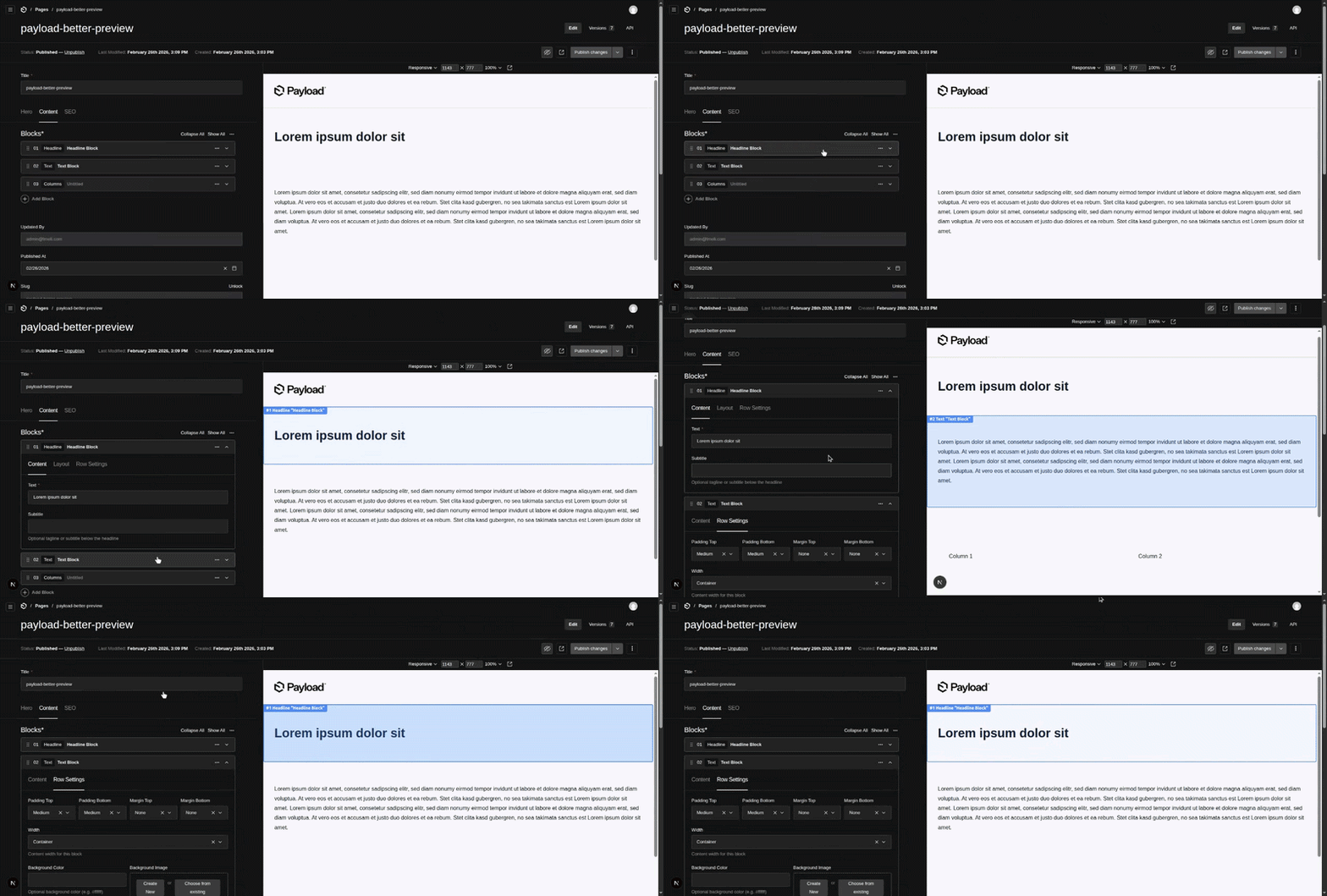
Admin → Preview Sync
Click a block row in the admin editor — the preview scrolls to that block and highlights it with a flash effect.
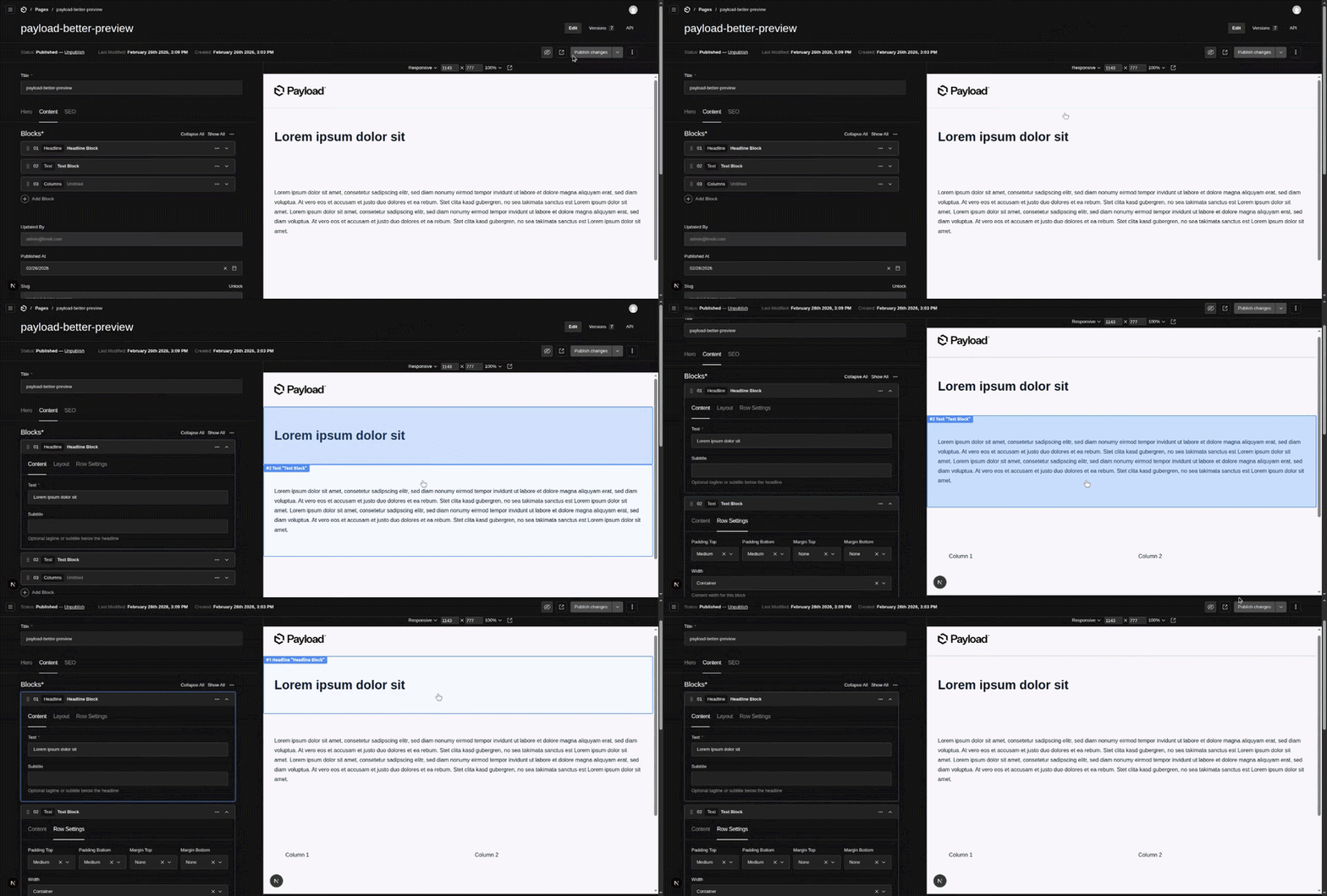
Preview → Admin Sync
Click a block in the preview — the admin editor scrolls to the corresponding block row, expands it if collapsed (including all ancestor rows for nested blocks), and highlights it.
Other
- Draft-only — Zero impact on published pages
- Scroll/Resize tracking — Overlay follows block position smoothly
- Infinite nesting — Bi-directional sync works at any block nesting depth
Installation
pnpm add payload-better-preview
# or
npm install payload-better-preview
1. Register the plugin
// payload.config.ts
import { betterPreview } from 'payload-better-preview'

export default buildConfig({
  plugins: [
    betterPreview({
      accentColor: '#3b82f6', // optional
      scrollAlign: 'start',   // optional
      scrollOffset: 128,      // optional
    }),
  ],
  admin: {
    livePreview: {
      collections: ['pages'],
      url({ data }) {
        return `/${data.id}`
      },
    },
  },
})
2. Add data attributes to block wrappers
Each rendered block must have three data attributes:
| Attribute | Description |
|---|---|
data-block | Block type slug, e.g. "hero", "text" |
data-block-index | 0-based index within the blocks field |
data-block-field | Field path — see below |
data-block-name | Optional display name shown in the overlay label |
The data-block-field value must match the Payload field name so the plugin can map blocks between the admin and the preview:
export function BlockRenderer({ block, index, field }) {
  return (
    <div
      data-block={block.blockType}
      data-block-index={index}
      data-block-field={field}
      data-block-name={block.name} // optional
    >
      {/* block content */}
    </div>
  )
}

export function RenderBlocks({ blocks, field }) {
  return blocks.map((block, index) => (
    <BlockRenderer key={block.id} block={block} index={index} field={field} />
  ))
}
// pass the exact Payload field name
<RenderBlocks blocks={page.content} field="content" />
<RenderBlocks blocks={page.sidebar} field="sidebar" />
3. Render <BetterPreview /> in your page
import { BetterPreview } from 'payload-better-preview/client'

export default async function Page() {
  const { isEnabled: draft } = await draftMode()

  return (
    <>
      {draft && <LivePreviewListener />}
      {draft && <BetterPreview />}
      {/* ... rest of page */}
    </>
  )
}
Nested blocks
For blocks that contain other blocks, construct the field prop by concatenating the parent field, parent index, and child field name with hyphens. This matches the ID pattern Payload generates in the admin and enables sync at any depth:
export function NestedBlockRenderer({ block, index, field }) {
  return (
    <div
      data-block={block.blockType}
      data-block-index={index}
      data-block-field={field}
    >
      <RenderBlocks
        blocks={block.content}
        field={`${field}-${index}-content`}
        {/* e.g. "content-0-content", "content-0-content-1-sidebar" */}
      />
    </div>
  )
}
RichText (Lexical) blocks
Payload's Lexical editor supports blocks embedded directly inside richText fields. The plugin provides full bi-directional sync for these blocks too.
Requires Payload 3.81+. On older versions the Lexical plugin component is rendered outside of the
LexicalComposerContextduring SSR and throws. The core block sync (layout blocks, hover highlighting, Admin ↔ Preview sync) still works on Payload ^3.0.0 — only the richText-block sync is gated on 3.81+.
1. Register the Lexical feature
Add BetterPreviewLexicalFeature to your Lexical editor config. This injects a client-side plugin that stamps each block in the editor with a data-block-id attribute so the admin can locate them:
// payload.config.ts
import { betterPreview, BetterPreviewLexicalFeature } from 'payload-better-preview'
import { lexicalEditor, BlocksFeature } from '@payloadcms/richtext-lexical'

export default buildConfig({
  plugins: [betterPreview()],
  editor: lexicalEditor({
    features: ({ defaultFeatures }) => [
      ...defaultFeatures,
      BlocksFeature({ blocks: [...] }),
      BetterPreviewLexicalFeature(),
    ],
  }),
})
2. Add data attributes in JSX converters
Add data-block-id (the block's unique ID from node.fields.id) to each block wrapper. The plugin uses this ID to sync between admin and preview:
// jsxConverters.tsx
import { JSXConvertersFunction } from '@payloadcms/richtext-lexical/react'

export const jsxConverters: JSXConvertersFunction = ({ defaultConverters }) => ({
  ...defaultConverters,
  blocks: {
    hero: ({ node }) => (
      <div
        data-block={node.fields.blockType}
        data-block-id={node.fields.id}         // required for richText sync
      >
        {/* block content */}
      </div>
    ),
  },
})
How it works
data-block-ididentifies each block uniquely across both admin and preview- Admin → Preview: clicking a Lexical block in the admin sends
scroll-to-richtext-blockwith the block ID — the preview finds[data-block-id]and scrolls to it - Preview → Admin: clicking a block with
data-block-id(but nodata-block-field) sendsfocus-richtext-block— the admin finds[data-block-id], expands the collapsible if needed, and scrolls to it
Disabling sync on specific elements
Add data-preview-ignore to any element to prevent clicks on it from triggering scroll sync. Works in both directions — in the preview (blocks rendered on the frontend) and in the admin (custom block components inside the Lexical editor).
Useful for interactive elements like buttons, links, or custom controls inside a block component:
// jsxConverters.tsx — preview side
blocks: {
  cta: ({ node }) => (
    <div
      data-block={node.fields.blockType}
      data-block-id={node.fields.id}
    >
      <h2>{node.fields.title}</h2>
      {/* clicks here will NOT trigger scroll sync */}
      <button data-preview-ignore onClick={...}>
        Buy now
      </button>
    </div>
  ),
},
// Custom block component — admin side (Lexical editor)
export function CtaBlockComponent({ formData }) {
  return (
    <div>
      <p>{formData.title}</p>
      {/* clicks here will NOT send scroll-to-preview message */}
      <button data-preview-ignore onClick={openModal}>
        Edit link
      </button>
    </div>
  )
}
Any click originating inside a [data-preview-ignore] element is ignored by the plugin entirely — hover highlighting and scroll sync are both skipped for that interaction.
Nested blocks inside richText
For blocks that are nested inside a richText block (e.g. a nestedBlock with its own blocks field), sync works the same as regular nested blocks. The plugin automatically detects the parent richText block and scopes the search to avoid duplicate IDs.
Add data-block-field and data-block-index to nested blocks (but NOT to direct richText blocks since they have no field path):
// For the outer richText block (nestedBlock):
<div
  data-block={node.fields.blockType}
  data-block-id={node.fields.id}
>
  <RenderBlocks
    blocks={node.fields.content}
    field="content"               // local field name only (not full path)
    richTextBlockId={node.fields.id}
  />
</div>

// For inner blocks (BlockRenderer receives richTextBlockId from parent):
<div
  data-block={block.blockType}
  data-block-id={block.id}
  data-block-index={index}
  data-block-field={field}        // e.g. "content"
>
Plugin options
| Option | Type | Default | Description |
|---|---|---|---|
disabled | boolean | false | Disable the plugin entirely |
accentColor | string | '#3b82f6' | Highlight color for overlays and flash effects in the admin |
scrollAlign | 'start' | 'center' | 'end' | 'start' | Block alignment when scrolling in admin |
scrollOffset | number | 128 | Top offset in px when scrolling in admin — accounts for the sticky admin header |
<BetterPreview /> props
| Prop | Type | Default | Description |
|---|---|---|---|
accentColor | string | '#3b82f6' | Highlight color for overlays and flash effects in the preview |
scrollAlign | 'start' | 'center' | 'end' | 'start' | Block alignment when scrolling in the preview |
scrollOffset | number | 0 | Top offset in px when scrolling in the preview — useful for fixed headers |
showToggle | boolean | true | Show the built-in toggle button |
toggleComponent | React.ComponentType<ToggleProps> | — | Replace the built-in toggle with a custom component |
Scroll offset in the preview
The preview uses window.scrollTo internally to avoid propagating scroll to the parent admin frame. Because of this, scroll-margin-top has no effect. Use scrollOffset instead:
<BetterPreview scrollOffset={80} />
Custom toggle component
import type { ToggleProps } from 'payload-better-preview/client'

function MyToggle({ enabled, onToggle }: ToggleProps) {
  return (
    <button onClick={onToggle} style={{ position: 'fixed', top: 16, right: 16 }}>
      {enabled ? 'Sync on' : 'Sync off'}
    </button>
  )
}

<BetterPreview toggleComponent={MyToggle} />
How it works
Block fields (standard):
- Admin → Preview: clicking a block row in the admin sends
scroll-to-blockwith{ field, index }to the preview iframe. The preview finds[data-block-field][data-block-index]and scrolls to it. - Preview → Admin: clicking a block with
data-block-fieldsendsfocus-block. The admin expands all ancestor rows and scrolls to the target row.
RichText (Lexical) blocks:
- Admin → Preview: clicking a Lexical block sends
scroll-to-richtext-blockwith{ blockId }. The preview finds[data-block-id]and scrolls to it. - Preview → Admin: clicking a block with
data-block-id(but nodata-block-field) sendsfocus-richtext-block. The admin finds[data-block-id], expands the collapsible if needed, and scrolls to it. - Nested blocks inside richText: clicking sends
focus-blockwith an extrarichTextBlockId. The admin opens the parent Lexical block, then scopes the row search within it — avoiding duplicate ID issues when multiple identical blocks exist.
All communication is via window.postMessage. No network requests, no shared state.
<BetterPreview /> is a 'use client' component that renders null (no React DOM output). It injects 3 absolutely-positioned DOM elements into document.body:
- Overlay — Primary block highlight (solid blue border)
- Parent Overlay — For nested blocks (dashed border, subtle)
- Label — Info badge with block type and index
All interaction is handled via event delegation on document, so it survives DOM updates from live preview re-renders.
Contributors
[image]Topics
Similar plugins

plugin
On-page editing and draft preview links for Payload pages rendered in a Next.js frontend
610/wk0v3 v4

plugin
Click-to-edit fields and block operations on the page, layered on Payload Live Preview
410/wk9v3

payload visual editor
Edit text fields inline in the Payload live preview iframe and save changes back as a draft
320/wk5v3
payload better editor
Side-by-side live preview iframe with a sidebar for editing individual blocks in the Payload edit view
710/wk113v3

payload live nav
Section index and field focus bridge that syncs the Payload edit form with Live Preview
628/wk0v3

payload plugin html preview
Live preview and click-to-edit for Payload on any frontend that renders HTML, including static sites and template…
600/wk29v3