
Overview
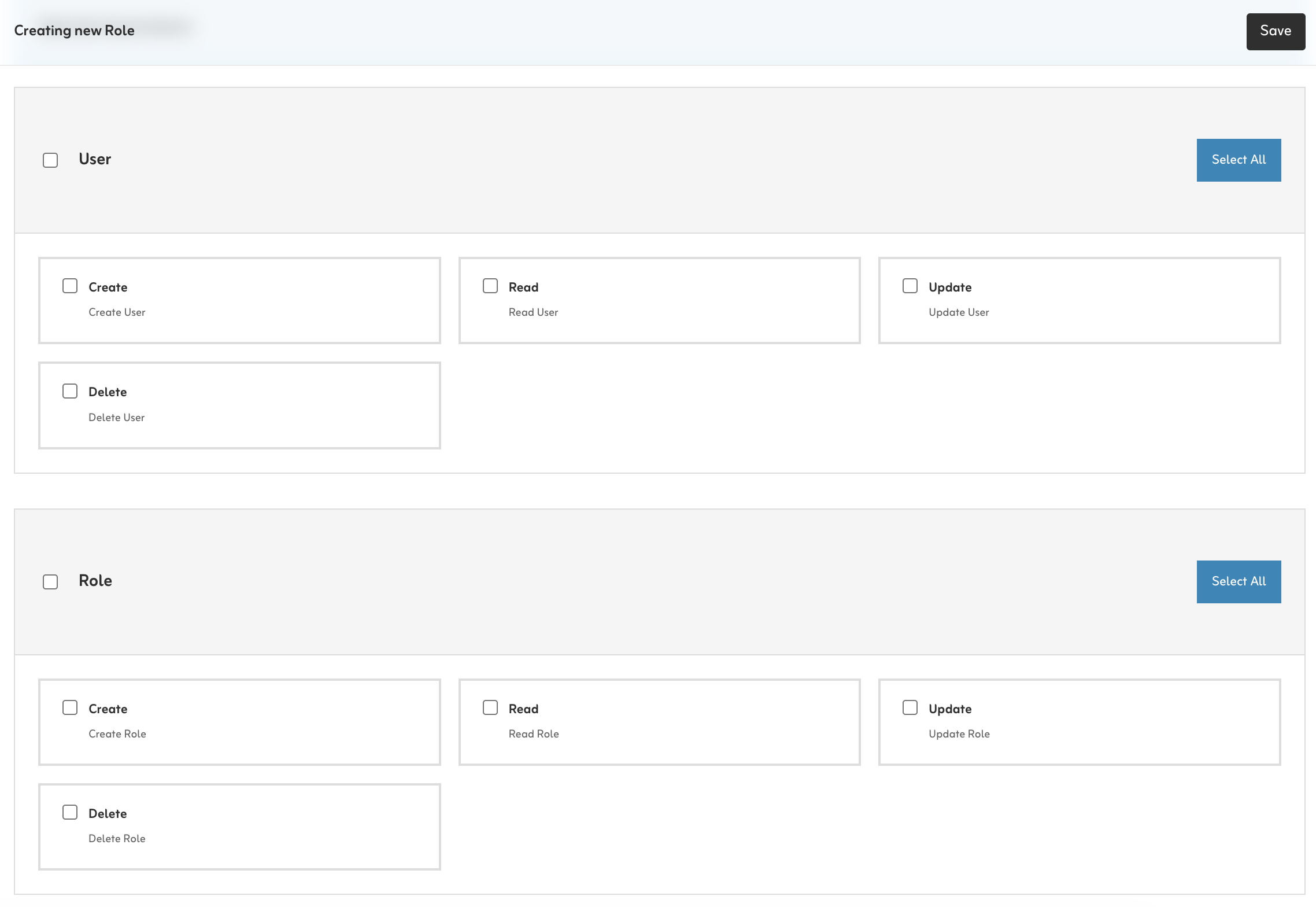
Summary generated from the READMEInjects a grouped checkbox permissions field into a Roles collection in the Payload admin. It auto-discovers permission strings from collections and globals, such as Create:Post or Read:Global:Setting, and validates saved permissions against that allow-list. Access rules still have to be added to each collection using the supplied helper pattern. Requires Payload 3.76.1 or later and React 19.
Features
- Grouped checkbox permissions matrix injected into the roles collection
- Auto-discovers permissions from collections and globals
- Validates saved permissions against an allow-list
- Hybrid mode merges manual permission groups with discovered ones
- Customizable action lists, permission formatting and group labels
- Optional callback to modify the final roles collection config
Use cases
- Build role-based admin access where editors get per-collection create, read, update and delete rights
- Let super admins manage permissions through a visual matrix instead of typing strings
From the author
Reusable RBAC permissions UI and helpers for Payload CMS
Installation
npm i @salemaljebaly/payload-plugin-rbac-ui1
Stars
0
Forks
4
Open Issues
4 months ago
Last Updated
0
Weekly Downloads
v0.5.0
npm Version
60.6 KB
Unpacked Size
0
Dependencies
Trends (last 90 days)
Trends appear after 7 days of data. Daily snapshots have not started yet.
Trends appear after 7 days of data. Daily snapshots have not started yet.
Each point is npm's rolling 7-day download count.
Health Score
Composite score based on GitHub activity, stars, npm downloads, publish recency, dependency count, and package size.
Badge for your README

[](https://payloaddirectory.dev/plugins/1158141331-root)<a href="https://payloaddirectory.dev/plugins/1158141331-root"><img src="https://payloaddirectory.dev/badge/1158141331-root.svg" alt="Payload Directory"></a>README
@salemaljebaly/payload-plugin-rbac-ui



RBAC permissions matrix UI for Payload CMS. Injects a grouped checkbox UI into your Roles collection and validates saved permissions against an auto-discovered allow-list.
Install
pnpm add @salemaljebaly/payload-plugin-rbac-ui
# or
npm install @salemaljebaly/payload-plugin-rbac-ui
Setup
1. Access helpers
Create these helpers first — they are used in the collections below.
// src/access/index.ts
import type { Access } from 'payload'

/** Check if user is a super admin (bypasses all permission checks). */
export function isSuperAdmin(user: any): boolean {
  return user?.superAdmin === true
}

/** Check if user has a specific permission in any of their roles. */
export function hasPermission(user: any, permission: string): boolean {
  if (!user?.roles) return false
  const roles = Array.isArray(user.roles) ? user.roles : [user.roles]
  return roles.some((role: any) => {
    const permissions = typeof role === 'object' ? role?.permissions : null
    return Array.isArray(permissions) && permissions.includes(permission)
  })
}

/** Use in collection access — super admins always pass, others need the permission. */
export const checkPermission =
  (permission: string): Access =>
  ({ req: { user } }) =>
    isSuperAdmin(user) || hasPermission(user, permission)
2. Users collection
Add a superAdmin flag and a roles relationship to your Users collection:
// src/collections/Users.ts
fields: [
  {
    name: 'superAdmin',
    type: 'checkbox',
    defaultValue: false,
    access: {
      // Only super admins can grant super admin access
      update: ({ req: { user } }) => isSuperAdmin(user),
    },
    admin: { description: 'Grants full access, bypasses all permission checks.' },
  },
  {
    name: 'roles',
    type: 'relationship',
    relationTo: 'roles',
    hasMany: true,
    saveToJWT: true, // Required — without this, hasPermission() always returns false
  },
]
3. Roles collection
// src/collections/Roles.ts
import type { CollectionConfig } from 'payload'
import { isSuperAdmin } from '../access'

export const Roles: CollectionConfig = {
  slug: 'roles',
  admin: { useAsTitle: 'name' },
  access: {
    read:   ({ req: { user } }) => isSuperAdmin(user),
    create: ({ req: { user } }) => isSuperAdmin(user),
    update: ({ req: { user } }) => isSuperAdmin(user),
    delete: ({ req: { user } }) => isSuperAdmin(user),
  },
  fields: [
    { name: 'name', type: 'text', required: true, unique: true },
    { name: 'description', type: 'textarea' },
    // 'permissions' field is injected automatically by the plugin
  ],
}
4. Add the plugin
// src/payload.config.ts
import { rbacUIPlugin } from '@salemaljebaly/payload-plugin-rbac-ui'

export default buildConfig({
  collections: [Users, Roles, Posts /* ... */],
  plugins: [
    rbacUIPlugin({
      rolesCollectionSlug: 'roles',
      autoDiscover: true,
    }),
  ],
})
5. Generate the import map
After adding the plugin, run this once so Payload registers the permissions UI component:
pnpm payload generate:importmap
# or: npx payload generate:importmap
Re-run this whenever you add or remove Payload plugins with custom UI.
6. Enforce permissions on your collections
The plugin does not protect your collections automatically. You must add
checkPermission(orisSuperAdmin) to every collection you want to gate. Any collection without a customaccessrule remains visible and accessible to all authenticated users.Not sure what string to pass? Complete the first setup (step 7), then open any Role in the admin UI — all generated permission strings are listed there.
Apply to every collection — including Media:
// src/collections/Posts.ts
import { checkPermission } from '../access'

access: {
  create: checkPermission('Create:Post'),
  read:   checkPermission('Read:Post'),
  update: checkPermission('Update:Post'),
  delete: checkPermission('Delete:Post'),
}
7. First setup
No one has superAdmin: true yet, so no one can access the Roles collection. Bootstrap by adding a temporary seed route:
// src/app/seed/route.ts  — REMOVE IN PRODUCTION
import configPromise from '@payload-config'
import { getPayload } from 'payload'

export const GET = async () => {
  const payload = await getPayload({ config: configPromise })
  const { docs } = await payload.find({ collection: 'users', limit: 1, sort: 'createdAt' })
  if (!docs[0]) return Response.json({ error: 'Create an account first.' }, { status: 404 })
  await payload.update({
    collection: 'users',
    id: docs[0].id,
    data: { superAdmin: true } as any,
    overrideAccess: true,
  })
  return Response.json({ message: 'Done! Log out and back in.', email: docs[0].email })
}
- Start your dev server, create your account at
/admin/create-first-user - Visit
http://localhost:3000/seed— your account is nowsuperAdmin - Log out and back in so the JWT refreshes
- Delete the seed route before deploying
The re-login step is required — the
superAdminflag is read from the JWT on each request.
Permission string format
| Type | Slug | Generated strings |
|---|---|---|
| Collection | posts | Create:Post, Read:Post, Update:Post, Delete:Post |
| Collection | categories | Create:Category, Read:Category, … |
| Global | settings | Read:Global:Setting, Update:Global:Setting |
Rule: slug → singularize → PascalCase. Open the Roles admin UI to see the exact strings for your app.
Hybrid mode (auto + custom)
rbacUIPlugin({
  autoDiscover: true,
  permissionGroups: [
    {
      label: 'Post',
      permissions: [
        { action: 'Publish', description: 'Publish posts', permission: 'Publish:Post' },
      ],
    },
  ],
})
Auto-discovered and manual groups with the same label are merged.
Options
| Option | Default | Description |
|---|---|---|
rolesCollectionSlug | 'roles' | Slug of your roles collection |
permissionsFieldName | 'permissions' | Field name to inject/patch |
permissionGroups | [] | Manual permission groups |
autoDiscover | false | true or config object (see below) |
rolesFieldDescription | — | Description shown under the field |
ensurePermissionsField | true | Auto-add field if missing. Set false to skip |
customFieldPath | — | Override the React component path |
onConfigureRolesCollection | — | Callback to modify the final collection config |
autoDiscover options
| Option | Default | Description |
|---|---|---|
collections | true | Discover from collections |
globals | true | Discover from globals |
collectionActions | ['Create','Read','Update','Delete'] | Actions per collection |
globalActions | ['Read','Update'] | Actions per global |
includeRolesCollection | true | Include the roles collection itself. Set false to exclude — permissions like Create:Role won't be in the allow-list, so don't use them in seed data |
formatPermission(ctx) | — | ctx: { action: string, slug: string, source: 'collection' | 'global' } → string |
formatGroupLabel(ctx) | — | ctx: { slug: string, source: 'collection' | 'global' } → string |
Compatibility
- Payload:
^3.76.1 - React:
^19 - Next.js:
>=15.2.9 <15.3.0 || >=15.3.9 <15.4.0 || >=15.4.11 <15.5.0 || >=16.2.0-canary.10 <17.0.0
Development
pnpm install
pnpm build
pnpm typecheck
pnpm test
Contributing
- Fork and branch from
main. - Make focused changes with tests.
- Run
pnpm build && pnpm typecheck && pnpm test. - Open a PR with clear before/after context.
See CONTRIBUTING.md for details.
Releasing
pnpm version patch   # or minor / major
pnpm publish --access public
git tag -a vX.Y.Z -m "Release vX.Y.Z"
git push origin vX.Y.Z
Similar plugins

multi tenant
Manage multiple tenants with scoped content and access from a single Payload admin panel
10090.4k/wk45.4kv3

rbac
Database-stored roles with a per-collection CRUD permission matrix enforced across all collections and globals
6327/wk15v3

payload plugin rbac
Database-driven role-based access control with a permission matrix and data scoping for Payload
5627/wk10v3

rbac
Database-driven role-based access control with a per-collection permissions matrix in the Payload admin
530/wk0v4

abac
Attribute-based access control that compiles user attributes into Payload where clauses
520/wk181v3

Payload RBAC Plugin
Database-backed role and permission management with row-level conditions for Payload collections
500/wk6v3