
Overview
Summary generated from the READMEReplaces the default Payload admin sidebar with a vertical icon tab bar that organizes collections and globals into tabs. Registered through the plugins array and works with defaults, with options for links, custom items, badges, sorting, access functions and custom components. Requires Payload 3.75 or newer.
Features
- Tabs with Lucide icons or custom icon components, plus link entries and tabs that also navigate
- Custom navigation items with grouping and top or bottom positioning
- Badges from collection counts, API endpoints or a reactive provider
- Server-side access functions to hide tabs, links and custom items
- Sort functions to control the order of groups and items per tab
- Replaceable components for nav items, groups, content and tab buttons
Use cases
- Organize a large admin panel into content, e-commerce and settings tabs
- Show pending order or notification counts next to sidebar entries
- Hide admin-only sidebar sections from non-admin users
From the author
An enhanced sidebar plugin for Payload CMS with tabbed navigation to organize collections and globals.
Installation
npm i @veiag/payload-enhanced-sidebar29
Stars
2
Forks
1
Open Issues
1 weeks ago
Last Updated
0
Weekly Downloads
v0.6.2
npm Version
284.2 KB
Unpacked Size
2
Dependencies
Trends (last 90 days)
Trends appear after 7 days of data. Daily snapshots have not started yet.
Trends appear after 7 days of data. Daily snapshots have not started yet.
Each point is npm's rolling 7-day download count.
Health Score
Composite score based on GitHub activity, stars, npm downloads, publish recency, dependency count, and package size.
Badge for your README

[](https://payloaddirectory.dev/plugins/1139180096-root)<a href="https://payloaddirectory.dev/plugins/1139180096-root"><img src="https://payloaddirectory.dev/badge/1139180096-root.svg" alt="Payload Directory"></a>README
Payload Enhanced Sidebar
An enhanced sidebar plugin for Payload CMS that adds a tabbed navigation system to organize collections and globals into logical groups.
Features
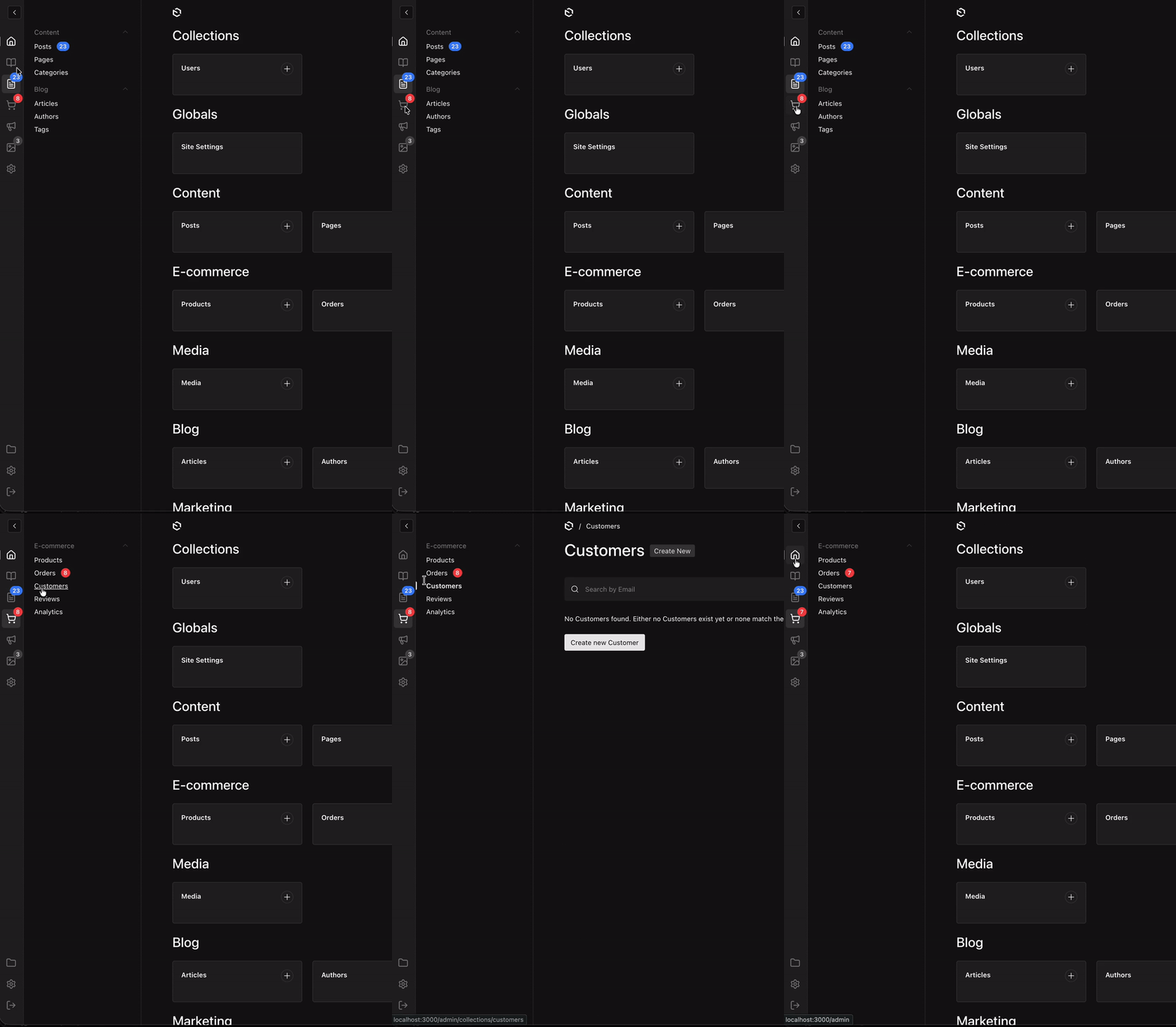
- Tabbed Navigation - Organize collections into separate tabs for cleaner navigation
- Vertical Tab Bar - Icon-based tabs on the left side of the sidebar
- Link Support - Add navigation links (like Dashboard) alongside tabs, or give a tab its own
hrefso it navigates and opens its panel - Custom Items - Add custom navigation items that can be merged into existing groups
- Badges - Show notification badges on tabs and navigation items (API-based or reactive provider)
- Custom Components - Replace any part of the sidebar with your own React components
- i18n Support - Full localization support for labels and groups
- Lucide Icons - Use any Lucide icon for tabs and links, or provide a custom icon component per tab
Installation
npm install @veiag/payload-enhanced-sidebar
# or
yarn add @veiag/payload-enhanced-sidebar
# or
pnpm add @veiag/payload-enhanced-sidebar
Windows support
See this comment if you have issues with scss : https://github.com/VeiaG/payload-enhanced-sidebar/issues/12#issuecomment-4229207755
Quick Start
import { payloadEnhancedSidebar } from '@veiag/payload-enhanced-sidebar'
import { buildConfig } from 'payload'

export default buildConfig({
  // ... your config
  plugins: [
    payloadEnhancedSidebar({
      // Works with defaults!
    }),
  ],
})
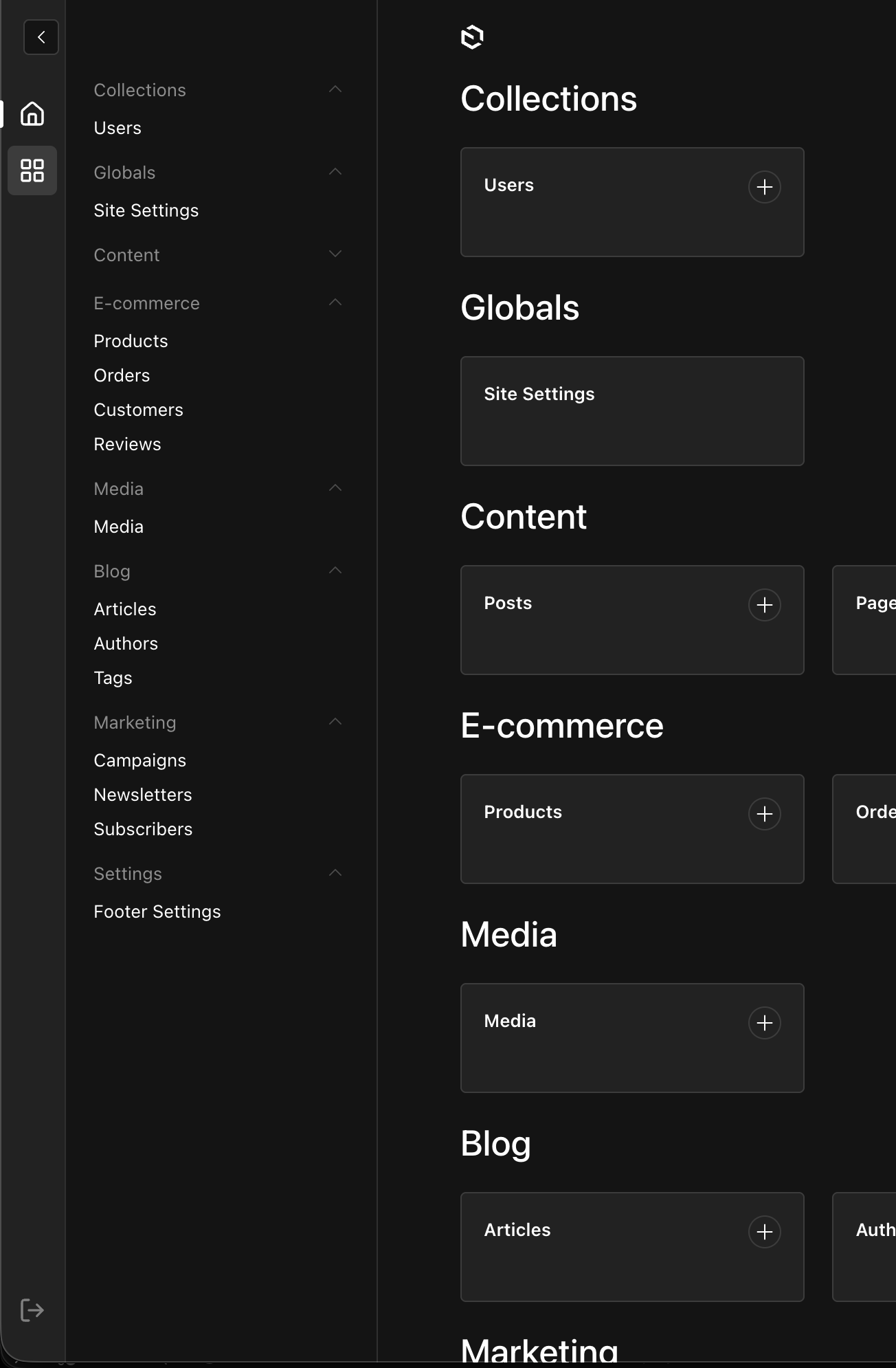
This will add:
- A Dashboard link at the top
- A default tab showing all collections and globals
- A logout button at the bottom
Configuration
Full Configuration Example
import { payloadEnhancedSidebar } from '@veiag/payload-enhanced-sidebar'
import { buildConfig } from 'payload'

export default buildConfig({
  plugins: [
    payloadEnhancedSidebar({
      // Tabs and links in the sidebar
      tabs: [
        // Dashboard link
        {
          id: 'dashboard',
          type: 'link',
          href: '/',
          icon: 'House',
          label: { en: 'Dashboard', uk: 'Головна' },
        },
        // Content tab - shows specific collections
        {
          id: 'content',
          type: 'tab',
          icon: 'FileText',
          label: { en: 'Content', uk: 'Контент' },
          collections: ['posts', 'pages', 'categories'],
        },
        // Link to external documentation
        {
          id: 'docs',
          type: 'link',
          href: 'https://payloadcms.com/',
          icon: 'BookOpen',
          isExternal: true,
          label: { en: 'Documentation', uk: 'Документація' },
        },
        // E-commerce tab with custom items
        {
          id: 'ecommerce',
          type: 'tab',
          icon: 'ShoppingCart',
          label: { en: 'E-commerce', uk: 'E-commerce' },
          collections: ['products', 'orders', 'customers'],
          customItems: [
            {
              slug: 'analytics',
              href: '/analytics',
              label: { en: 'Analytics', uk: 'Аналітика' },
              group: 'E-commerce', // Merge into existing group
            },
            {
              slug: 'quick-add',
              href: '/quick-add',
              label: { en: 'Quick Add', uk: 'Швидке додавання' },
              position: 'top', // Appears above all collection groups
            },
          ],
        },
        // Settings tab with globals
        {
          id: 'settings',
          type: 'tab',
          icon: 'Settings',
          label: { en: 'Settings', uk: 'Налаштування' },
          collections: ['users'],
          globals: ['site-settings', 'footer-settings'],
          customItems: [
            {
              slug: 'api-keys',
              href: '/api-keys',
              label: { en: 'API Keys', uk: 'API Ключі' },
              // No group - will appear at the bottom
            },
            {
              slug:'external-link',
              href: 'https://example.com',
              isExternal: true,
              label: { en: 'External Link', uk: 'Зовнішнє Посилання'}
            }
          ],
        },
      ],

      // Show/hide logout button (default: true)
      showLogout: true,

      // Disable the plugin
      disabled: false,
    }),
  ],
})
Configuration Options
tabs
Array of tabs and links to show in the sidebar.
Tab (type: 'tab')
| Property | Type | Required | Description |
|---|---|---|---|
id | string | Yes | Unique identifier |
type | 'tab' | Yes | Tab type |
icon | IconName | Yes* | Lucide icon name |
iconComponent | SidebarComponent | Yes* | Path to a custom icon component (string or { path, clientProps }) |
buttonComponent | SidebarComponent | No | Custom button for this item only — overrides customComponents.TabButton (see docs) |
label | LocalizedString | Yes | Tab tooltip/label |
collections | CollectionSlug[] | No | Collections to show in this tab |
globals | GlobalSlug[] | No | Globals to show in this tab |
customItems | SidebarTabItem[] | No | Custom navigation items (see below) |
contentComponent | SidebarComponent | No | Replaces the whole nav area while this tab is active — e.g. a chat list (see docs) |
badge | BadgeConfig | No | Badge configuration for the tab icon |
href | string | No | Makes the tab navigate as well as open its panel. Relative to the admin route (see below) |
position | 'top' | 'bottom' | No | 'bottom' pins the tab to the bottom of the bar, above the actions (default 'top') |
access | TabAccessFunction | No | Server-side access control — return false to hide |
* Exactly one of
iconoriconComponentis required — they are mutually exclusive. If neithercollectionsnorglobalsis specified, the tab shows all collections and globals (except tabs with acontentComponent). Once either is set, only the listed slugs are shown — passcollections: []/globals: []to show none.
Tabs that are also links (href on a tab)
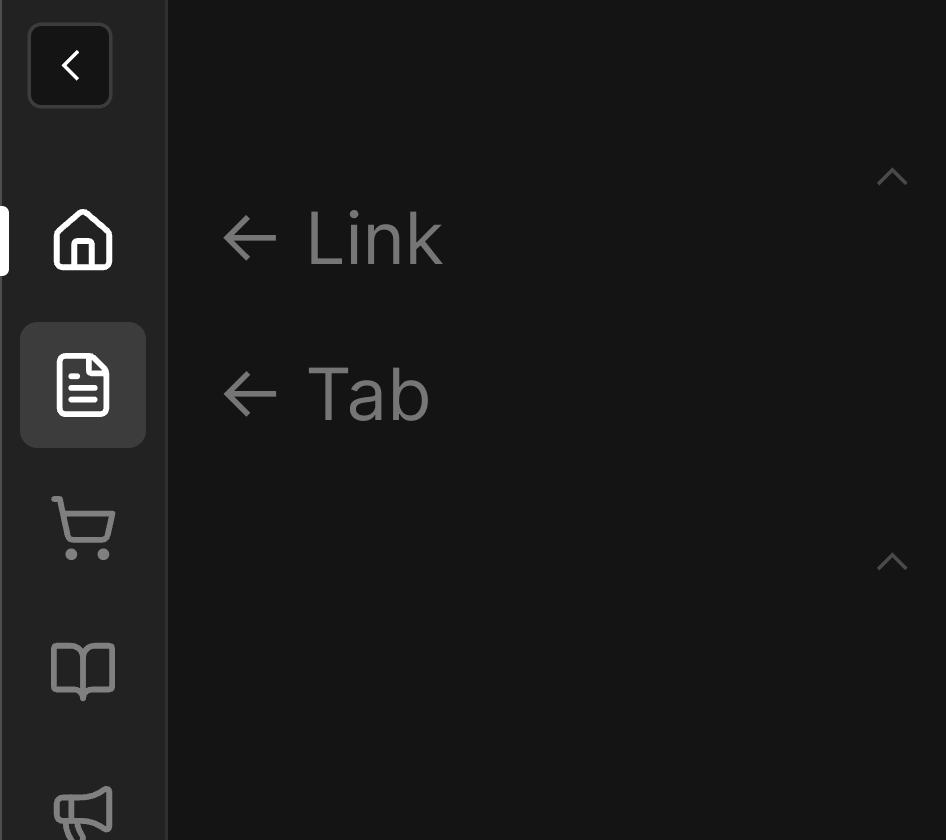
By default a tab opens a panel and a link navigates — one or the other. Give a tab an href and it does both: a click navigates and opens the tab's panel, so its child items stay visible. This is what you want for a Dashboard tab that should open /admin while still showing its own shortcuts.
tabs: [
  {
    id: 'dashboard',
    type: 'tab',
    href: '/',                 // relative to the admin route → /admin
    icon: 'House',
    label: 'Dashboard',
    customItems: [
      { slug: 'new-post', href: '/collections/posts/create', label: 'New Post' },
    ],
  },
]
Click behavior:
| Click | Result |
|---|---|
| Plain left-click | Navigates to href and opens the tab's panel |
| ⌘ / Ctrl / Shift / Alt click, middle-click | Navigates only — a click that lands in a new tab/window leaves the current window's panel exactly as it was |
A tab's href is always relative to the admin route — there is no isExternal here. An external href opens in a new browser tab, which would leave this window untouched and the tab's panel unreachable. Use type: 'link' for external destinations.
The tab renders as a real anchor, so "Open in new tab", link previews and keyboard activation all work as expected.
Such a tab shows two independent states: the background highlight marks the open panel, while the left-edge bar marks the current route — so it stays visible as the active panel even after you navigate away.
Link (type: 'link')
| Property | Type | Required | Description |
|---|---|---|---|
id | string | Yes | Unique identifier |
type | 'link' | Yes | Link type |
icon | IconName | Yes* | Lucide icon name |
iconComponent | SidebarComponent | Yes* | Path to a custom icon component (string or { path, clientProps }) |
buttonComponent | SidebarComponent | No | Custom button for this item only — overrides customComponents.TabButton (see docs) |
label | LocalizedString | Yes | Link tooltip/label |
href | string | Yes | URL |
isExternal | boolean | No | If true, href is absolute URL, if not, href is relative to admin route |
badge | BadgeConfig | No | Badge configuration for the link icon |
position | 'top' | 'bottom' | No | 'bottom' pins the link to the bottom of the bar, above the actions (default 'top') |
access | TabAccessFunction | No | Server-side access control — return false to hide |
* Exactly one of
iconoriconComponentis required — they are mutually exclusive.
Custom slot (type: 'custom')
Renders an arbitrary component in the tabs bar — useful for spacers, separators, decorative elements, etc. Does not open any navigation content.
| Property | Type | Required | Description |
|---|---|---|---|
id | string | Yes | Unique identifier |
type | 'custom' | Yes | Custom slot type |
component | SidebarComponent | Yes | Component to render (string path or { path, clientProps }) |
position | 'top' | 'bottom' | No | 'bottom' pins the slot to the bottom of the bar, above the actions (default 'top') |
access | TabAccessFunction | No | Server-side access control — return false to hide |
The component receives { id } plus any clientProps you pass. See Custom Components for details.
{
  id: 'separator',
  type: 'custom',
  component: './components/Sidebar#TabSeparator',
}
Tab bar position (position)
Any tab, link, or custom slot can be pinned to the bottom of the tabs bar with position: 'bottom'. Bottom items render in config order, just above the actions area (folders / settings / logout). Items default to 'top'.
tabs: [
  { id: 'dashboard', type: 'link', href: '/', icon: 'House', label: 'Dashboard' },
  { id: 'content', type: 'tab', icon: 'FileText', label: 'Content', collections: ['posts'] },
  // pinned to the bottom, above the logout button
  { id: 'settings', type: 'tab', icon: 'Settings', label: 'Settings', globals: ['site-settings'], position: 'bottom' },
]
The tab bar is not virtualized/scrolled — if you have a very large number of top tabs they may collide with the bottom group.
positionis intended for a small number of pinned items (settings, help, etc.).
customItems
Custom items can be added to any tab:
{
  slug: 'unique-slug',           // Required: unique identifier
  href: '/path',                 // Required: URL
  label: { en: 'Label' },        // Required: display label
  group: { en: 'Group Name' },   // Optional: merge into existing group or create new
  isExternal: true,              // Optional: if true, href is absolute URL
  position: 'top',               // Optional: 'top' | 'bottom' (default: 'bottom')
}
Group behavior:
- If
groupmatches an existing collection group label, the item is added to that group - If
groupdoesn't match any existing group, a new group is created - If
groupis not specified, the item appears as ungrouped
Position behavior:
position: 'top'— item (or new custom group) appears above all collection/global groupsposition: 'bottom'— appears below all groups (default)- Has no effect on items that merge into an existing collection group via
group
Custom component item:
Instead of href/label, a custom item can render your own component (slug + component). It renders in the nav row via Payload's component system — both server and client components are supported — and honors the same group/position rules.
{
  slug: 'storage-meter',                       // Required: unique identifier
  component: './components/Sidebar#StorageMeter', // Required: string path or { path, clientProps }
  position: 'top',                             // Optional
  group: 'Content',                            // Optional
}
The component receives CustomNavItemComponentProps ({ slug }) plus any clientProps. See Custom Components for details.
Ordering groups and items (sort)
By default, groups and items follow Payload's default order plus your customItems position/group rules. The sort option lets you take full control of the order per tab, without changing that default for tabs you don't configure.
sort is keyed by tab id. Each entry has two optional functions that return a sort key (number | string | undefined):
payloadEnhancedSidebar({
  tabs: [
    { id: 'shop', type: 'tab', icon: 'ShoppingCart', label: 'Shop', collections: ['products', 'orders'] },
  ],
  sort: {
    shop: {
      // Orders the top-level groups within the tab
      groups: (group, ctx) => {
        // ungrouped items become individual units you can place anywhere
        if (group.isUngrouped && group.entities[0]?.slug === 'banner') return -100
        if (typeof group.label !== 'string' && group.label.en === 'Featured') return 0
        // everything else → default position
      },
      // Orders the entities inside each group
      items: (item, group, ctx) => {
        if (item.type === 'custom-component') return 10 // place after collections
        if (item.slug === 'products') return -10        // pin products first
      },
    },
  },
})
How sort keys work (like CSS order):
number— explicit order index; lower comes first.string— sorted lexicographically (localeCompare).undefined— treated as0, i.e. keeps the default position.
Sorting is stable — anything you don't assign a key to stays where the default logic placed it. Avoid mixing numbers and strings in the same scope (numbers sort before strings).
Notes:
- Labels are passed raw (not translated) — use
group.label.enetc., or translate viactx.locale. itemssorts only within a group — it can't move an item to a different group (usegroupfor that).- When a
groupsfunction is set, ungrouped items become individual single-item units so you can interleave them between real groups (e.g. a banner above one group, a CTA below another). sortis a final pass that overridesposition.- Tab bar order (the icons on the left) is simply the order of the
tabsarray —sortonly affects nav content.
Badges
Badges allow you to show notification counts on tabs and navigation items. There are three ways to configure badges:
Badge on Tabs/Links
Add a badge property to any tab or link in the tabs array:
tabs: [
  {
    id: 'orders',
    type: 'tab',
    icon: 'ShoppingCart',
    label: 'Orders',
    collections: ['orders'],
    // Badge on the tab icon
    badge: {
      type: 'collection-count',
      collectionSlug: 'orders',
      color: 'error',
    },
  },
]
Badges on Navigation Items
Use the badges configuration to add badges to any sidebar item (collections, globals, or custom items):
payloadEnhancedSidebar({
  badges: {
    // Show document count for posts collection
    posts: { type: 'collection-count', color: 'primary' },
    // Custom API endpoint
    orders: {
      type: 'api',
      endpoint: '/api/orders/pending',
      responseKey: 'count',
      color: 'error',
    },
    // Provider-based (reactive)
    notifications: { type: 'provider', color: 'warning' },
  },
})
Badge Types
collection-count
Automatically fetches document count from a collection.
{
  type: 'collection-count',
  collectionSlug?: string,  // Defaults to item's slug
  color?: BadgeColor,       // 'default' | 'primary' | 'success' | 'warning' | 'error'
  where?: object,           // Optional filter query
}
api
Fetches badge value from a custom API endpoint.
{
  type: 'api',
  endpoint: string,         // API URL (relative or absolute)
  method?: 'GET' | 'POST',  // Default: 'GET'
  responseKey?: string,     // Key to extract from response. Default: 'count'
  color?: BadgeColor,
}
provider
Uses reactive values from BadgeProvider context. Values update automatically when the provider changes.
{
  type: 'provider',
  slug?: string,            // Key in provider values. Defaults to item's slug/id
  color?: BadgeColor,
}
Using BadgeProvider
For reactive badges (real-time updates, websockets, etc.), use the BadgeProvider:
- Create a provider component:
// components/MyBadgeProvider.tsx
'use client'

import { BadgeProvider } from '@veiag/payload-enhanced-sidebar/client'
import { useEffect, useState } from 'react'

export const MyBadgeProvider = ({ children }) => {
  const [counts, setCounts] = useState({
    orders: 0,
    notifications: 0,
  })

  useEffect(() => {
    // Fetch initial counts, subscribe to websocket, etc.
    const ws = new WebSocket('wss://your-api/counts')
    ws.onmessage = (e) => setCounts(JSON.parse(e.data))
    return () => ws.close()
  }, [])

  return <BadgeProvider values={counts}>{children}</BadgeProvider>
}
- Add it to Payload's providers:
// payload.config.ts
export default buildConfig({
  admin: {
    components: {
      providers: ['./components/MyBadgeProvider#MyBadgeProvider'],
    },
  },
})
- Configure badges to use the provider:
payloadEnhancedSidebar({
  badges: {
    orders: { type: 'provider', color: 'error' },
  },
  tabs: [
    {
      id: 'notifications',
      type: 'link',
      href: '/notifications',
      icon: 'Bell',
      label: 'Notifications',
      badge: { type: 'provider', slug: 'notifications', color: 'warning' },
    },
  ],
})
Badge Colors
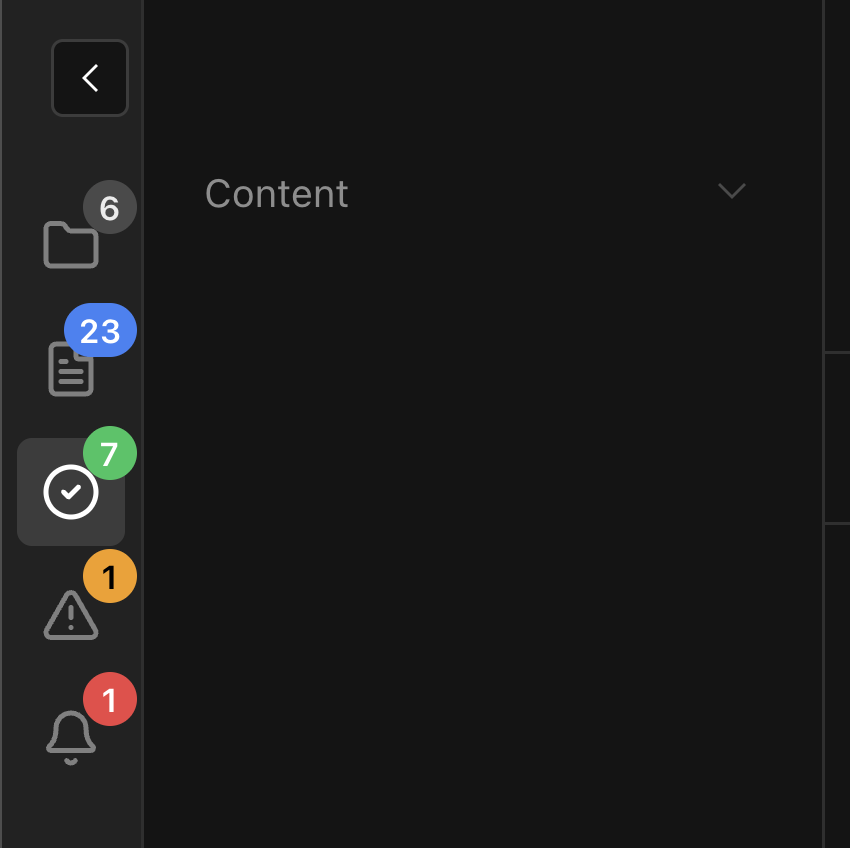
Available colors: default, primary, success, warning, error
Badge Display
- Numbers up to 99 are shown as-is
- Numbers > 99 are shown as "99+"
- Zero or undefined values hide the badge
- Provider values can also be React nodes for custom rendering
Access Control
You can control visibility of tabs, links, and custom items using an access function. It runs server-side and receives the current PayloadRequest, so you have full access to req.user, roles, permissions, etc.
On tabs and links
tabs: [
  {
    id: 'admin-panel',
    type: 'tab',
    icon: 'Shield',
    label: 'Admin',
    collections: ['users', 'tenants'],
    access: ({ req, item }) => {
      return req.user?.role === 'admin'
    },
  },
  {
    id: 'reports',
    type: 'link',
    href: '/reports',
    icon: 'BarChart',
    label: 'Reports',
    access: async ({ req }) => {
      // async is supported
      return Boolean(req.user)
    },
  },
]
If access returns false, the tab button is hidden from the tabs bar and its content is not rendered.
On custom items
customItems: [
  {
    slug: 'admin-tools',
    href: '/admin-tools',
    label: 'Admin Tools',
    access: ({ req }) => req.user?.role === 'admin',
  },
]
Access function signatures:
// For tabs and links
type TabAccessFunction = (args: {
  item: SidebarTab       // full tab/link config
  req: PayloadRequest
}) => boolean | Promise<boolean>

// For custom items
type ItemAccessFunction = (args: {
  item: SidebarTabItem   // full custom item config
  req: PayloadRequest
}) => boolean | Promise<boolean>
Default collections and globals already respect Payload's built-in access control — they are filtered by
visibleEntitiesautomatically. Theaccessfunction is only needed for tabs, links, and custom items.
Behavior when req is unavailable
Access functions are fail-closed: if req is not available (e.g. on certain error pages), all items with an access function will be hidden. This is a known limitation caused by a Payload bug where req is not passed to the Nav component on 404 admin pages.
Custom views and access control
If you have custom admin views, you must pass req to DefaultTemplate for access control to work correctly. Retrieve it from props.initPageResult.req:
import type { AdminViewProps } from 'payload'
import { DefaultTemplate } from '@payloadcms/next/templates'

export async function MyCustomView(props: AdminViewProps) {
  const { initPageResult, params, searchParams } = props
  const { permissions, req, visibleEntities } = initPageResult
  const { i18n, locale, payload, user } = req

  return (
    <DefaultTemplate
      i18n={i18n}
      locale={locale}
      params={params}
      payload={payload}
      permissions={permissions}
      req={req}
      searchParams={searchParams}
      user={user ?? undefined}
      visibleEntities={visibleEntities}
    >
      {/* your view content */}
    </DefaultTemplate>
  )
}
Without req={req}, the sidebar will treat the page as unauthenticated and hide all access-controlled items.
showLogout
Show/hide the logout button at the bottom of the tabs bar.
- Type:
boolean - Default:
true
disabled
Completely disable the plugin.
- Type:
boolean - Default:
false
Custom Components
You can replace any part of the sidebar with your own React components. The plugin registers them automatically in Payload's import map — no manual import map configuration needed.
payloadEnhancedSidebar({
  customComponents: {
    // Replace individual nav items (collections, globals, custom links)
    NavItem: './components/Sidebar#MyNavItem',
    // Replace group headers
    NavGroup: './components/Sidebar#MyNavGroup',
    // Replace the entire nav scroll area
    NavContent: './components/Sidebar#MyNavContent',
    // Replace every button in the tabs bar (tabs and links)
    TabButton: './components/Sidebar#MyTabButton',
  },
  tabs: [
    {
      id: 'dashboard',
      type: 'link',
      href: '/',
      // Custom icon for just this tab/link (mutually exclusive with `icon`)
      iconComponent: './components/Sidebar#DashboardIcon',
      label: 'Dashboard',
    },
    {
      id: 'chats',
      type: 'tab',
      icon: 'MessagesSquare',
      label: 'Chats',
      // Custom button for just this tab/link (overrides TabButton)
      buttonComponent: './components/Sidebar#ChatsTabButton',
      // Replace the whole nav area while this tab is active
      contentComponent: './components/Sidebar#ChatListPanel',
    },
  ],
})
Custom components can be client or server components. Everything is pre-rendered on the server on each page load — including tabs that aren't open — so fetch lazily in a client component if that matters (see Rendering). The plugin provides hooks to connect them to sidebar state:
| Hook | Description |
|---|---|
useNavItemState(href) | { isActive, isCurrentPage } — for custom NavItem |
useTabState(id) | { isActive } — for custom NavContent or TabButton |
useEnhancedSidebar() | { activeTabId, onTabChange } — full tab context |
The default building blocks — NavItem, TabButton, NavContentShell, Badge and useBadge — are exported too, so a custom component can wrap them instead of rebuilding badges, tooltips and active states.
→ See docs/custom-components.md for full documentation, prop types, and examples for each slot.
Localization
All labels support localized strings:
label: 'Simple string'
// or
label: {
  en: 'English',
  uk: 'Українська',
  de: 'Deutsch',
}
Payload Features Support
- Browse by Folder Button - Automatically shows folder view button when Payload folders are enabled (requires Payload v3.41.0+)
- Settings Menu Items - Integrates with Payload's SettingsMenu components (requires Payload v3.60.0+)
beforeNav/afterNavslots - Supports Payload'sadmin.components.beforeNavandadmin.components.afterNavslots (requires Payload v3.75.0+). Both slots are rendered inside the nav content area —beforeNavbeforebeforeNavLinks,afterNavafterafterNavLinks.
Contributing
Contributions are welcome! Please feel free to submit a Pull Request.
- Fork the repository
- Create your feature branch (
git checkout -b feature/amazing-feature) - Commit your changes (
git commit -m 'Add some amazing feature') - Push to the branch (
git push origin feature/amazing-feature) - Open a Pull Request
Issues
Found a bug or have a feature request? Please open an issue on GitHub.
License
MIT © VeiaG
Links
More plugins and Payload resources at PayloadCMS Extensions
Topics
Similar plugins

payload nav studio
Replace the Payload admin sidebar with a drag-and-drop navigation that each user can customize
640/wk13v3

payload admin theme
shadcn-style admin theme for Payload whose colors, logo, navigation and login page are configured from the admin panel
530/wk1v3
payload cmdk
Command menu for the Payload admin panel with keyboard shortcuts to jump to collections, globals and documents
520/wk30v3

payload plugin admin alerts
Dashboard alerts for the Payload admin with audience targeting and per-user dismissals
4820/wk1v3

Payload Advanced Sidebar
Add icons, custom links and animated groups to the Payload admin sidebar
470/wk7v3

payload plugin search replace
Find and replace text across collections, including Lexical rich text, with a preview before saving
250v3