
Overview
Summary generated from the READMEAdds a subscribers auth collection and an opt-in channels collection to Payload. Subscribers sign in with an emailed magic link or one-time login code, then manage their channel subscriptions. Emails are sent through the email adapter in your Payload config, and Next.js client components, hooks and a provider are included for the frontend.
Features
- Magic link sign-up and sign-in through emailed tokens
- One-time login code flow as an alternative to magic links
- Opt-in channels collection managed from the Payload admin
- Endpoints to subscribe, update opt-ins and unsubscribe
- SubscriberProvider, hooks and ready-made client components with class name props
- Option to add opt-in channel relationship fields to chosen collections
Use cases
- Collect newsletter subscribers and let them pick which channels they receive
- Offer passwordless sign-in for site visitors without full user accounts
- Build a subscription preferences and unsubscribe page for emailed links
From the author
A Payload CMS (3.0) plugin to add subscriber features into a site or app
Installation
npm i payload-subscribers-plugin3
Stars
0
Forks
1
Open Issues
1 months ago
Last Updated
0
Weekly Downloads
v0.1.1
npm Version
450.5 KB
Unpacked Size
0
Dependencies
Trends (last 90 days)
Trends appear after 7 days of data. Daily snapshots have not started yet.
Trends appear after 7 days of data. Daily snapshots have not started yet.
Each point is npm's rolling 7-day download count.
Health Score
Composite score based on GitHub activity, stars, npm downloads, publish recency, dependency count, and package size.
Badge for your README

[](https://payloaddirectory.dev/plugins/1134242888-root)<a href="https://payloaddirectory.dev/plugins/1134242888-root"><img src="https://payloaddirectory.dev/badge/1134242888-root.svg" alt="Payload Directory"></a>README
Payload Subscribers Plugin
A plugin to manage subscribers and the "channels" they can subscribe to.
This includes ways to allow your subscribers to:
- Sign up or sign in by requesting a magic link email
- Verify the magic link to authenticate
- Sign up or sign in by requesting a one-time login code email, as an alternative to the magic link
- Verify the code to authenticate
- Opt in or out of "opt-in channels"
You manage the opt-in channels via the Payload admin.
The plugin relies on your email adapter configured in your payload config to send emails.
That is all this plugin does currently. Potential features might include email authoring and send scheduler or simple CRM features.
Installation
pnpm add payload-subscribers-plugin
Compatibility
Supports Payload ^3.0.0 and Next.js ^15.0.0 || ^16.0.0.
If you're on a relational database (Postgres/SQLite) and upgrade Payload to 3.90.0 or
later, Payload requires a migration for the resetPasswordRequestedAt field it adds to
auth-enabled collections — including this plugin's subscribers collection, since it has
auth enabled. Run payload migrate:create and payload migrate after upgrading. This
does not affect MongoDB, which is schemaless. See the
Payload v3.90.0 release notes
for the full list of changes in that release.
Usage
You need to have an email adapter configured in your Payload config.
Add the plugin to your Payload config.
// payload.config.ts

export default buildConfig({
  plugins: [
    payloadSubscribersPlugin({

      // Add slugs of your collections which should have a relationship field to the optInChannels.
      collections: {
        posts: true,
      },

      // Easily disable the plugin logic while keep the collections schema changes.
      disabled: false,

      // Specify the collection to use as the subscribers collection
      //  - Optional. If not specified, the plugin will add a 'subscribers' collection.
      //  - Sets auth if not already
      //  - Adds (or overrides) fields: email, fullName, status, optIns,
      //    verificationToken, verificationTokenExpires, and source
      subscribersCollectionSlug?: CollectionSlug

      // Provide a custom expiration for magic link tokens. The default is 30 minutes.
      tokenExpiration: 30 * 60,

      // Provide your unsubscribe route. This route should include the Unsubscribe component, or implement your own with the useUnsubscribe hook. If not provided, your payload config must have serverURL defined, and the default will be serverURL+'/unsubscribe'
      unsubscribeURL?: string,

      // Optional. Provide a route for the link included in login-code emails, letting the subscriber click through to a page pre-filled with their email (via a ?email= query param) so they only have to type the code. The link never carries the code itself. This route should include the VerifyCode component (passing its initialEmail prop from that query param), or implement your own with the useVerifyCode hook. If omitted, the code email has no link — just the code — unless your payload config has serverURL defined, in which case the default is serverURL+'/verify-code'
      verifyCodeURL?: string,

      // Provide your verify route. This route should include the Verify component, or implement your own with the useVerifyMagicLink hook. If not provided, your payload config must have serverURL defined, and the default will be serverURL+'/verify'
      verifyURL?: string,
}),
  ],
})
Place the SubscriberProvider at the a good location in your app structure. For example, in your root layout:
// layout.tsx

import { SubscriberProvider } from 'payload-subscribers-plugin/ui'

const Layout: React.FC<{ children: React.ReactNode }> = ({ children }) => {
  return (
    <html lang="en">
      <head></head>
      <body>
        <SubscriberProvider>
          ...
        </SubscriberProvider>
      </body>
    </html>
  )
}
Then you can use the components in your app:
// page.tsx

import { RequestOrSubscribe } from 'payload-subscribers-plugin/ui'

const Page = () => {
  return (
    <main>
      <RequestOrSubscribe
        classNames={{ button: 'customCssClassNames', container: 'customCssClassNames', emailInput: 'customCssClassNames' }}
      />
    </main>
  )
}
IMPORTANT: Be sure to create a /verify route
// verify/page.tsx

import { VerifyClient } from '@/components/VerifyClient.js'

const Page = () => {
  return (
    <main id="main-content">
      <VerifyMagicLink
        classNames={{ button: 'customCssClassNames', container: 'customCssClassNames', emailInput: 'customCssClassNames' }}
      />
    </main>
  )
}
🟢🔵🔴 Features
🟢 Plugin options
collections
You can specify collections in the plugin options which will be amended to include a relationTo field referring to the optInChannels collection. Right now this does not override the plugin-added subscribers collection, which is still used for the primary record of subscribers and used for authentication. The collections amended with an optIns can be used, for example, to manage your subscription channels and any email campaigns related.
disabled
Easily disable the plugin logic while keep the collections schema changes.
tokenExpiration
Provide a custom expiration for magic link tokens. The default is 30 minutes.
unsubscribeURL
Provide your unsubscribe route. This route should include the Unsubscribe component, or implement your own with the useUnsubscribe hook. If not provided, your payload config must have serverURL defined, and the default will be serverURL+'/unsubscribe'
verifyCodeURL
Optional. Provide a route for the link included in login-code emails, letting the subscriber click through to a page pre-filled with their email (via a ?email= query param) so they only have to type the code — the link never carries the code itself, so clicking it doesn't verify or log anyone in by itself. This route should include the VerifyCode component (passing its initialEmail prop from that query param, as the dev app's /verify-code route does), or implement your own with the useVerifyCode hook. If omitted, the code email just won't include a link — unless your payload config has serverURL defined, in which case the default is serverURL+'/verify-code'
verifyURL
Provide your verify route. This route should include the Verify component, or implement your own with the useVerifyMagicLink hook. If not provided, your payload config must have serverURL defined, and the default will be serverURL+'/verify'
🔵 Collections
optInChannels
Seeded when plugin inits.
- Fields
- title: text
- description: text
- active: boolean
- slug: text
subscribers
Seeded when plugin inits.
- Fields
- email: text
- full name: text
- status: Subscribed | Unsubscribed | Pending verification (default)
- opt-ins: referenceTo optInChannels hasMany
- source: text
- verificationToken: text hidden
🔴 Fields
OptedInChannels
THE FIELD SPEC IS CURRENTLY NOT EXPORTED Documenting here in case that seems useful in the future.
This is the same field used by the plugin collections to amended a relationTo field referring to the optInChannels collection.
🟢 Payload endpoints
requestMagicLink
Takes an email, verifies it, registers it if unknown, constructs a magic link, and uses your Payload emailAdapter to sendEmail.
verifyMagicLink
Takes an email and token, verifies the token, and authenticates the user, using Payload's HTTP-only cookies auth.
requestCode
Takes an email, verifies it, registers it if unknown, generates a short numeric login code, and uses your Payload emailAdapter to sendEmail. An alternative to requestMagicLink — the two live side by side, not behind a shared option, so a project can offer either or both.
If the verifyCodeURL plugin option is set, the email also includes a secondary "click here to enter it" link carrying only the subscriber's email (never the code) to that route, so they can land on a page ready to type the code instead of retyping their email too. The code itself is always front-and-center in the email; the link is a convenience, not a substitute for it — clicking it doesn't log anyone in.
verifyCode
Takes an email and code, verifies the code, and authenticates the user, using Payload's HTTP-only cookies auth. The counterpart to verifyMagicLink for the code flow.
Note: the magic-link and code flows both store their pending secret in the same subscriber fields (verificationToken/verificationTokenExpires). If your project offers both to the same subscriber, whichever was requested most recently is the one that's valid — requesting a code after a magic link invalidates that link, and vice versa.
getOptInChannels
Returns all active optInChannels data.
subscribe a user, or update a subscriber's opt-ins.
Takes an email and list of optInChannel IDs, verifies them, and if the authenticated subscriber matches the email will update the channels that subscriber is opted into.
unsubscribe
The unsubscribe endpoint sets the subscriber status to "unsubscribed".
🔵 SubscriberProvider provider with useSubscriber context
SubscriberProvider fetches and holds the current subscriber auth state (via POST /api/subscriberAuth) and exposes it to the tree. Any component that uses useSubscriber(), or the plugin’s client components (RequestOrSubscribe, RequestMagicLink, Subscribe, etc.), or the plugin's client hooks (useRequestMagicLink, useSubscribe, etc.) must be a descendant of this provider.
The context value includes:
- subscriber — The current authenticated subscriber (or
nullif not logged in). - isLoaded —
trueonce the initial auth check has completed. - permissions — Permissions returned from the auth endpoint (if any).
- refreshSubscriber — Call to refetch the current subscriber (e.g. after verifying a magic link or updating preferences).
- logOut — Calls POST /api/logout and clears subscriber state.
Wrap your app (or the part that uses subscriber features) with SubscriberProvider, then use useSubscriber in child components:
// layout.tsx (or root layout)

import { SubscriberProvider } from 'payload-subscribers-plugin/ui'

export default function Layout({ children }: { children: React.ReactNode }) {
  return (
    <html lang="en">
      <body>
        <SubscriberProvider>
          {children}
        </SubscriberProvider>
      </body>
    </html>
  )
}
// Any descendant component

import { useSubscriber } from 'payload-subscribers-plugin/ui'

function MyComponent() {
  const { isLoaded, logOut, refreshSubscriber, subscriber } = useSubscriber()

  if (!isLoaded) return <p>Loading…</p>
  if (!subscriber) return <p>Not signed in.</p>

  return (
    <div>
      <p>Signed in as {subscriber.email}</p>
      <button type="button" onClick={() => void refreshSubscriber()}>
        Refresh
      </button>
      <button type="button" onClick={() => void logOut()}>
        Log out
      </button>
    </div>
  )
}
Note: useSubscriber throws if used outside a SubscriberProvider. Ensure the provider is mounted above any component that calls it.
🔴 Client hooks
Use these hooks inside components that are descendants of SubscriberProvider. They call the plugin endpoints and expose state and callbacks for building custom UI.
useRequestMagicLink
Requests a magic-login link by email (POST /api/emailToken). Exposes sendMagicLink, plus result and status for rendering messages and loading state.
import { useRequestMagicLink } from 'payload-subscribers-plugin/ui'

function MySignInForm() {
  const { result, sendMagicLink, status } = useRequestMagicLink({
    handleMagicLinkRequested: (response) => console.log('Link sent', response),
    verifyData: `forwardURL=${typeof window !== 'undefined' ? window.location.href : ''}`,
  })

  const handleSubmit = (e: React.FormEvent<HTMLFormElement>) => {
    e.preventDefault()
    const email = new FormData(e.currentTarget).get('email') as string
    void sendMagicLink(email)
  }

  return (
    <form onSubmit={handleSubmit}>
      <input name="email" type="email" required />
      <button type="submit" disabled={status === 'sending'}>
        {status === 'sending' ? 'Sending…' : 'Request magic link'}
      </button>
      {result && <p className={status === 'error' ? 'error' : ''}>{result}</p>}
    </form>
  )
}
useVerifyMagicLink
Handles the verify step of the magic-link flow: reads email and token from URL search params, calls POST /api/verifyToken, and refreshes the subscriber on success. Takes no options.
import { useEffect } from 'react'
import { useVerifyMagicLink } from 'payload-subscribers-plugin/ui'

function VerifyPage() {
  const { isError, isLoading, result, verify } = useVerifyMagicLink()

  useEffect(() => {
    void verify()
  }, [verify])

  if (isLoading) return <p>Verifying…</p>
  return <p className={isError ? 'error' : ''}>{result || 'Done.'}</p>
}
useRequestCode
Requests a one-time login code by email (POST /api/emailCode). Exposes sendCode, plus result and status for rendering messages and loading state. An alternative to useRequestMagicLink.
import { useRequestCode } from 'payload-subscribers-plugin/ui'

function MyCodeSignInForm() {
  const { result, sendCode, status } = useRequestCode({
    handleCodeRequested: (response, email) => console.log('Code sent to', email, response),
  })

  const handleSubmit = (e: React.FormEvent<HTMLFormElement>) => {
    e.preventDefault()
    const email = new FormData(e.currentTarget).get('email') as string
    void sendCode(email)
  }

  return (
    <form onSubmit={handleSubmit}>
      <input name="email" type="email" required />
      <button type="submit" disabled={status === 'sending'}>
        {status === 'sending' ? 'Sending…' : 'Send login code'}
      </button>
      {result && <p className={status === 'error' ? 'error' : ''}>{result}</p>}
    </form>
  )
}
useVerifyCode
Handles the verify step of the code flow. Unlike useVerifyMagicLink, it doesn't read from URL search params — a typed-in code has no URL — so you call verify(email, code) explicitly, typically from a form submit. Calls POST /api/verifyCode and refreshes the subscriber on success.
import { useVerifyCode } from 'payload-subscribers-plugin/ui'

function VerifyCodeForm({ email }: { email: string }) {
  const { isError, isLoading, result, verify } = useVerifyCode()

  const handleSubmit = (e: React.FormEvent<HTMLFormElement>) => {
    e.preventDefault()
    const code = new FormData(e.currentTarget).get('code') as string
    void verify(email, code)
  }

  return (
    <form onSubmit={handleSubmit}>
      <input name="code" type="text" required />
      <button type="submit" disabled={isLoading}>
        {isLoading ? 'Verifying…' : 'Verify code'}
      </button>
      {result && <p className={isError ? 'error' : ''}>{result}</p>}
    </form>
  )
}
useSubscribe
Updates the current subscriber’s opt-in channels (POST /api/subscribe). Exposes updateSubscriptions, plus subscriber, result, and status. Use with SubscriberProvider so subscriber and refresh are available.
import { useSubscribe } from 'payload-subscribers-plugin/ui'

function MyPreferencesForm() {
  const { result, status, subscriber, updateSubscriptions } = useSubscribe({
    handleSubscribe: (response) => console.log('Updated', response),
    verifyData: `forwardURL=${typeof window !== 'undefined' ? window.location.href : ''}`,
  })

  const handleSave = (e: React.FormEvent) => {
    e.preventDefault()
    const channelIds = ['channel-id-1', 'channel-id-2'] // from your form state
    void updateSubscriptions(channelIds)
  }

  return (
    <form onSubmit={handleSave}>
      {/* your channel checkboxes, etc. */}
      <button type="submit" disabled={status === 'updating'}>
        {status === 'updating' ? 'Saving…' : 'Save choices'}
      </button>
      {result && <p>{result}</p>}
    </form>
  )
}
useUnsubscribe
Calls POST /api/unsubscribe with email and token (from the hook args or from subscriber context). For use on unsubscribe pages linked from emails.
import { useEffect } from 'react'
import { useSearchParams } from 'next/navigation'
import { useUnsubscribe } from 'payload-subscribers-plugin/ui'

function UnsubscribePage() {
  const searchParams = useSearchParams()
  const { isError, isLoading, result, unsubscribe } = useUnsubscribe({
    handleUnsubscribe: (response) => console.log('Unsubscribed', response),
  })

  // With email/hash from URL (e.g. from email link)
  useEffect(() => {
    const email = searchParams.get('email')
    const hash = searchParams.get('hash')
    if (email && hash) void unsubscribe({ email, hash })
  }, [searchParams, unsubscribe])

  if (isLoading) return <p>Unsubscribing…</p>
  return <p className={isError ? 'error' : ''}>{result}</p>
}
🟢 Client components
The plugin provides several NextJS client components ready for use in a frontend app
-
All App Components are client components that consume hooks, server components, server functions. Including the useSubscriber context, and so they must be used within the children descendent tree of the SubscriberProvider provider.
-
All App Components accept a classNames prop to specify CSS class names to add to the different parts of the component
RequestOrSubscribe
Shows the Subscribe component to authenticated subscribers, otherwise shows RequestMagicLink.
  <RequestOrSubscribe
    // Provide your own global class names to add to the component elements. Optional
    classNames={{
      button: 'customCssClassNames',
      container: 'customCssClassNames',
      emailInput: 'customCssClassNames',
      error: 'customCssClassNames',
      form: 'customCssClassNames',
      loading: 'customCssClassNames',
      message: 'customCssClassNames',
      section: 'customCssClassNames',
    }}
    // Called after a subscribers opt-ins have been updated. Optional
    handleMagicLinkRequested={async (result: RequestMagicLinkResponse) => {}}
    // Called after a subscribers opt-ins have been updated. Optional
    handleSubscribe={async (result: SubscribeResponse) => {}}
    }
    // Provide a payload of data to put on any verify link sent by either Request or Subscribe components
    verifyData={`forwardURL=${window.location.href}`}
  />
RequestMagicLink
Form to input email address and get a magic link email sent.
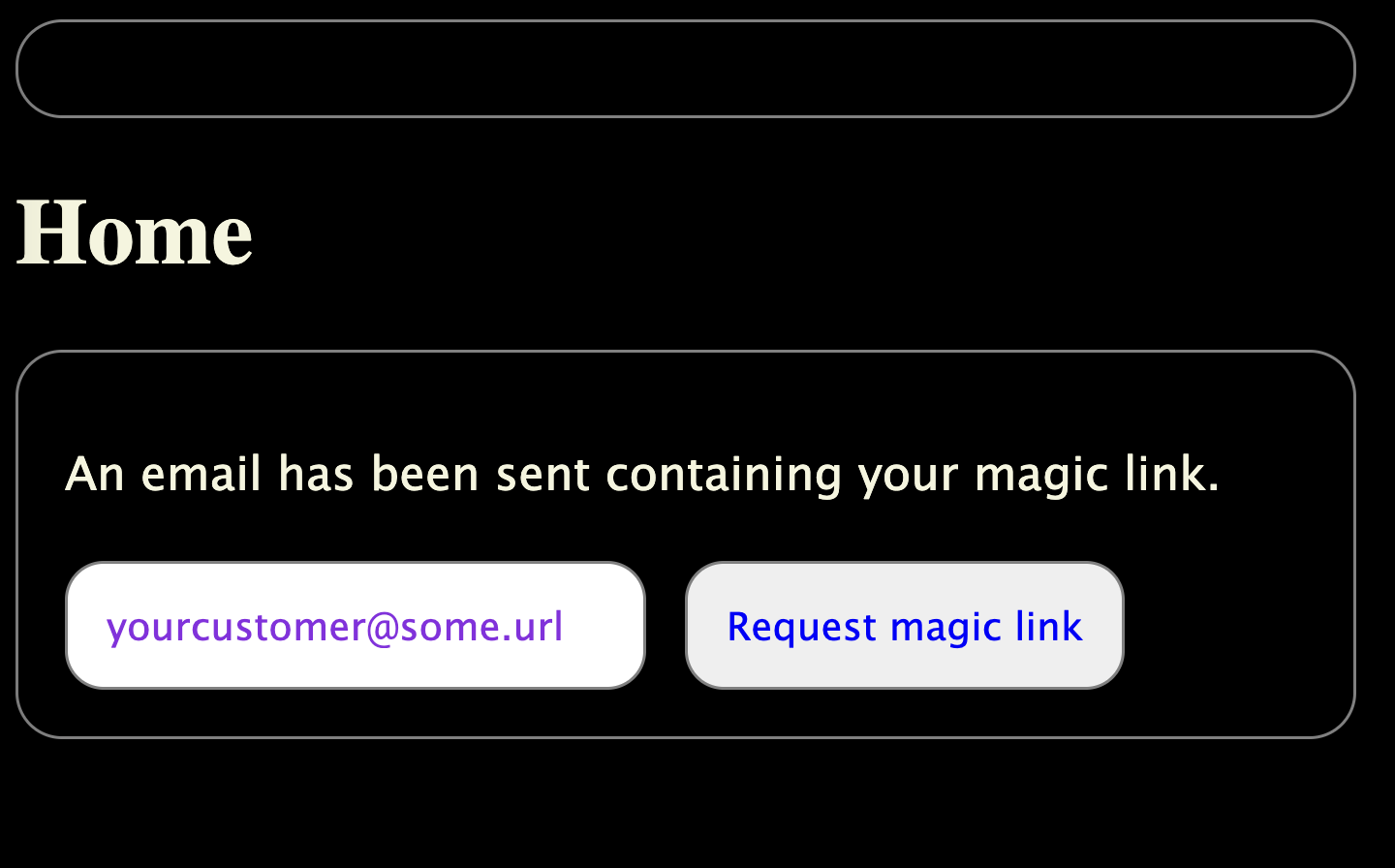
  <RequestMagicLink
    // Provide your own global class names to add to the component elements. Optional
    classNames={{
      button: 'customCssClassNames',
      container: 'customCssClassNames',
      emailInput: 'customCssClassNames',
      error: 'customCssClassNames',
      form: 'customCssClassNames',
      message: 'customCssClassNames',
    }}
    // Called after a subscribers opt-ins have been updated. Optional
    handleMagicLinkRequested={async (result: RequestMagicLinkResponse) => {}}
    // Provide a payload of data to put on any verify link sent
    verifyData={`forwardURL=${window.location.href}`}
  />
<!-- The HTML scaffolding with global CSS classes you can use -->
<div class="subscribers-request subscribers-container">
  <p class="subscribers-message subscribers-error">{result}</p>
  <form class="subscribers-form">
    <input class="subscribers-emailInput" type="email" />
    <button class="subscribers-button">Request magic link</button>
  </form>
</div>
VerifyMagicLink
Component that verifies a magic link using expected url parameters.
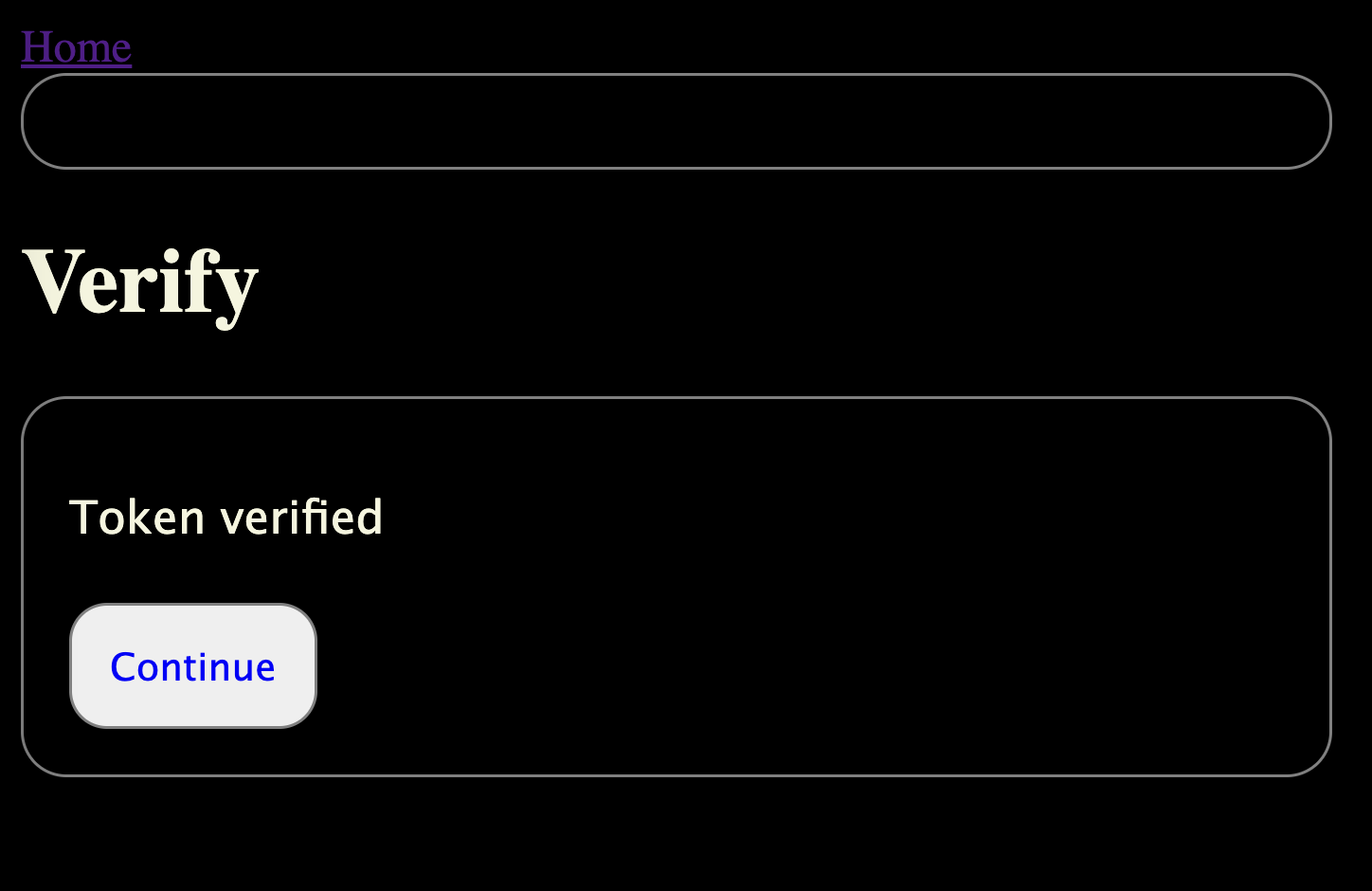
  <VerifyMagicLink
    // Provide your own global class names to add to the component elements. Optional
    classNames={{
      button: 'customCssClassNames',
      container: 'customCssClassNames',
      error: 'customCssClassNames',
      form: 'customCssClassNames',
      loading: 'customCssClassNames',
      message: 'customCssClassNames',
    }}
    // Called after a magic link email has been sent. Optional
    handleMagicLinkRequested={async (result: RequestMagicLinkResponse) => {}}
    // Called after a magic link has been verified. Optional
    handleMagicLinkVerified={async (result: RequestMagicLinkResponse) => {}}
    // Provide a payload of data to put on "request another" link sent
    verifyData={`forwardURL=${window.location.href}`}
  >
    // Provide children to render after link is verified. Optional
    // Since you provide the verifyURL to any of the plugin components, you can include a forwardUrl
    // as a search param, which your route can then use here.
    <a href={forwardUrl}>
      <button className={'customCss'} name={'continue'} type="button">
        Continue
      </button>
    </a>
  </VerifyMagicLink>
<!-- The HTML scaffolding with global CSS classes you can use -->
<div class="subscribers-verify subscribers-container">
  <p class="subscribers-loading">verifying...</p>
  <p class="subscribers-message">{result}</p>
  <div class="subscribers-form">
    <!-- Form elements render here, before the component children provided -->
    {children}
  </div>
</div>
RequestCode
Form to input email address and get a one-time login code emailed. An alternative to RequestMagicLink — you can use either, or both side by side, since they're independent components hitting independent endpoints.
  <RequestCode
    // Provide your own global class names to add to the component elements. Optional
    classNames={{
      button: 'customCssClassNames',
      container: 'customCssClassNames',
      emailInput: 'customCssClassNames',
      error: 'customCssClassNames',
      form: 'customCssClassNames',
      message: 'customCssClassNames',
    }}
    // Called after a login code email has been sent. Receives the endpoint result and the
    // email the code was sent to. Optional
    handleCodeRequested={async (result: RequestCodeResponse, email: string) => {}}
  />
<!-- The HTML scaffolding with global CSS classes you can use -->
<div class="subscribers-request subscribers-container">
  <p class="subscribers-message subscribers-error">{result}</p>
  <form class="subscribers-form">
    <input class="subscribers-emailInput" type="email" />
    <button class="subscribers-button">Send login code</button>
  </form>
</div>
VerifyCode
Self-contained login-code flow: shows RequestCode to collect an email and send the code, then — once an email has been submitted — shows a code-entry form that verifies it and logs the subscriber in. Unlike VerifyMagicLink, this isn't driven by URL search params (a typed-in code has no URL), so it manages its own two-step state instead. Mount it on whatever route you like; it doesn't need a dedicated verifyURL plugin option.
The code is entered as one box per digit, the common OTP pattern. Typing auto-advances between boxes and Backspace on an empty box moves back, but the subscriber can also paste a full copied code anywhere in the row and every box fills in at once — they don't have to paste one digit at a time.
  <VerifyCode
    // Provide your own global class names to add to the component elements. Optional
    classNames={{
      button: 'customCssClassNames',
      codeDigit: 'customCssClassNames',
      codeInput: 'customCssClassNames',
      container: 'customCssClassNames',
      emailInput: 'customCssClassNames',
      error: 'customCssClassNames',
      form: 'customCssClassNames',
      loading: 'customCssClassNames',
      message: 'customCssClassNames',
    }}
    // Number of digit boxes to render. Defaults to 6, matching the plugin's default code length. Optional
    codeLength={6}
    // Called after a login code email has been sent. Optional
    handleCodeRequested={async (result: RequestCodeResponse, email: string) => {}}
    // Called after the code has been verified. Optional
    handleCodeVerified={async (result: string) => {}}
    // Skip straight to the code-entry step for a known email (e.g. read from a `?email=`
    // query param on a route you link to after RequestCode/VerifyCode has already sent a
    // code). Optional
    initialEmail={email}
  >
    // Provide children to render after the code is verified. Optional
    <a href={'/'}>
      <button className={'customCss'} name={'continue'} type="button">
        Continue
      </button>
    </a>
  </VerifyCode>
Subscribe
Allows a subscriber to select from among all active optInChannels.
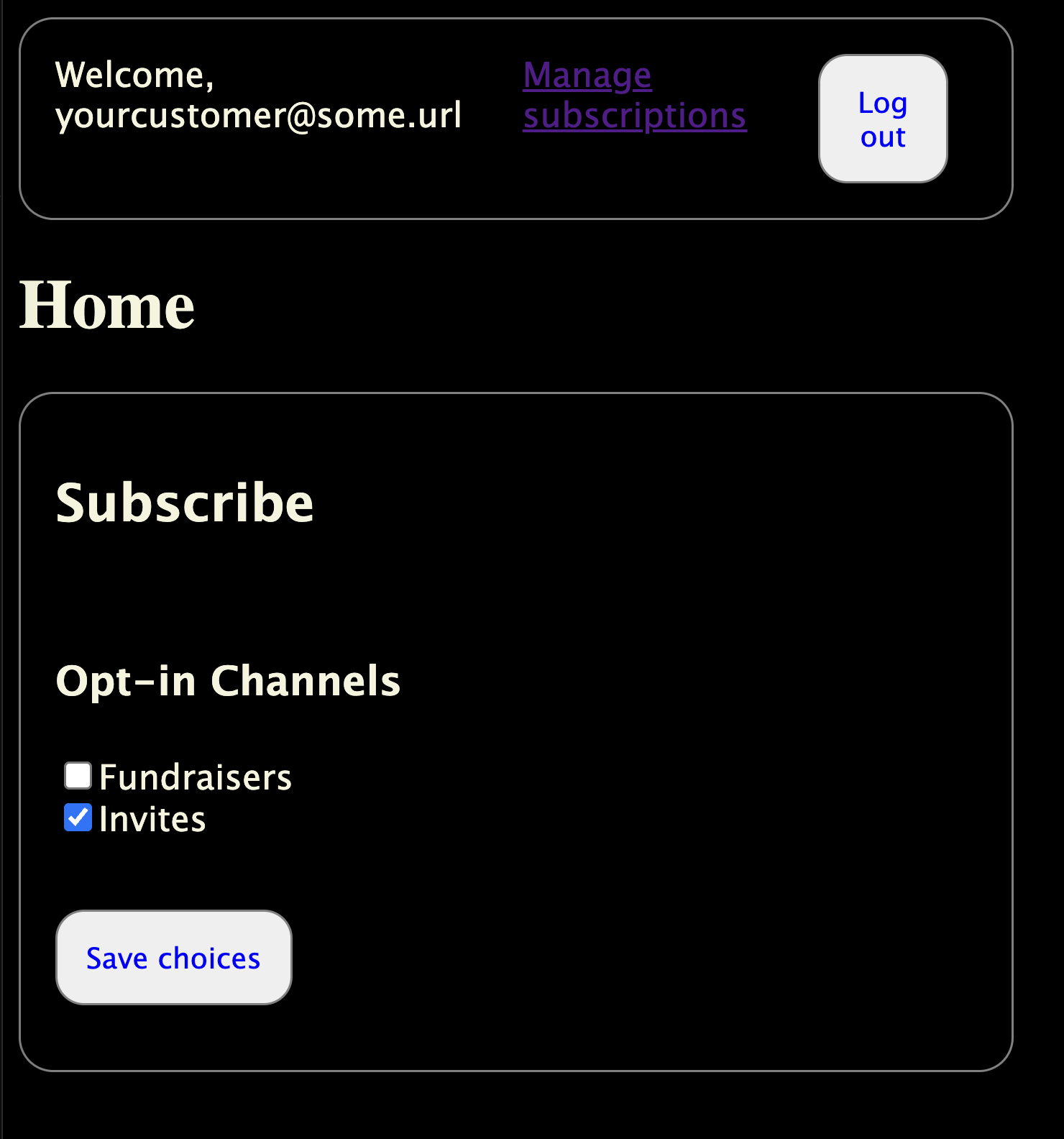
  <Subscribe
    // Provide your own global class names to add to the component elements. Optional
    classNames={{
      button: 'customCssClassNames',
      container: 'customCssClassNames',
      emailInput: 'customCssClassNames',
      error: 'customCssClassNames',
      form: 'customCssClassNames',
      loading: 'customCssClassNames',
      message: 'customCssClassNames',
      section: 'customCssClassNames',
    }}
    // Called after a subscribers opt-ins have been updated. Optional
    handleSubscribe={async (result: SubscribeResponse) => {}}
    // Provide a payload of data to put on any verify link sent
    verifyData={`forwardURL=${window.location.href}`}
  />
<!-- The HTML scaffolding with global CSS classes you can use -->
<div class="subscribers-subscribe subscribers-container">
  <h2>Subscribe</h2>
  <div class="subscribers-section">
    <!-- START: SelectOptInChannels -->
    <div class="subscribers-container">
      <h3>Opt-in Channels</h3>
      <p class="subscribers-loading">verifying...</p>
      <div class="subscribers-optionsGroup">
        <!-- START: FOR EACH CHANNEL -->
        <div class="subscribers-optInCheckboxItem">
          <label class="subscribers-optInCheckboxLabel" ,>
            <input class="subscribers-optInCheckbox" type="checkbox" />
            {channel.title}
          </label>
        </div>
        <!-- END: FOR EACH CHANNEL -->
      </div>
    </div>
    <!-- END: SelectOptInChannels -->
  </div>
  <form class="subscribers-form">
    <div class="subscribers-section">
      <input class="subscribers-emailInput" placeholder="enter your email" type="email" />
      <button class="subscribers-button" type="submit">Save choices</button>
    </div>
  </form>
  <p class="subscribers-message subscribers-error">{result}</p>
</div>
SubscriberMenu
A simple user menu, most useful for testing. Seen in the screenshots above. Includes a "welcome" message, a link to a /subscribe route, and a log out button.
// classNames prop

<SubscriberMenu
  classNames={{
    button: 'customCssClassNames',
    container: 'customCssClassNames',
  }}
  subscribeURL={new URL('/subscribe', serverURL)}
 />
<!-- The HTML scaffolding with global CSS classes you can use -->
<div class="subscribers-menu subscribers-container">
  <div class="subscribers-group">
    <div class="subscribers-welcome">Welcome, {subscriber email}</div>
    <div class="subscribers-subs-link">
      <a href="{subscribeURL}">Manage subscriptions</a>
    </div>
    <div class="subscribers-logout">
      <button class="subscribers-button" type="button">Log out</button>
    </div>
  </div>
</div>
Unsubscribe
A component that uses URL parameters to execute the /api/unsubscribe end point. Should be used on your own route, as specified in the unsubscribeURL plugin option.
// Unsubscribe with a custom "resubscribe" button

<Unsubscribe
  classNames={{ button: 'customCss', container: 'customCss', emailInput: 'customCss' }}
  handleUnsubscribe={handleUnsubscribe}
>
// <!-- children are rendered after unsubscribe is successful -->
  <a href={'/subscribe'}>
    <button name={'resubscribe'} type="button">
      Resubscribe
    </button>
  </a>
</Unsubscribe>
<!-- The HTML scaffolding of the built-in render layout, with global CSS classes you can use -->
<div class="subscribers-container">
  <!-- While loading -->
  <p class="subscribers-loading">unsubscribing...</p>
  <!-- After loading -->
  <p class="subscribers-message">{result}</p>
  <div class="subscribers-form">{children}</div>
</div>
Contributing
Community contributions are welcome! I haven't organized around that yet, so let me know if you're interested by opening an issue on the GitHub repo.
Similar plugins

payload auth pwless
Passwordless login for Payload with passkeys, magic links, OAuth and refresh-token sessions
550/wk2v3

payload better auth
Better Auth database adapter and plugins that replace Payload's local auth strategy
700/wk74v3

payload totp
Add TOTP-based two-factor authentication to a Payload auth collection using authenticator apps
670/wk163v3

payload auth
Replaces Payload's built-in auth with Better Auth, sharing one session between the admin panel and your app
590/wk344v3

plugin
OAuth 2.1 with PKCE and dynamic client registration for the Payload MCP plugin, enabling custom connectors
570/wk8v3

payload authjs
Use Auth.js 5 providers to sign in and authenticate users in Payload CMS 3
560/wk207v3